68kMLA Classic Interface
This is a version of the 68kMLA forums for viewing on your favorite old mac. Visitors on modern platforms may prefer the main site.
| Click here to select a new forum. | |
| Reduced eye strain text editor for classic Mac | |
| Posted by: CharlieFrown on 2025-01-17 04:31:30 Hi, I am thinking about using my old Macs (512k, Plus, SE/30) as distraction free typewriters. Is there any chance I could use white color characters on black screen to reduce eye strain? I think in mid 90s I used telnet or terminal emulator program for my old PowerBook 170 that had this inverted display mode. | |
| Posted by: joshc on 2025-01-17 05:59:36 Do older versions of BBEdit or Tex Edit Plus allow this? | |
| Posted by: cheesestraws on 2025-01-17 12:23:25 Under 7.1+ at least, one of the accessibility control panels will let you invert the whole screen IIRC, I can't remember which one - might have weirdly been in CloseView? Though I'll note that a lot of "dark mode" stuff is basically pseudoscience and is mostly driven by the aesthetics of 'looking cool'... | |
| Posted by: nathall on 2025-01-17 20:10:03 I don’t know, I find as I get older, my eyes get physically fatigued more and more looking at dark on light vs light on dark. They have an easier time focusing. All that said, there was a simple, small application for the original compacts that you could run that would invert the screen until the next reboot. I think I have it somewhere— I’ll look. | |
| Posted by: nathall on 2025-01-17 21:01:02 Found it. Called, believe it or not, Reverse Screen. Running on my 512k: 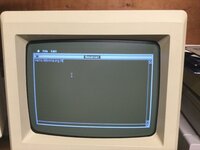 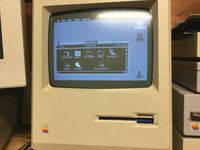 | |
| Posted by: CharlieFrown on 2025-01-17 23:41:16 wow that's what I needed! | |
Posted by: cheesestraws on 2025-01-18 02:15:59I don’t know, I find as I get older, my eyes get physically fatigued more and more looking at dark on light vs light on dark. They have an easier time focusing It really suits some people, and I'm not going to knock anyone for using it as an accessibility feature (or any other accessibility feature, they're great, the first thing I do on any new computer is 'increase contrast' personally). But that's not quite the same thing as saying that it's "good for eyestrain" in the general case, for all or most people, divorced from other ergonomic considerations. I use dark mode, for example, in coordination with changes in ambient lighting, and that *does* help because it's keeping light levels more consistent and my eys aren't continually having to adjust. But it seems to be fashionable to throw around dark mode as a bit of an eyestrain panacæa, which it... isn't. | |
| Posted by: nathall on 2025-01-19 12:26:57 I get you. wow that's what I needed! Let me know if you can’t find a copy and I’ll get it over to you. | |
| 1 |