68kMLA Classic Interface
This is a version of the 68kMLA forums for viewing on your favorite old mac. Visitors on modern platforms may prefer the main site.
| Click here to select a new forum. | |
| Advice regarding sparks on 512k analog board | |
| Posted by: feltel on 2024-12-18 04:02:20 I have an 512k Macintosh on the bench which I'm about to revive. I did not turn it on upon receiving the machine cause the analog board showed burn marks on the coil connector. I know this type of damage from my Plus but not that severe.  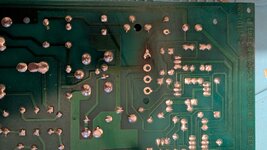 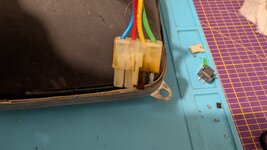 I replaced the connector and the plug on the CRT and took the chance to recap the board as usual. On the first power up the board sparked and smoked between the logic board connector and the coil connector. I immediately cut the power. I double checked all capacitor orientations and I do not spot any burnt components. Around that area it also smells as expected. 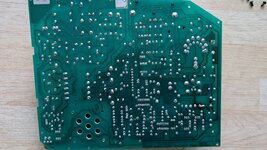 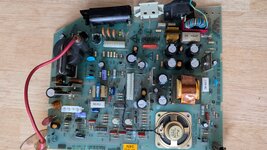 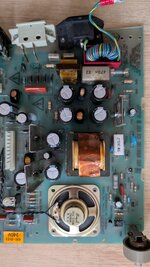 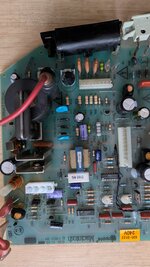 I know it is a very difficult question, but what could cause sparks without burn marks. I hope I did not fry the logic board. | |
Posted by: SparrowRat on 2024-12-18 09:16:17I know it is a very difficult question, but what could cause sparks without burn marks.Sparks that didn't last long because you turned it off quickly. | |
| Posted by: SparrowRat on 2024-12-18 09:26:42 I would check for shorts, It looks like the yellow pin (I don't know the pinout of the Mac Plus harness but yellow is usually 12v) was drawing too much power | |
| Posted by: feltel on 2024-12-18 10:53:07 Could be that the CRT or coil is faulty/shorted and caused the burn marks in first place? I dont know what happened to the machine before. I'm sure I cannot power on the analog board without a connected CRT, which makes testing the AB difficult. I have another CRT/coil from a battery bombed classic which I can swap for testing. | |
| Posted by: feltel on 2024-12-19 00:19:37 I tried a second time with another CRT/coil. It sparks again but now I spotted the area. It the diodes CR9, CR10 and especially CR11. Measuring CR11 i have throughput in both directions. As a diode it should be conducting only in one direction. I have to source a replacement and lets cross fingers this is the only fault. Btw. the LB chimed while testing, so hopefully nothing got damaged. | |
| Posted by: feltel on 2025-01-06 09:08:56 It took me a while to replace the diodes in question. After that the machine bongs and I had a picture. But within minutes the brightness degraded up to a point where I could barely see the floppy icon. The brightness adjust knob worked while this happened. I think that machine is cursed in some ways or another. Over the holidays I reworked the 400k floppy drive but now it seems stuck again. *meh* 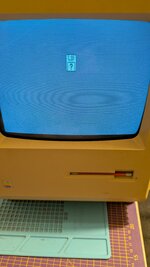 If I leave the machine powered off for some time this behaviour is repeatable. Could the CRT be worn out? I'm no CRT expert so I ask for advice. | |
| Posted by: SparrowRat on 2025-01-06 10:04:25 The R57 pot looks damaged, according to the schematics it's the contrast pot, it could be changing over time as a result of heat or something else. | |
| Posted by: Unknown_K on 2025-01-06 10:17:47 What is that unsoldered pin that is in line with the burnt pad? A marginal connection causes resistance and when power is applied causes heat. | |
Posted by: feltel on 2025-01-06 10:26:30What is that unsoldered pin that is in line with the burnt pad? A marginal connection causes resistance and when power is applied causes heat.There where no unsoldered pins when I received the machine. I took the photos while repairing it. The R57 pot looks damaged, according to the schematics it's the contrast pot, it could be changing over time as a result of heat or something else. Yes those pots R56+57 where probably affected by the leaky battery. R56 (brightness) is working again after cleaning but a little bit scratchy, R57 (focus, according to AB cover sheet) is still stuck. | |
| Posted by: feltel on 2025-01-11 03:43:42 I'm doing small incremental steps towards a functional 512k. I replaced R56 and R57 with new pots (2.5M ohm ones; 2M ohm were not available). Now the dimming of the whole picture does not happen anymore. I also replaced the LM324 on U1 as I thought it fixes the upwards shifted picture. I read this in the Dead Macs scrolls book. But it did not solve it. Also I have an issue that the picture often goes blank for an blink of an eye. Maybe another dirty pot or something like this. I have a spare CRT screen. I'l swapping it, maybe the CRT itself is the source of the remaining problems. The outside reachable brightness pot is smooth and I dont see how it could be affected by the battery juice. I tested the desoldered pots on R56&R57. Both were drifting while checking resistance with the multimeter. Without touching them they are changing resistance in the 10k ohm range. I dont think this is supposed to happen. | |
| Posted by: feltel on 2025-01-11 04:42:50 The picture I get is 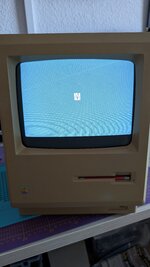 It is shifted upwards. I can regulate it with the height adjustment pot, but this only streches the picture. | |
| Posted by: bibilit on 2025-01-11 05:43:08 Hi, you have to adjust the image with the two tabs present in the yoke side. You will see two cadmium plated tabs next to the coil, most of the time some paint is applied to avoid those rings from turning. Pushing (will make the ring spin) one or another will move the image up or down and left to right. | |
| Posted by: feltel on 2025-01-11 06:19:04 I know those two tabs but in my experience those only control the horizontal position of the picture. | |
| Posted by: feltel on 2025-01-11 06:33:28 I did it. Those tabs are in fact controlling both directions. 😀 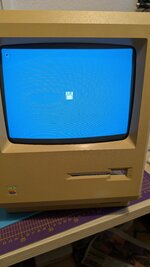 | |
| 1 |