68kMLA Classic Interface
This is a version of the 68kMLA forums for viewing on your favorite old mac. Visitors on modern platforms may prefer the main site.
| Click here to select a new forum. | |
| Oversized HDD with Mac IIsi? | |
| Posted by: dv- on 2024-12-05 19:52:46 Have a 9GB scsi HDD I’m trying to use with a IIsi. I can boot from a CD image on a ZuluSCSI to format and install an OS. When I initialize the drive I get a prompt about volume size, so I create a 1GB volume. It mounts, I install an OS, and then… nothing. It won’t boot from the volume and if I reboot from the ZuluSCSI and try to mount the volume with disk utility, I get an error saying I need a 68040 or PPC to use the “large volume.” I’ve done this same thing twice now with the same issue. (Tried installing 7.1 and 7.5.) Do I need a 68040 or PPC to support drives (not just volumes) over a certain size? All I can find online are references to the maximum volume size (2GB for 7.1, 4GB for 7.5, etc.) | |
| Posted by: croissantking on 2024-12-05 21:27:32 Not sure what’s gone wrong, but I’ve used a IIsi with an 18GB SCSI very happily, so it’s not a hardware incompatibility at least | |
| Posted by: nathall on 2024-12-05 22:09:39 What utility are you using to partition the drive? Sounds like a potential issue with the driver that is getting put on the drive. I’ve seen that error before at some point in the past and am racking my brain to recall what it was. I can also vouch for large drives working on the IIsi without issues. | |
Posted by: dv- on 2024-12-05 22:31:54Not sure what’s gone wrong, but I’ve used a IIsi with an 18GB SCSI very happily, so it’s not a hardware incompatibility at leastInteresting; that's good to know. Thank you! | |
Posted by: dv- on 2024-12-05 22:32:28What utility are you using to partition the drive? Sounds like a potential issue with the driver that is getting put on the drive. I’ve seen that error before at some point in the past and am racking my brain to recall what it was.Disk Utility 1.7.3 included on this: https://www.macintoshrepository.org/931-apple-legacy-software-recovery-cd | |
| Posted by: joshc on 2024-12-06 00:07:01 Use FWB HDT to create a smaller partition on it and then try. | |
| Posted by: mikes-macs on 2024-12-06 03:28:03 Agreed, FWB HD Toolkit or Lido can take care of that. | |
| Posted by: croissantking on 2024-12-06 07:38:23 I mean you should be able to use the patched HD SC Setup, making sure that you set up a custom partition under 2GB in size. I can't see why it wouldn't work – something's not configured correctly. | |
| Posted by: cheesestraws on 2024-12-06 07:42:54 I always find the A/UX HD SC Setup useful in this kind of circumstance. | |
| Posted by: robin-fo on 2024-12-06 07:44:11 Although this might sound a bit far-fetched: Are you sure your SCSI chain is properly terminated? I could imagine the data transmission just barely works and an error happens every now and then… Does your drive maybe require termination power for internal active termination? | |
Posted by: joshc on 2024-12-06 07:52:11I always find the A/UX HD SC Setup useful in this kind of circumstance.I always forget that this even exists. | |
Posted by: cheesestraws on 2024-12-06 08:10:15I always forget that this even exists. It's a very useful thing to have in the toolbox. Makes fewer assumptions than the "consumer" HD SC Setup, has better partitioning options, doesn't have the approved HD list - and also doesn't do the weird custom driver thing that FWB / Lido / Silverlining do. | |
Posted by: nathall on 2024-12-06 19:08:03Disk Utility 1.7.3 included on this: https://www.macintoshrepository.org/931-apple-legacy-software-recovery-cd I bet it’s a driver issue. Agree with the others in trying one of the other utilities. | |
| Posted by: dv- on 2024-12-07 22:28:54 Well, it works now. The only difference was updating the driver and repartitioning with a patched version of HD SC Setup 7.3.5. Thanks for the advice! | |
| Posted by: dv- on 2024-12-07 22:52:02 And then it stoped working again as soon as I unplugged the external ZuluSCSI. Maybe it is a termination issue. Huh. | |
| Posted by: dv- on 2024-12-07 23:00:38 This is the adapter that's on the drive. I thought RN1 and RN2 provided termination to the drive. Any idea how I could test/check those? I tried putting on a jumper of the "term power" jumper of the HDD but it doesn't make a difference. https://www.seagate.com/staticfiles...n_guides/atlas_10k_iii_installation_guide.pdf 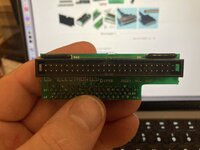 | |
| Posted by: dv- on 2024-12-19 16:09:25 Is it possible the adapter requires termination power from the motherboard to work correctly? (Knowing that it works with a Quadra and the IIsi doesn't have termination power on its internal SCSI connector?) | |
| Posted by: dv- on 2024-12-30 18:35:37 Okay, so I've dug out a couple other internal HDDs, some of which are even Apple OEM, and have found that _none_ of them are recognized without the ZuluSCSI plugged in. If it's plugged in, the drives format, mount, and can be booted from just fine. However, the drives all work fine in my other IIsi. (!) So I guess it's something wrong with the SCSI chain or controller on the first IIsi, which makes me sad. Traces all check out; not sure where to go from there, except swapping the chip? | |
| Posted by: Forrest on 2024-12-31 16:27:52 Your post on December 8 shows a terminator with passive termination (resistors). Sometimes you need active termination. I think the ZuluSCSI is acting as an active terminator. If your hard drives work with a ZuluSCSI, it sounds like a permanent solution to me and not that expensive. | |
Posted by: dv- on 2025-01-01 13:16:56Your post on December 8 shows a terminator with passive termination (resistors). Sometimes you need active termination. I think the ZuluSCSI is acting as an active terminator. If your hard drives work with a ZuluSCSI, it sounds like a permanent solution to me and not that expensive.Yeah, it just irks me, having to leave an external device plugged in like that. I was hoping to have it working "the right way" and not just "sorta works if you..." you know? :-( Do you know if the original HDDs for the IIsi included active termination or something extra? I wouldn't mind replacing the HDD with an internal SCSI emulator, but everybody seems to be out of stock of internal BlueSCSI kits at the moment, and the preassembled ones are more expensive. | |
| 1 > |