68kMLA Classic Interface
This is a version of the 68kMLA forums for viewing on your favorite old mac. Visitors on modern platforms may prefer the main site.
| Click here to select a new forum. | |
| faulty Performa 475 Mainboard ... | |
| Posted by: franklyn on 2024-11-26 01:59:56 I bought a defective Performa 475 over eBay Germany. The previous owner unfortunately removed the onboard RAM completely and destroyed/broke the pads in the process. He also replaced the electrolytic capacitors I think and destroyed the pads in the process too. I removed the old solder from the pads and cleaned everything. The board seems to work without a PRAM battery. After the normal start-up sound, it makes the sound of dead. Does anyone know if the board works without RAM Bank A and a PS/2 Simm in the Ram socket? Is there a circuit diagram for the Performa 475 somewhere? | |
Posted by: Daniël on 2024-11-26 02:16:02Is there a circuit diagram for the Performa 475 somewhere? Yes, you can find it here. Sounds like the previous person who worked on it probably got the Death Chimes too, and suspected a fault on the on-board RAM, which wasn't the case. | |
| Posted by: Bolle on 2024-11-26 02:20:23 The 475 will work without any onboard RAM just fine. The problem is that a lot of the main data lines pass along the onboard RAM and if pads get ripped off during removal those data lines will be disconnected from the rest of the board. Look at the ripped pad on U8 pin 1 and you'll see a trace coming from a via into the pad as well as a trace leaving the other side of the pad going to a via again. I don't see any other problematic ripped pads on the other chips, so if you're lucky this is your only problem. Add a jumper between the two vias and then check if D8 connects to everywhere it should go (CPU, ROM, RAM SIMM, Primetime, VRAM) 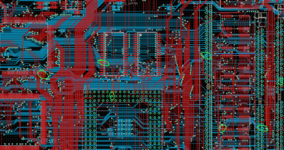 Or just go with a new board right away: https://github.com/TheRealBolle/LC475 | |
| Posted by: franklyn on 2024-11-27 01:34:45 Thanks for help me ... | |
| Posted by: franklyn on 2024-11-27 09:31:04 I fix the broken connection on U8. It doesn't look good but is OK according to the tester. U11 has also a faulty pad. The error still exists. I suspect that the destroyed pad and the entire DRAM of bank A were not the original first problem. The missing 47uF C127 and C128 can't be the problem, can they? I'm still checking all the RAM connections but what else could the problem be? | |
| Posted by: franklyn on 2024-11-28 01:59:32 Begin to check the connections ... Rom <-> Ram D0-D3 Simm ok / U10 ok D16-D19 Simm ok / U6 ok D4-D7 Simm ok / U11 ok D20-D23 Simm ok / U7 ok D8-D11 Simm ok / U8 ok D24-D27 Simm ok / U4 ok D12-D15 Simm ok / U9 ok D28-D31 Simm ok / U5 ok ... next check A0 - A11 to the Ram. | |
| Posted by: franklyn on 2024-11-28 04:17:46 DRAM Address to Simm ... A0,2,5,7,8,9,10,11 - ok A1,3,4,6 - no connected to RP9,10,11 ... I think it's due to defective vias between U5 and C127? The tracks are extremely thin and the vias are so small that you can't even put wire through them. I still have no idea how to fix it? | |
| Posted by: franklyn on 2024-11-28 07:30:40 Everything is there up to the vias in the picture near C127. From there to the SIMM socket, however, A1, A3, A4 and A6 are missing. @Bolle can you help with a picture of the paths? | |
| Posted by: franklyn on 2024-11-28 09:57:35 Quick and dirty fix... Unfortunately I don't have a microscope, just an LED magnifying glass. Trace on/at the VIA looking good but it isn't, there is a break. But I can't find the spots without a microscope. | |
Posted by: Mustermann on 2024-11-28 22:23:06The missing 47uF C127 and C128 can't be the problem, can they?While recapping a 475 board i started it without ALL 47µ capacitors successful so I do not expect missing C127(-5V) and C128(12V) would create an issue. | |
| 1 |