68kMLA Classic Interface
This is a version of the 68kMLA forums for viewing on your favorite old mac. Visitors on modern platforms may prefer the main site.
| Click here to select a new forum. | |
| Beige G3 jumper settings | |
| Posted by: EvieSigma on 2024-10-30 15:02:08 I acquired a G3 AIO this past weekend that was sadly a battery bomb victim. I installed a spare G3 desktop board but it doesn't boot at all. Someone I was on Discord mentioned something about jumpers to set the board as a tower, desktop, or AIO and I'm just wondering...is that true? If it is, what are the jumper settings? | |
| Posted by: finkmac on 2024-10-30 15:59:15 check here | |
| Posted by: aladds on 2024-10-30 16:14:45 A little off topic, but has anyone before noticed that some of the photos in there show a personality card with USB ports? (This is from page 43) 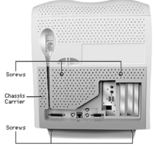 | |
Posted by: aladds on 2024-10-30 16:47:16I acquired a G3 AIO this past weekend that was sadly a battery bomb victim. I installed a spare G3 desktop board but it doesn't boot at all. Someone I was on Discord mentioned something about jumpers to set the board as a tower, desktop, or AIO and I'm just wondering...is that true? If it is, what are the jumper settings? In response to your question, though. Check J28 on the original and replacement boards. 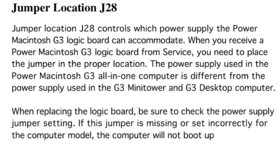 | |
| Posted by: EvieSigma on 2024-10-30 16:49:47 Thanks, so the jumper is near the PCI slots! I was looking in the wrong place! | |
Posted by: finkmac on 2024-10-30 17:00:48A little off topic, but has anyone before noticed that some of the photos in there show a personality card with USB ports?hah, hidden in plain sight.... | |
| Posted by: chelseayr on 2024-10-31 02:48:45 @finkmac its been some time so I forgot where I had actually seen it but someone on a different forum somewhere had a silly signature that said "want to hide something? *surprised smiley* put it in plain sight! *cowboy yeehawing smiley*" (the two faces only made it a bit more funny to look at indeed) | |
| 1 |