68kMLA Classic Interface
This is a version of the 68kMLA forums for viewing on your favorite old mac. Visitors on modern platforms may prefer the main site.
| Click here to select a new forum. | |
| PB180 restoration issues | |
| Posted by: terrytheimpaler on 2024-10-17 11:38:36 So, I'm restoring this PB180, and when I do power on, this is what I get. It's not tunnel vision, but this instead. How do I go about fixing this? 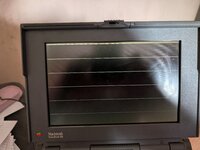 | |
| Posted by: finkmac on 2024-10-17 12:32:09 torn display cable? maybe a bad interconnect cable? idk, does it chime? | |
| Posted by: 3lectr1cPPC on 2024-10-17 14:38:11 First step is to try reseating everything. Make sure the LCD cable is seated well on both sides (and isn't damaged). If the interconnect cable is damaged, you won't be able to tell visually. Only way to know would be to swap in a spare board or replace the cable yourself. If it chimes then that's a good sign that the bottom half is working fine. If reseating all the things doesn't fix anything and nothing is off visually, then you'll really need a parts donor to isolate which component is bad. | |
| Posted by: Byrd on 2024-10-17 15:08:19 Pull the main battery out when restoring any 1x0 PowerBooks, they usually need some coaxing to run with them in. Your LCD error is either the LCD ribbon cable or the Cpu daughter card isn't fully pushed down. | |
Posted by: terrytheimpaler on 2024-10-17 15:39:51torn display cable? maybe a bad interconnect cable?It does chime. | |
Posted by: terrytheimpaler on 2024-10-17 15:40:22Pull the main battery out when restoring any 1x0 PowerBooks, they usually need some coaxing to run with them in. Your LCD error is either the LCD ribbon cable or the Cpu daughter card isn't fully pushed down.I'll check those out. I have no battery, so I'll examine those. Thanks! | |
| Posted by: Shaddam IV on 2024-10-18 01:05:00 This is what a 180 looks like for about a second after it's been turned on. If it stays, I would guess that something's wrong with the mother- or daughter board, or as previous authors have written a cable is not seated right - I'd first look at the interconnect cable and reseat that (watch for bent or broken pins when seating that cable) | |
| Posted by: demik on 2024-10-18 01:55:02 Interconnect cable / jedi board most likely. Do you get video out of the external video port ? | |
| Posted by: terrytheimpaler on 2024-10-21 09:25:53 Update: So, what I have found so far is: Thick ribbon cable between daughterboard on top half of system appears to have pulled apart, and it looks prior done. Upon rebooting and PRAM reset, I get a little more display, but now the crash sound, which I did not get before. | |
| Posted by: Shaddam IV on 2024-10-21 22:27:51 Perhaps get a new ribbon cable (from a donor laptop)? | |
Posted by: terrytheimpaler on 2024-10-22 16:07:21Perhaps get a new ribbon cable (from a donor laptop)?That's what I'm thinking, but where? It also appears that the cable pins direct to the small board. | |
| Posted by: Shaddam IV on 2024-10-23 00:16:18 Yes, I had forgotten. Well, get a new interconnect board as well (either from Ebay or from a donor laptop). You can use a PB 160, 165, or 180 interconnect board, they're all the same. You could replace the buffer battery on that board while you're at it. | |
| Posted by: croissantking on 2024-10-23 04:21:50 You can rebuild the interconnect board ribbon cable. Perhaps get a new ribbon cable (from a donor laptop)?I don’t recommend this approach as the original ribbon cables are failure prone. | |
| Posted by: Shaddam IV on 2024-10-23 23:43:23 Hm, I haven't really seen that... I have a few interconnect boards (with attached ribbon cables) and they all seem to be working ok. | |
Posted by: terrytheimpaler on 2024-10-24 13:34:45Hm, I haven't really seen that... I have a few interconnect boards (with attached ribbon cables) and they all seem to be working ok.That would be nice. How much for a good one, shipping to Virginia? | |
| Posted by: Shaddam IV on 2024-10-25 22:42:42 I‘m in Gemany (and doing the Olive Harvest in Italy atm) - this might by costly and will take time. I suggest getting a cheap 160 or 165 from ebay, e.g. here or here, and harvest its interconnect board. If you‘re lucky you‘ll get a working hard drive, too (useful as a backup in case the original drive gives up the ghost). | |
| 1 |