68kMLA Classic Interface
This is a version of the 68kMLA forums for viewing on your favorite old mac. Visitors on modern platforms may prefer the main site.
| Click here to select a new forum. | |
| Macintosh 128k 630-0101 board with “jailbars” | |
| Posted by: Joopmac on 2024-10-05 07:52:30 hello all, we just finished replacing the ram chips on this board, did not boot, sad mac Now we have these, what I know as jail bars like my se 30 Had =) Anybody got some hints where to look first? | |
| Posted by: nyef on 2024-10-05 08:28:59 Look for a pair of shift registers (74LS166 at UF13 and UF14 according to the schematic that I found). Eight pins on each chip are supposed to connect to different RAM data output lines. One of those connections is probably bad. It's clearly not the RAM chips themselves, as the system boots to this point. And it's possible that it's one of the shift registers themselves, but that feels less likely than it being a blown trace. | |
| Posted by: Joopmac on 2024-10-05 09:06:09 Thanks Traces checked and look OK ordered some new old stock LS166… Would it also explain the weird boot beep? | |
| Posted by: nyef on 2024-10-05 10:39:45 Audio pulls from the RAM using a shared data path, though it's the pair of 74LS161 chips at UE15 and UF15. I'd have to do a bit of digging to understand quite how it gets from eight bits of data to an analog audio signal, though my current intuition is that it's using counters to generate a PWM signal and then an op-amp to integrate that. At any rate, this lends support to the theory of it being a bad trace, and tells us that it's one of the traces feeding UF13, after it feeds UE13 (which is a 74LS244 and drives the values that the CPU sees for D8-D15, since the system boots we know that this chip is connected and working), and feeds either UE15 or UF15. Check continuity between pins 3, 4, 5, and 6 of UE15 and UF15 and pins 2, 4, 6, 8, 11, 13, 15, and 17 of UE13. Also between pins 2, 3, 4, 5, 10, 11, 12, 14 of UF13 and UE13. I'm thinking that a break on pin 2 or 11 of UE13 is most likely for both audio and video. And, looking at your screenshot above, pin 2. | |
| Posted by: Joopmac on 2024-10-05 13:44:19 Well my friend has found the sound fault 😁  | |
| Posted by: Joopmac on 2024-10-06 03:19:57 Hello again 🙂 We also removed a resistor pack at the 6522 I thought this was for a ram upgrade but now I think Its probably original Does anybody know if it should be there and Why? I Cannot find anything about it | |
| Posted by: nyef on 2024-10-06 06:05:11 Ten-pin thing, half its legs cut off, attached to pins 34-38 and C30? Looks like extra pull-ups on A9-A12, or low-maybe pull-downs (they'd conflict with RP1, which is all the way across the board if they were pull-downs). If so, I'm not sure why it's there (though it's probably to do with having a valid state at the NMOS VIA register selects before the CPU is driving the bus and RP1 not being close/strong enough to do the job), but it's almost certainly original. | |
| Posted by: Joopmac on 2024-10-06 14:25:06 Cool insight, thanks. I found this nice piece of information in Macintosh Repair & Upgrade secrets And after googling a lot 128k logic boards and their images, i found that some of them have, and some of them don't - also early ones like week 6 can have it all the way up until week 43, only the shape of the resistorpack has changed throughout the year. And it is recommended for all 128k's, Larry Pina says even required with 512K RAM IC upgrades. but certainly not all 128k's have this, this the first resistorpack on that strange location on a multitude of m0100X's i have, i first thought it had to do with a 512K upgrade board Not sure if it's a official Apple Service Bulletin or something from 1984=) | |
| Posted by: nyef on 2024-10-06 18:45:30 How odd. The fan-out on those lines is only four, maybe five if the RAM upgrade also taps them (both ROM chips, the VIA, and split over a couple of address multiplexers, probably using some as row addresses and some as column addresses). Maybe it's something to do with trace length, with the VIA being basically the opposite side of the board from the address logic, combined with NMOS' atrocious upwards drive strength? At any rate, it seems clear that you should have it installed. | |
Posted by: Joopmac on 2024-10-16 07:03:15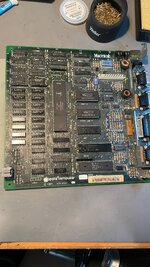 Hello🙂 (autocorrect made this: “Help”, probably a better way to start 😬) Replaced LS166 and LS161 and the result went bad🙁 Hope anybody can give some hints where we are going wrong here =) | |
| Posted by: Joopmac on 2024-10-19 02:22:38 update am suspecting the new LS161AN, installed was a LS161N, not sure why there is a electrical difference | |
| Posted by: Joopmac on 2024-10-19 05:49:43 New update It was the resistor pack Now to find the jail bar issue | |
| Posted by: Joopmac on 2024-10-26 03:47:22 Replaced the 244’s again, a Pain because I rather use no sockets I don’t like the look😂 Still the same and all the connections and traces are checked. Is it possible that the CPU is defective? | |
Posted by: nyef on 2024-10-26 08:09:59Is it possible that the CPU is defective?You showed an image with the system running and showing the Finder's about box. It is vanishingly unlikely to be the CPU. Also note that this means that the system had to have passed its basic RAM tests, so it's not anything in the direct path between CPU and RAM in either direction. The display image is recognizable, so it's not the video address generation logic or anything after the display shift registers. What's left to check? I still say a broken trace between one of the shift registers and RAM is a likely culprit. | |
| Posted by: Joopmac on 2024-10-30 07:30:05 257's replaced and the 253's also, traces checked, all beep out OK Maybe it's the CPU after all? | |
| Posted by: nyef on 2024-10-30 12:51:32 A CPU problem such that it passes the startup RAM test and runs the Finder yet has a consistent single-bit error when writing to video memory? This feels unlikely, but I suppose it could be possible. How about this? Drag a finder window slightly to the side (just a few pixels, certainly not as many as sixteen pixels), and see if also drags a copy of the jailbars with it? If the jailbars get copied then we're looking at something between the CPU and RAM (since the CPU is reading the jailbars as it does a bitblt). If they don't (the CPU is working with good data), then it's the video output path. | |
| Posted by: Joopmac on 2024-11-09 00:11:20 FIXED! It was a trace under a LS166! | |
| Posted by: nyef on 2024-11-09 22:59:28 Congratulations. Glad that you managed to get it figured out and working! | |
| Posted by: Joopmac on 2024-11-10 00:49:21 Thanks for your help, you nailed it in the first answer already We just missed it every time | |
| 1 |