68kMLA Classic Interface
This is a version of the 68kMLA forums for viewing on your favorite old mac. Visitors on modern platforms may prefer the main site.
| Click here to select a new forum. | |
| THAT'S not an error I've seen before... | |
| Posted by: marchie on 2024-09-29 11:15:43 *yawns and stretches* it has to be nearly 25 years since we created this place.... So this SE gives a good startup beep, and then goes to a blinking disk. It if I hookup the external floppy drive... It gives this error. Not behaviour I've seen before. I guess I'll have to wait till next week when my new long shank torx drives get here to take a look. 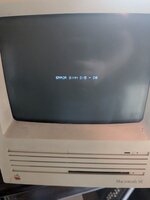 | |
| Posted by: cheesestraws on 2024-09-29 11:25:27 That... is novel. Not a stock error message, I think. Is there an upgrade in it? | |
| Posted by: LaPorta on 2024-09-29 11:34:21 I was about to say, possibly an accelerator throwing it’s own error code for on-board RAM? | |
| Posted by: robin-fo on 2024-09-29 11:59:46 I bet there is an accelerator card inside! | |
| Posted by: marchie on 2024-09-29 12:31:50 Apparently there's a thread from 12 years ago when I booted this and... Yes. There's something in it. I guess I'll see when the screw driver shows up! Hopefully it has a pass thru... I have an ethernet card I wanted to add. | |
| Posted by: marchie on 2024-10-10 08:34:16 Aaaah, it's an SE Faux 30! Standard Mac SE board, with 4x256KB SIMMs on it. And a "New life computer corp" PDS board in it. PN: CD306D SE The board has 4x4MB SIMMs on it. An MC68030 chip and MC68882 math coprocessor. | |
| Posted by: marchie on 2024-10-10 09:25:36 Well... Without the Faux30 board in, I got this. I took the mother board out again, took some RAM out because one is probably bad (causing the jail bars) And now I get sizzle when I boot. I almost certainly blew the rectifier at CR2 on the analogue board. I get the sense I'm going to have a cascade of problems. 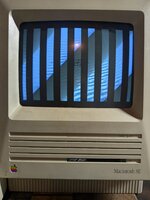 | |
| Posted by: KennyPowers on 2024-10-10 11:31:47 I've seen the same error before from a MicroMac Multispeed accelerator in an SE, which makes sense since it's a licensed NewLife design (the ROM dump says "NewLife" all over it). 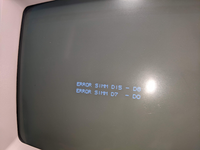 It's a test for the onboard SIMMs (which are all required to be present). In my case, I had two broken data lines caused leaky caps, but I suppose that error could also be caused by a SIMM being bad itself. When I buzzed out the data lines between the CPU and SIMM slots, it seemed like they were laid out linearly, so D0-D7 were SIMM 1, D8-D15 were SIMM 2, etc. So, I would assume your error is a problem talking to the "second" onboard SIMM if they're labeled in any way. So I would first try swapping two SIMMs around and see if the data lines in the error message change. If they don't, then buzz out D8-D15 between the CPU and SIMM slot and look for broken connections. Looks like that accelerator uses tants instead of SMD electrolytics, so I doubt you have any leaky cap damage. | |
Posted by: marchie on 2024-10-10 12:39:53I've seen the same error before from a MicroMac Multispeed accelerator in an SE, which makes sense since it's a licensed NewLife design (the ROM dump says "NewLife" all over it).I swapped out the on board SIMMs for 4x1MB ones, and now I get a boot with no jail bars! I put the new life back in... And I'm getting the same error. Error simm d15-d8 So, I'm thinking I'll take the accelerator board out. Get my BlueSCSI programmed up with a few disk images, and boot this "naked", to test for any other errors, then see if it's memory on the expansion board. I have a set of 4x4MB SIMMs that looks in good shape, so swapping one or two in is probably doable... | |
Posted by: KennyPowers on 2024-10-10 14:41:22I swapped out the on board SIMMs for 4x1MB ones, and now I get a boot with no jail bars!I guess I should have been more specific in that those error messages only refer to the SIMMs on the accelerator board 👍 | |
| Posted by: marchie on 2024-10-11 11:04:03 I pulled and reseated all the SIMMs on the accelerator board. No more error! But it seems all the microSD cards I had are dead, so I have to wait till Amazon delivers tomorrow to load some images on the BlueSCSI and get it booted proper. But I also noticed, this has a lithium battery soldered to the board. I'll clip it and solder in a MacBatt when they get here. | |
| Posted by: KennyPowers on 2024-10-11 20:34:49 You'll probably need Compact Virtual to use the RAM on the accelerator. | |
Posted by: marchie on 2024-10-11 21:09:33You'll probably need Compact Virtual to use the RAM on the accelerator.looks like I need this one: from here: https://www.savagetaylor.com/2023/0...-corporation/#newlife_accelerator_se_16_se_20 | |
| Posted by: marchie on 2024-10-12 12:38:32 She boots! The accelerator might not be live yet. Trying to get the disk images and such downloaded and set on the BlueSCSI. 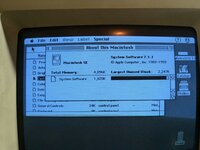 | |
Posted by: marchie on 2024-10-12 13:05:56She boots!Oh noes! There's definitely an issue with the screen.... | |
| Posted by: marchie on 2024-10-12 15:30:28 This SE/30 screen is in GREAT shape. No flickering or any other issues. So this is now officially... The SE Faux 30! 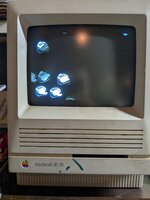 | |
| Posted by: marchie on 2024-10-17 14:23:20 Alright... So the accelerator board is not working. The memory is not activating (it has 16MB on it and the system only sees the 4mb on the motherboard board). And I get a bus error when the Init tries to load for extra controls, in both system 7.1.1 and 6.0.8 I'm going to have to open it up. Probably start with resetting or replacing all the RAM. BUT! I have where in the USA is Carmen Sandiego loaded and working! Which my 10 year old is loving. | |
| Posted by: KennyPowers on 2024-10-17 20:25:34 The similar accelerator I have is picky about RAM. I also got a bus error when the init loaded until I found RAM it liked. I can confirm that this 16MB kit works in the MicroMac Multispeed, so it would probably work in yours: https://www.tindie.com/products/siliconinsider/purpleram-16mb-4mb-x-4-30-pin-dram-simm-kit/ I still suspect that you'll need Compact Virtual in addition to the NewLife driver to actually use the accelerator's onboard RAM once you get it booting. | |
| Posted by: marchie on 2024-10-24 18:16:32 Replaced RAM on the board. Still get a bus error when the Init tries to load. No clue at this point. I'll be replacing the lithium NVRAM battery with a MacBatt that came in the mail yesterday, then decide if I'm going to continue to try and make that accelerator work, or remove it and work it Into another SE I've picked up. | |
| 1 |