68kMLA Classic Interface
This is a version of the 68kMLA forums for viewing on your favorite old mac. Visitors on modern platforms may prefer the main site.
| Click here to select a new forum. | |
| Mac classic geometry problems | |
| Posted by: Jonweimer on 2024-09-25 10:14:02 So I recapped this unit over a month ago, and it looked pretty good geometry wise. Then all of a sudden I started getting pincushion at the bottom, and a slight overscan on the top left. I’ve tried adjusting the magnetics on the yoke, didn’t affect it. I checked the values of all the new caps and they’re all in range still. I looked for broken solder joints, found nothing. I checked the resistor at r2 that everyone says causes geometry issues. Still reading 150ohms. Anyone have any ideas? I really wanna get this one back in the working category. Thx 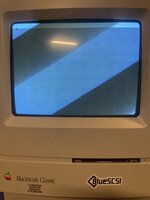 | |
| Posted by: LaPorta on 2024-09-25 12:40:55 First, your screen is way too big. You need to bring it into normal parameters by following the Pina Dead Mac Scrolls or repair secrets book for the Classic/SE. then I’d see if the issue even persists. | |
Posted by: Jonweimer on 2024-09-25 12:41:50First, your screen is way too big. You need to bring it into normal parameters by following the Pina Dead Mac Scrolls or repair secrets book for the Classic/SE. then I’d see if the issue even persists.It persists and as I said before it was fine and deteriorated. This is 7 1/8w x 4 3/4h like the source you quoted. Same problem. 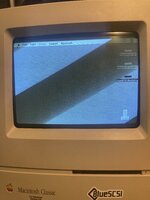 | |
| Posted by: cheesestraws on 2024-09-25 13:10:18 No, that is significantly both wider and higher than the image ought to be. Nonlinearity is probably not surprising. Go and look at images of what they looked like new, if in doubt. | |
Posted by: Jonweimer on 2024-09-25 13:20:32No, that is significantly both wider and higher than the image ought to be. Nonlinearity is probably not surprising. Go and look at images of what they looked like new, if in doubt.I can read a tape measure. I adjusted with a tape on the screen to exactly the specs in the book. And I can turn it down to a 1 inch cube and the problems persists. This is not the solution. It’s still collapsing into reverse pyramid even turned down signifigantly. 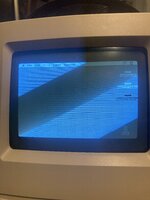 | |
| Posted by: cheesestraws on 2024-09-25 13:25:19 ok then | |
Posted by: Jonweimer on 2024-09-25 13:28:09ok thenIt’s about 1/2 inch at the top and 3/4 at the bottom and the word trash is slanted. | |
| Posted by: LaPorta on 2024-09-25 14:29:56 Now I can see that in the photos that you adjusted it. Now that that is cleared, it’s possible some of the rings around the yoke have become misaligned. Those can affect that. | |
Posted by: Jonweimer on 2024-09-25 14:31:06Now I can see that in the photos that you adjusted it. Now that that is cleared, it’s possible some of the rings around the yoke have become misaligned. Those can affect that.There’s two rings and they only adjust the position when moved. I marked them before trying to use them and they don’t fix the problem and I moved them back to the original marked positions. | |
| Posted by: LaPorta on 2024-09-25 15:17:21 Are the rubber wedges (if present) centering the yoke intact and have not moved? | |
Posted by: Jonweimer on 2024-09-25 15:18:15Are the rubber wedges (if present) centering the yoke intact and have not moved?this one doesn’t have any. It’s kinda hot glued in place from the factory and it’s intact. It doesn’t move in the slightest. | |
| Posted by: falen5 on 2024-09-25 15:27:18 Ive had this on a few machines and no matter how much i messed with magnets , rings , pots etc etc I never really got it perfect on some machines I got the display 95% of the way there but on 2 or 3 of the machines nothing I did could fix the display i could get one side of the screen looking correct but not the other and visa versa shrinking the display 'helps' but didnt fix it i did the mystic upgrade on a CC with the reseolution mod and ended up with this problem yet again - an no tinkering could get the screen looking correct i ended up wondering if there could have been some incident with the machine before i got it , like the display being up against some magnet or something and i tried for a long time with each of them , following all the advice i could get its just one of those problems that dont make sense , for me anyway | |
Posted by: Jonweimer on 2024-09-25 15:28:33Ive had this on a few machines and no matter how much i messed with magnets , rings , pots etc etc I never really got it perfectI’m thinking it’s that v/h ic going wonky. | |
| Posted by: nathall on 2024-09-25 21:13:48 Have you tried calling MacSupport @ (714)660-1856, for service? (Sorry, I really couldn’t resist.) | |
Posted by: Jonweimer on 2024-09-25 21:14:35Have you tried calling MacSupport @ (714)660-1856, for service?I don’t have AppleCare. 🤣 | |
| Posted by: s_pupp on 2024-09-26 12:43:14 I once used a degausser (a cheap one from eBay) on a TV that developed problems after being next to a highly magnetic ribbon speaker. Do classic Macs self-degauss, and, if not, would degaussing adversely affect the magnets? | |
Posted by: Jonweimer on 2024-09-26 12:44:14I once used a degausser (a cheap one from eBay) on a TV that developed problems after being next to a highly magnetic ribbon speaker. Do classic Macs self-degauss, and, if not, would degaussing adversely affect the magnets?It doesn’t have a degaussing coil, but I used a manual one and it did nothing noticeable at all unfortunately. | |
| Posted by: Jonweimer on 2024-10-12 10:47:43 So it was a yoke issue. Replaced it and now the geometry is correct. After the standard adjustments that is. 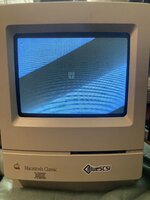 | |
| Posted by: LaPorta on 2024-10-12 13:09:44 Glad it was an easy(ish) fix! | |
Posted by: Jonweimer on 2024-10-19 08:37:54Glad it was an easy(ish) fix!I mean honestly that’s one screw, so not so bad. I know a lot of people hate messing with yokes. 🤣 | |
| 1 |