68kMLA Classic Interface
This is a version of the 68kMLA forums for viewing on your favorite old mac. Visitors on modern platforms may prefer the main site.
| Click here to select a new forum. | |
| IIci too much memory... | |
| Posted by: Juror22 on 2024-09-24 21:05:11 I have been tying to take better care of my II's this past few months and this weekend I caught up with on of my two IIci's, which originally came to me with a packed Toby card, as well as ethernet, cache and GPIB cards (but and no hard drive). I had recapped this one in the not-too-distant past, and also placed a random HD in it (from a performa, which boots with the extensions off) and now also replaced the failing fan in the PSU with a Noctua (NF-R8 redux-1200 per excellent advice from someone else here on the forum - I'm curious how they handled the generous length of the cord on their installation...) After getting the PSU back in, and installing 7.1, so that it boots without holding down the shift key, I next took out the old 1 MB sticks and put in eight new 16MB memory sticks in their place that I bought on Amazon and booted it up. Following the startup chime I waited, and waited, waited some more... then I thought about how everyone warns about how long it takes the older machines to check through that much RAM. (still waiting btw...) So after what seemed like a couple of minutes, but might have been less, it did finally come up, and with so much memory. I know this is the wrong place to complain about this, but this could be too much memory, so based on some threads I have seen covering memory/video and such, I cut it back to just the expanded memory in bank B and I'm placing 1MB SIMMs back in bank A to drive the onboard video. Once I get the cache card recapped (still works, but cap goo was obvious when I took it out), I'll put that back in and raise the memory cache to about 768MB. That should give me the best onboard video performance, along with a fair startup time, providing me with a nice IIcx experience. This really started out as one of those, 'What do you suggest I do, now that I have configured this wrong?" items, but now I've talked myself into taking this path and unless the video is really slow, and I'll put the card in something else. | |
| Posted by: David Cook on 2024-09-24 21:58:16 I believe you can get a replacement ROM that will skip the memory check and add other features such as a ROM drive. | |
| Posted by: aladds on 2024-09-24 23:13:36 I always forget which keys it is but if you hold a couple of keys down whilst opening the memory control panel (maybe control and command?) you get an extra option to disable startup memory tests. You do need a clock battery to retain that setting, though. | |
| Posted by: macpto4639 on 2024-09-25 00:36:18 you can just use command + shift + soft power (keyboard button) to forced an unchecked boot | |
Posted by: cheesestraws on 2024-09-25 00:51:06I always forget which keys it is but if you hold a couple of keys down whilst opening the memory control panel (maybe control and command?) you get an extra option to disable startup memory tests. I think this only works up on PowerMacs, unfortunately (may be wrong, but I think so...) | |
Posted by: danny.gonzalez.0861@gmai on 2024-09-25 05:55:22I think this only works up on PowerMacs, unfortunately (may be wrong, but I think so...)I too believe @cheesestraws is correct here. On IIci's, only way to bypass RAM check is to use a customer ROM SIMM like BMOW, etc. I have 128MB on my IIci and spent the money on the ROM to bypass the check as it took an eternity to cold boot. | |
Posted by: lobust on 2024-09-25 06:11:01you can just use command + shift + soft power (keyboard button) to forced an unchecked boot I thought I knew all the key combos, but this is a new one on me. Is it confirmed, and on which models? | |
Posted by: macpto4639 on 2024-09-25 06:13:37I thought I knew all the key combos, but this is a new one on me.its Control-Command-Power on a Mac forces a restart, i dont know why i put shift! | |
| Posted by: macpto4639 on 2024-09-25 06:15:28 but here is a complete list to commands - https://devonhubner.org/Macintosh_Classic_Keyboard_Commands/ | |
| Posted by: Juror22 on 2024-09-25 06:45:48 I am going to try the key command and report back, is there a link for the replacement ROM for this? | |
Posted by: macpto4639 on 2024-09-25 06:51:15Mac ROM-inator II | Big Mess o' Wires | |
| Posted by: olePigeon on 2024-09-25 14:03:49 If you have a DayStar accelerator, you can disable memory check in the Advanced options by holding the Option key while in the Control Panel. | |
Posted by: Juror22 on 2024-09-25 15:21:48If you have a DayStar acceleratorI wish! 🙂 I have been watching, but not for that long... so I have not seen a good price on one. There could could have been some at VCF midwest and I wouldn't have known - I didn't get to spend very much time there, just happy that I got to go and get a few items, I'll try to plan a bit better next time. I don't know why, with over half a dozen Mac IIs of various sorts and other items that would benefit, I still don't have one of these, so I went out and got one. I suspect the reason I haven't gotten one yet is that if I started, I might need more than one, or two or... you get the picture 😉 | |
| Posted by: olePigeon on 2024-09-25 16:41:48 @Juror22 I have the original one from DougG3 that he hand-soldered for me. It's my favorite upgrade out of everything. Mine has a Pirate Mac with glowing red eyes on the PCB. 😀 | |
Posted by: Juror22 on 2024-09-25 21:56:19I have the original one from DougG3 that he hand-soldered for me. It's my favorite upgrade out of everything. Mine has a Pirate Mac with glowing red eyes on the PCB. 😀Now that's a fun feature! And its always great to learn more about where some of these items originated. | |
| Posted by: olePigeon on 2024-09-26 08:32:04 @Juror22 You can't really see it after it's installed, of course, but the red glow it gives off reminds you that it's there. 😀 It's fun to watch when you have it loaded in the SIMM programmer, though. | |
Posted by: KennyPowers on 2024-09-26 09:08:55If you have a DayStar accelerator, you can disable memory check in the Advanced options by holding the Option key while in the Control Panel.Are you KIDDING me?! I owe you a beer 😀 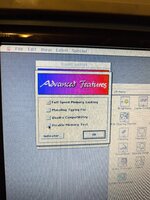 | |
Posted by: croissantking on 2024-09-26 12:48:28its Control-Command-Power on a Mac forces a restart, i dont know why i put shift!So you are saying start up with the power key and then do a soft restart and it will bypass the memory check. Can anyone confirm if this works? | |
Posted by: KennyPowers on 2024-09-26 13:18:51So you are saying start up with the power key and then do a soft restart and it will bypass the memory check.Powering on my IIci with the power key and then doing control-command-power during the memory test does nothing for me. The machine does not restart in response to the key combo. | |
Posted by: croissantking on 2024-09-26 13:20:36Powering on my IIci with the power key and then doing control-command-power during the memory test does nothing for me. The machine does not restart in response to the key combo.What about the front reset button? | |
| 1 > |