68kMLA Classic Interface
This is a version of the 68kMLA forums for viewing on your favorite old mac. Visitors on modern platforms may prefer the main site.
| Click here to select a new forum. | |
| PowerBook 170 Mirror PowerVision Driver Request | |
| Posted by: David Cook on 2024-09-22 19:30:01 TLDR: Does anyone have the PowerVision drivers for the PowerBook 170 video out? I purchased a PowerBook 170 with an aftermarket mod video out connector on the hinge.  The hard drive still worked. Booting it up, the PowerBook did not display anything on the external video. Sadly, the System does not contain any special extension or control panel, nor does the Monitors control panel show the external display. I think someone wiped out the original system. I opened the PowerBook, hoping to find the exact model of the external output board. The PCB text isn't helpful. 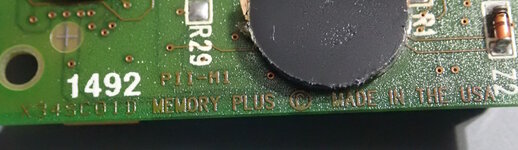 But, the board sure looks like the other Internet pictures of the PowerVision. The board contains 6 MB of additional system RAM along with 2 MB of VRAM. 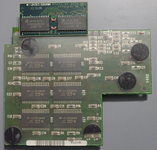 The bottom of the board 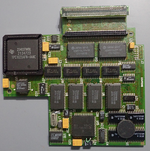 Now comes a shock! It looks like connector J3 has been ripped off the board. 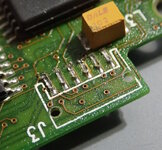 And, when I opened the external video connector, I found that indeed some jerk had cut the cable. 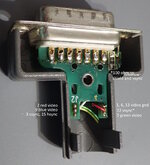 So, yeah. At some point, someone wiped the drive of the drivers, cut the cable, and ripped off the connector. There are only six wires for the connector. In the above image, I've mapped them to the standard Macintosh video port pins. It would not be too difficult to replace the wires -- except notice none of them are monitor sense pins. Maybe the 100 ohm resistor acts as a cable sense? It is wired to vsync. My concern is that the video card is unlikely to output anything for me to test a monitor against without the drivers. If any kind-hearted soul has the "Mirror PowerVision" software, I would sure appreciate a copy. - David References: 
MacWorld 9302 February 1993 : Free Download, Borrow, and Streaming : Internet ArchiveMacWorld 9302 February 1993
archive.org
Some mod for Powerbook 170 display out?I remember reading somewhere on the internet, that there was an adapter for the powerbook 170, which made it possible to connect it to a vga monitor... I wanted to know if anyone knows some mod using a protoboard or something like that to connect the soldering points of the motherboard to an...
 68kmla.org
| |
| Posted by: David Cook on 2024-09-23 19:20:57 The Mirror PowerVision was also branded Envisio External Video or EVE. Knowing that, the drivers were located. Attached below. You need the installer, as it copies resources into the System file as well as the usual extension. 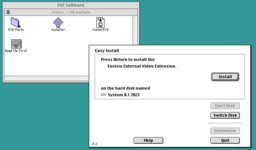 Replacing the cut cable was not fun. I ended up soldering six 30 AWG wires to the board and the port. A connector is not strictly necessary, as you can remove the memory/video card to separate the two halves of PowerBook for servicing. A tip: use solid copper wire, not stranded. Even though the flexibility of stranded is appreciated, the small holes on the connector PCB are awful to thread tiny stranded wire through. The pinouts on J3 are as follows: 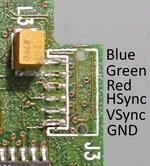 I might have blue and red mixed up, as I experimented with the wiring after reassembling the laptop and before final soldering. GND was easy to find with a multimeter in continuity mode against a chip with a known GND pin. VSync was found with an oscilloscope looking for a 60 Hz (ish) frequency. HSync was a little more difficult because it is a composite signal. But, basically it looks really noisy and higher frequency on an oscilloscope. Red, Green, and Blue all connected to resistors on the board. So, that was easy to assume those were the color signals. I guessed green would be in the middle. 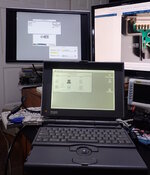 - David | |
| Posted by: finkmac on 2024-09-23 20:15:16 awesome work as always. wonder why the previous owner ripped the cable out. | |
Posted by: David Cook on 2024-09-23 21:31:46awesome work as always. Thank you very kindly. One additional note, if you hold down the option key at startup, you will be given a choice of monitor resolutions. 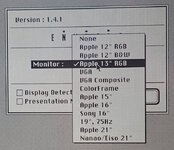 However, at 16" only 16 colors are available. At 21", only B&W is available. Clearly my 2MB of VRAM comment in my initial post is incorrect. It needs 307200 bytes for 256 colors at 640x480. But, it can't display 256 colors at 800x600, which would require 480000 bytes. So, it either has less than 512K VRAM (maybe 384K?) or it's pixel output rate is the limiting factor at larger resolutions. | |
| Posted by: btober on 2024-12-12 19:50:26 Thanks for sharing all of this, David! I have two PowerBooks 170 with this modification, and in trying to get one working to hand off to a friend of mine, I realized I needed this software. In the process of getting things working, I realized that it appears virtual memory needs to be off in order to be able to use that monitor type selection menu at startup; for me, at least, I would get a bomb every time I'd try to click on the menu with it on. Not sure if there's something else specific to my situation that might be causing this, but wanted to share in case it helps anyone else. Brad | |
Posted by: David Cook on 2024-12-12 22:48:43I realized that it appears virtual memory needs to be off in order to be able to use that monitor type selection menu at startup; Very interesting. I always have virtual memory disabled on all my Macs, so I would not have encountered that issue. Thanks for letting everyone know that VM may cause problems. | |
| Posted by: zefrenchtoon on 2024-12-12 23:59:19 Thanks for sharing guys !! 🙂 Very insteresting. Does any magician can answer a little question about this card : Is it "reloaded"-able ? 😅 Thinking about @Bolle @max1zzz or @zigzagjoe | |
Posted by: Bolle on 2024-12-13 00:09:07Does any magician can answer a little question about this card : Is it "reloaded"-able ? 😅The Ti TPC1020 on there is very likely secured, so I'd say no. | |
| Posted by: zigzagjoe on 2024-12-13 03:16:01 Making a function-alike card would probably be more doable, but I'm in no hurry to tackle that I'm afraid. I am curious how many PCB layers they used on the original... probably 8? | |
Posted by: zefrenchtoon on 2024-12-13 04:24:27The Ti TPC1020 on there is very likely secured, so I'd say no. Making a function-alike card would probably be more doable, but I'm in no hurry to tackle that I'm afraid. I am curious how many PCB layers they used on the original... probably 8? Thanks for your thoughts 🙂 | |
| 1 |