68kMLA Classic Interface
This is a version of the 68kMLA forums for viewing on your favorite old mac. Visitors on modern platforms may prefer the main site.
| Click here to select a new forum. | |
| Mac Plus not recognizing BlueSCSI after recap of analog board | |
| Posted by: lostkerbal on 2024-09-17 10:08:04 I've just finished my first recap, redoing the analog board of my Mac Plus that slowly died. When I first got it a few months ago, it booted up just fine with the BlueSCSI 2.0 that I got, with the .ini file, with USB power, etc., etc., but it no longer boots after the recap. Just a blinking question mark, which is at least better than it was before the recap (non-flashing and frozen), but I would like to figure out what's wrong. Before recapping, I measured the voltages from the floppy port and they were way off, so maybe a controller or fuse got fried? Not sure, as the rest of the machine seems to work perfectly. Any and all advice is greatly appreciated, I'm pretty new to this hobby. | |
| Posted by: Callan on 2024-09-17 10:15:30 I'd try reformatting the sd card and putting a fresh copy of your drive on it. I've had this happen to me a couple of times and this solved it (my bluescsi not booting that is) | |
Posted by: lostkerbal on 2024-09-17 11:02:23I'd try reformatting the sd card and putting a fresh copy of your drive on it. I've had this happen to me a couple of times and this solved it (my bluescsi not booting that is)Tried that multiple times, it's a hardware issue. | |
| Posted by: Callan on 2024-09-17 11:38:42 If that's the case you either have a scsi issue or bluescsi issue. I haven't seen a bluescsi hardware issue (as of yet), but I've had a number of scsi issues. I take it you've done the diode mod for scsi termination since the bluescsi was working before. First thing I would do is try another bluescsi to take that out of the equation. I would also verify the bus termination mod. SInce you just got done doing a cap kit (and it worked before the kit) I would go back and make sure you got all your polarities correct and look for any possible solder shorts. Either at the caps or possible unintentional ones - solder fell of the tip as you were soldering and shorted something. If you live close to me I'd be happy to have a 'looksee' at it for you. | |
| Posted by: Callan on 2024-09-17 11:43:30 Oh. And verify all your voltages are good coming from your analog board | |
Posted by: lostkerbal on 2024-09-17 11:55:58Oh. And verify all your voltages are good coming from your analog boardJust verified and adjusted voltages to within spec ±0.05 V | |
| Posted by: lostkerbal on 2024-09-17 12:35:52 I've also completely reformatted both the sd card and the BlueSCSI's Pi Pico, wiping the latter and reflashing it with the latest nightly build of BlueSCSI. The case is properly grounded, and I have everything reassembled. | |
| Posted by: Callan on 2024-09-17 15:57:13 At this point I would check my termination power and verify my bluescsi with a different one. Also... make sure your formatting you sd card correctly (exfat or fat32) and see if you can put a blank hda in it and install to it from floppy (ive had bad sd's that wouldnt format correctly). If your floppy port is fine maybe get a test program loaded to see if it can find any issues with the machine. These are the easiest things to do before you start troubleshooting the scsi port. It requires tools and soldering experience after this point. For the scsi port you'll need either a loopback plug or techstep. Or you can get a cheap logic probe and verify your getting the required signals to the 25pin scsi port (assuming you dont already have a scope). Test the easy stuff first, and you can cross the scsi port tests when you get to that bridge. Maybe there is a common problem with the mac plus that might be a goto thing to check. I'm not super familiar with the hardware, so if someone who is would like to chime in I'm sure he'd appreciate it. | |
| Posted by: lostkerbal on 2024-09-17 16:16:27 I do have access to a basic scope, what pins/signals would I be looking for? I don't have the term power mod (I have it powered via 5V USB, it worked flawlessly before), another machine, another BlueSCSI, or a boot floppy, so that would be my next course of action. | |
| Posted by: saybur on 2024-09-17 16:23:16 Before going down the scope route I'd suggest reviewing the log file, which may give you a better idea of what's happening. They have a general troubleshooting guide as well. Enabling debugging should let you know if the Mac is successfully issuing SCSI commands. | |
Posted by: lostkerbal on 2024-09-17 16:35:40Before going down the scope route I'd suggest reviewing the log file, which may give you a better idea of what's happening. They have a general troubleshooting guide as well. Enabling debugging should let you know if the Mac is successfully issuing SCSI commands.Log file looks fine, but I'll try debugging. | |
| Posted by: lostkerbal on 2024-09-20 16:11:45 Update: I put it into debug mode, this is the log after 20s of both the BlueSCSI and Mac being on: INFO: Pico Voltage: 3.228V. Timeout waiting for response in rp2040_sdio_command_R1(13), PIO PC: 6 RXF: 0 TXF: 0 SDIO SD card error on line 199, error code 2 Timeout waiting for response in rp2040_sdio_command_R1(13), PIO PC: 6 RXF: 0 TXF: 0 SDIO SD card error on line 199, error code 2 SD card removed, trying to reinit SD card reinit succeeded === SD Card Info === SD card detected, exFAT volume size: 7716 MB SD Name: SD16G, MID: 0x00, OID: 0x34 0x32 [132214ms] [132214ms] === Global Config === [132218ms] Reading configuration from bluescsi.ini [132222ms] Active configuration (using system preset "MacPlus"): [132227ms] -- EnableSCSI2 is off [132230ms] -- EnableSelLatch is on [132233ms] -- Debug is enabled [132236ms] DBG -- Parity is enabled [132239ms] DBG -- ReinsertCDOnInquiry is disabled [132274ms] [132274ms] === Finding images in / === [132277ms] == Opening /HD10_512 22MB try.hda for ID: 1 LUN: 0 [132283ms] DBG ---- Read prefetch enabled: 8192 bytes [132287ms] DBG ---- Valid Macintosh Device Image detected. [132291ms] ---- Image ready [132293ms] [132294ms] === ROM Drive === [132297ms] Platform supports ROM drive up to 1692 kB [132301ms] ---- ROM drive image not detected [132305ms] [132306ms] === Configured SCSI Devices === [132310ms] * ID: 1, BlockSize: 512, Type: Fixed, Quirks: Apple, Size: 22576kB It doesn't seem to be getting to the last step of configuration, either that or it's not receiving any signal. | |
| Posted by: GreenBar0n on 2024-09-30 00:00:41 I have a working BlueSCSI v2 desktop board here, but I don't use the berg floppy power connector. The only jumpers that I have closed/enabled, are the Termination Power On (green jumper), then PWR_ON, Back Feed jumper is off, 3-pin Initiator set to Target, other Initiator 2-pin header is not enabled, jumper on one leg only. 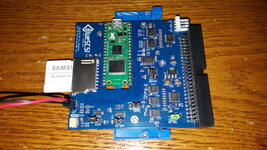 Using the RetroSCSI 6.0.8 and 7.0.1 images, they work without modifying a single thing for me, didn't need to change the file names either, copied those .HDA images to my SD card (Samsung Pro Endurance 64Gb), and they worked without issue. 6.0.8 and 7.0.1 images for testing: 
File folder on MEGA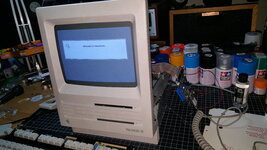 Worth a try to see if these exact settings and images will work for you, as mine does. | |
Posted by: lostkerbal on 2024-09-30 09:31:49I have a working BlueSCSI v2 desktop board here, but I don't use the berg floppy power connector.I have a DB25 BlueSCSI V2, the jumpers are stock/unmodified, and I am powering the BlueSCSI with a 5V Micro-USB power source. I've tried all of the 6.0.8 images I can, including that exact RetroSCSI image; I can't try it with System 7 as the stock Plus can't boot system 7 (not enough RAM). It's not an image problem, it's a hardware problem. See my newer thread: https://68kmla.org/bb/index.php?threads/at-wits-end-with-a-plus-odd-behavior-after-recap.48486/ | |
| 1 |