68kMLA Classic Interface
This is a version of the 68kMLA forums for viewing on your favorite old mac. Visitors on modern platforms may prefer the main site.
| Click here to select a new forum. | |
| SE/30 no sound | |
| Posted by: mst3k on 2024-09-09 12:11:23 Picked up an SE/30 with some power supply issues but a nice logic board. Replaced the analog board and CRT with a donor set from an SE. The Frankenstein SE/30 booted. Worked fine, but no sound. Recapped the logic board and put everything back together. Floppy, HDD, external SCSI all work great. CRT is perfect. Voltages are all correct. Everything is dandy, except... no sound. No snap. No crackle. No pop. Checked the speaker connections. No go. Tried a new speaker. No go. Re-checked all the new caps. No issues. Using the attached sound chip guide I checked continuity on every connection. All good. What am I missing? Thanks for the help. 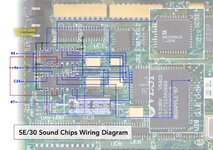 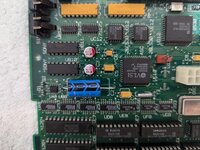 | |
| Posted by: falen5 on 2024-09-09 12:37:42 try plugging headphones into it - there is a mechanical switch in that jack that turns off the speaker when you plug in headphones ..... least i think there is - it could be stuck | |
| Posted by: falen5 on 2024-09-09 12:42:26 I can see green on the pins of UE10 from that picture - you might want to give the board a very good clean and make sure that green has not eaten away your pins | |
Posted by: mst3k on 2024-09-09 13:04:16try plugging headphones into it - there is a mechanical switch in that jack that turns off the speaker when you plug in headphones ..... least i think there is - it could be stuckThanks for the tip. Headphones work! But still no sound when they are removed. How do I unstick switch? | |
| Posted by: falen5 on 2024-09-09 13:13:09 it happened to me before - you can open up the headphone socket by prying back a few 90 degree tabs ( if i remember correctly) inside there is a tiny metal strip , spring loaded in some way ( trying to remember from many years ago) - this strip moves up and down when you insert and remove the headphones - the metal strip is the actual switch - mine was just stuck with old grease - cleaned it out and it worked that little metal strip has to move back down fully into place when you remove the headphone jack to turn back on the speaker go for it - open it up carefully and be ready for that little strip to take off !!! once you have it open its pretty self explanatory from there | |
Posted by: mst3k on 2024-09-09 17:19:55it happened to me before - you can open up the headphone socket by prying back a few 90 degree tabs ( if i remember correctly) I wonder if I can assume since the sound is working thru the headphone, then the problem is either with the headphone jack, the speaker or the speaker connection? I guess what I'm asking is because the sound works thru the headphone, then the board is working (sound chips, traces, etc). | |
| Posted by: finkmac on 2024-09-09 17:26:50 it could be any of those, yes. in my experience more likely to be the headphone switch. | |
| Posted by: falen5 on 2024-09-09 17:47:29 well if you have sound on headphones then its either the jack , the speaker , the wiring of what ever chip is the audio amp test the speaker | |
| Posted by: mari3311 on 2024-09-09 23:14:12 Just to be on the safe side, please check the path to make sure that +12V and -12V are being properly supplied from the J12 connector to Q1 and Q2 respectively. A long time ago, the contact on pin 7 (-12V) of J12 of a friend's SE/30 was rotten inside, and although he could hear through headphones, no sound came out of the speakers. | |
| Posted by: mst3k on 2024-09-10 09:24:25 OK. Hooked up some powered speakers to the headphone jack. Problem solved. 🙂 Well, that worked, but it was not a satisfying fix... I checked the headphone jack with a flashlight and magnifier and it looked OK. Also, bending that tin to get to the jack made me nervous so decided to revisit the speaker. I had previously tried the sound with two different internal speakers from other Macs but not with anything from a compact Mac. So, I pulled the speaker from my donor SE and tried it on the board just to see if it made a difference. Et Voila! Sound. Beautiful sound. Not sure why the other speakers didn't work though. Underpowered? Anyway, thanks to all for the help! PS. To falen5, I did go back in and cleaned that corrosion from the pins on UE10. Thanks for the good spot. | |
| Posted by: zigzagjoe on 2024-09-10 10:19:43 Try measuring impedance of the speaker - it could just be a bad speaker. Should be <100 ohms. I've also had internal corrosion on the connector causing the same issue of no sound. | |
| Posted by: bibilit on 2024-09-10 11:52:27 Hi, can you have a look at a trace that looks dubious ? Just above a capacitor. | |
| Posted by: falen5 on 2024-09-10 15:04:57 blown speaker - easy fix - happy days mac no good with no beep me thinks | |
| 1 |