68kMLA Classic Interface
This is a version of the 68kMLA forums for viewing on your favorite old mac. Visitors on modern platforms may prefer the main site.
| Click here to select a new forum. | |
| Help booting with ZuluSCSI Pico Slim on Mac Plus | |
| Posted by: Shyzah on 2024-09-07 23:46:39 Hey, noob here. I was trying to boot my Mac Plus with the new ZuluSCSI Pico Slim. Looking at the instructions, it seems as if I'm doing everything right. SD card is 32gb, named SDHC, formatted to Fat32. I have one file on it called HD1.hda of OS 6.0.5 (I've tried several naming methods as well as different .hda files sourced from infinitemac, etc). Using USB power, I get a green light that constantly flashes on the ZuluSCSI and a question mark on the Mac Pro. Unfortunately haven't been able to boot 🙁 I'm either doing something wrong or my hda file is bad? Help appreciated Log from the ZuluSCSI 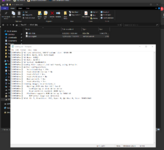 | |
| Posted by: finkmac on 2024-09-07 23:54:38 create a blank text filed called "zuluscsi.ini" on the SD card. stick this text in that file and save: [SCSI] System=MacPlus EnableSCSI2=0 EnableSelLatch=1 SelectionDelay=0 see if that works | |
Posted by: Shyzah on 2024-09-08 00:05:02create a blank text filed called "zuluscsi.ini" on the SD card.Worked like a charm, thanks 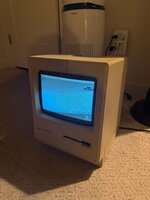 | |
Posted by: rabbitholecomputing on 2024-09-18 19:29:52create a blank text filed called "zuluscsi.ini" on the SD card.@Shyzah FWIW, all you need to do is set System=MacPlus. All of the other parameters are set by the first key/value pair, and are therefore not necessary. 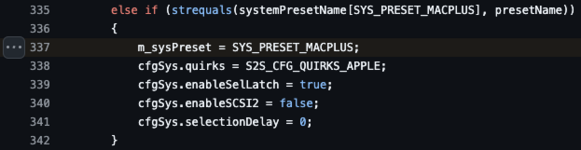 | |
| 1 |