68kMLA Classic Interface
This is a version of the 68kMLA forums for viewing on your favorite old mac. Visitors on modern platforms may prefer the main site.
| Click here to select a new forum. | |
| Macintosh Classic Partial Screen Collapse? | |
| Posted by: jmb2011 on 2024-08-14 18:40:22 Hello, A while back I partially recapped the analog board of my Macintosh Classic. I got the typical suspects replaced. I remember it working fine, but when I turned it on today, the screen is smaller at the top and bigger at the bottom. If you wait for the computer to warm up, it eventually fills out 95% of the way, with the top still not looking perfect. Any ideas of what could be the issue? Is it still a capacitor issue? Any help would be appreciated!  | |
| Posted by: robin-fo on 2024-08-14 22:52:06 I‘d assume either bad solder joints or remaining capacitor juice | |
Posted by: jmb2011 on 2024-08-15 10:22:35I‘d assume either bad solder joints or remaining capacitor juiceI’ve reflowed the main solder joints where the analog board connects to the crt yoke and the logic board. I did clean up residue with a qtip and isopropyl alcohol when recapping. Should I have been more aggressive with cleaning it? | |
| Posted by: jmb2011 on 2024-08-20 19:55:26 Just wanted to update this thread in case anybody else comes across this issue. I bought a recap kit and went ahead and replaced all the capacitors on the analog board (I had only done a partial recap previously). There was some of the capacitors that I did not replace the first go around that did have some electrolytic gunk underneath the caps. After cleaning the board thoroughly and replacing with all new capacitors, I finally got the issue resolved. 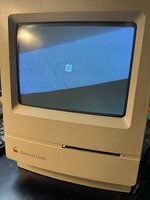 | |
| Posted by: Byrd on 2024-08-21 01:57:16 Looking good! I've a similar Mac Classic II and need to get back into it for another deep clean the cap goo was like honey. | |
| Posted by: cheesestraws on 2024-08-21 04:33:54 Good stuff! The Classic and Classic II ABs were built extremely on the cheap, and it shows. | |
| 1 |