68kMLA Classic Interface
This is a version of the 68kMLA forums for viewing on your favorite old mac. Visitors on modern platforms may prefer the main site.
| Click here to select a new forum. | |
| Radeon 9250 Flashing Question | |
| Posted by: chikorita157 on 2024-07-31 16:12:12 I finally managed to move the resistors (or rather, replace them since I lost the two when I tried to remove them and move them), and it seems to work in Mac OS X with a reduced ROM. However, it only shows a blue screen when booted with Mac OS 9. The question is, do you need a full size ROM flashed to make it work under Mac OS 9. Also, can you flash a blank ROM chip directly with Graphicellerator or do you need a ROM flasher tool, The card I'm using is a Sapphire Radeon 9250 256 MB PCI, which recognizes itself as a 128 MB one. | |
Posted by: Byrd on 2024-07-31 18:22:439250 Trick - The Mac Elite themacelite.wikidot.com
This site says you might need some edited drivers for OS 9, and the ROM download page refers to some issues with OldWorld G3 or need for a different ROM. The provided ROMs for these cards are usually best flashed over on a PC if you can using ATIFlash, assuming it is identified with the resistor mods still. More links ATI Radeon 9250 in mac with pci slotsI have a Radeon 9250 laying around will it work in a Mac with pci slots? JT
 forum.vcfed.org
Power Macintosh Graphite G4 – ATI Radeon 9250 « modelrail.otenkoflashing + mods for various cards for os9 (9250, 9000, 7000)flashing + mods for various cards for os9 (9250, 9000, 7000)
macos9lives.com
| |
| Posted by: chikorita157 on 2024-07-31 19:09:41 I soldered the resistors correctly and used the Tome ROM. I installed the 9250 drivers, but it was in a regular PCI slot rather than the 66 MHz. Maybe I’ll try putting it in the dedicated slot, as the video card works under Mac OS X even with a 3D program. May be just a conflict with the original PCI Radeon GPU. 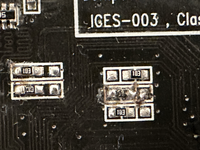 | |
| Posted by: chikorita157 on 2024-08-01 19:59:18 I tried the 66 MHz slot, it only shows a grey screen and won't boot into Mac OS 9. This seems to be only the issue with Mac OS 9, card works in OS X. I think it's the reduced ROM as I have the 9250 mod drivers installed. Can try another one, but I think I'm going to find a bigger ROM chip and solder a new one. The question is, if I replace the ROM chip, can I flash it on a computer, or I need a programmer? | |
| Posted by: Byrd on 2024-08-01 20:27:35 Both, but best using DOS ATI flashing tool. Good it works in OS X, how is the performance? | |
Posted by: chikorita157 on 2024-08-01 20:45:53Both, but best using DOS ATI flashing tool. Good it works in OS X, how is the performance?I’ll go grab a 128k ROM. I have to go and dig out the floppy drive and flash it on the Pentium III PC. Desoldering the old ROM shouldn’t be that bad since I have the Hakko hot tweezers. | |
Posted by: V.Yakob on 2024-09-08 00:25:05I’ll go grab a 128k ROM. I have to go and dig out the floppy drive and flash it on the Pentium III PC. Desoldering the old ROM shouldn’t be that bad since I have the Hakko hot tweezers.Did you manage to flash it so that it was displayed in 256 mb? What firmware did you use? | |
| Posted by: DarthNvader on 2024-09-09 06:12:52 Are I finally managed to move the resistors (or rather, replace them since I lost the two when I tried to remove them and move them), and it seems to work in Mac OS X with a reduced ROM. However, it only shows a blue screen when booted with Mac OS 9.Are you sure you have the correct ATI ROMXtender extension installed in Mac OS 9? The reduced ROM was reduced by removing the 'NDRV' or Native Device Driver, both OS 9 and OS X will need a disk base 'NDRV' for the card to function in the Mac OS, this is what the ATI ROMXtender is, it's a disk based 'NDRV'. | |
| 1 |