68kMLA Classic Interface
This is a version of the 68kMLA forums for viewing on your favorite old mac. Visitors on modern platforms may prefer the main site.
| Click here to select a new forum. | |
| Newly-acquired Mac Plus displays shifting garbage when powered on | |
| Posted by: Huxley on 2024-07-29 09:37:43 Hi all! An acquaintance of my wife reached out this weekend to say that they were at a yard sale and had spotted "an old Mac for $20 - do you want it?" Obviously we said YES, and it turned out to be a lovely Mac Plus, complete with keyboard, mouse, and an ImageWriter II. Not bad! The Mac itself is in good condition overall, with no obvious signs of physical or water damage, and the old battery had miraculously not leaked. Unfortunately, when I powered it on, the display just rotates through a variety of garbage patterns, and there's never a chime: It's safe to assume that this machine is due for a fresh set of capacitors, but I don't want to assume that bad caps are also the cause of this odd visual behavior. Any suggestions on where I should start? I haven't opened the machine up to take a look inside yet, so I'll definitely be giving it a careful inspection, including making sure that the RAM SIM's are seated properly. I should also note that the mouse cable is cut in half. The internal wires appear to be color-coded, so I'm optimistic that I can rejoin them and use the mouse, but if not: anyone know of a good option for a replacement mouse cable? Thanks for any suggestions on troubleshooting this beautiful Mac Plus! Huxley | |
| Posted by: finkmac on 2024-07-29 10:04:38 more likely to be bad logic. check the RAM. | |
| Posted by: Byrd on 2024-07-29 11:18:02 + dry solder joints on the analogue board. Hopefully will be a quick fix, once RAM is reseated/replaced and you find a fairly obvious bad join or three on the board. | |
| Posted by: dochilli on 2024-07-30 01:27:25 Reseating/Cleaning of RAM and ROM could help. Did you measure the voltages at the floppy port? | |
| Posted by: Huxley on 2024-07-30 09:55:10 Great suggestions and info, guys - much appreciated! I cracked the machine open yesterday and gave it a quick blow-out with my handheld air compressor - a fair bit of dust and hairballs flew away. Now that it's opened up, I'll spend some time this evening visually inspecting everything for solder cracks and re-seating the RAM (and/or removing the RAM and testing with one stick at a time). I will say that I'm happy that there's no obvious signs of water damage, the clock battery never leaked, and I didn't see any big/glaring indications of burst capacitors in there... Fingers crossed that I can get it going again! Huxley | |
| Posted by: dochilli on 2024-07-30 14:47:36 Could be also a ROM problem. Sometime Plus ROMs are defect. Then you need some new burned eproms. 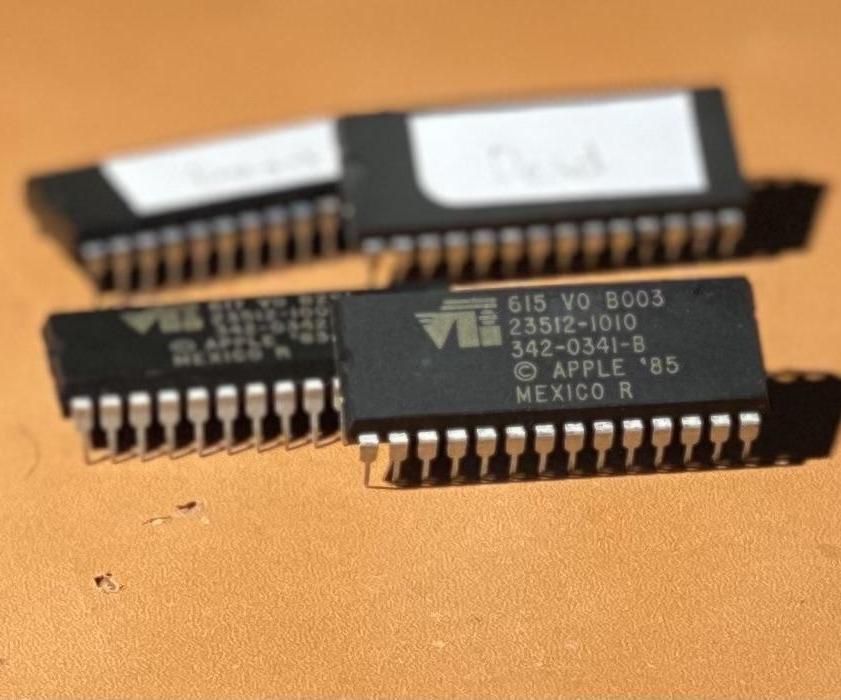
Create Macintosh Plus ROMsCreate Macintosh Plus ROMs: This Instructable will guide you through the process of "ripping" EPROM images from from your Macintosh Plus ROM chips and (or) "burning" the images to new chips. The process will basically be performed twice to create both "hi" and "lo" ROM chips f…
 www.instructables.com
| |
Posted by: Huxley on 2024-07-30 15:54:53Could be also a ROM problem. Sometime Plus ROMs are defect. Then you need some new burned eproms.That's an excellent point, thank you! I took the motherboard out and gave it a nice cleaning today, and also re-seated the RAM sticks after wiping their contacts with 99% alcohol. I've also done a visual inspection of the motherboard and analog board, and I'm not seeing any obvious issues - no leaking caps, no obvious cracked solder joints, etc. Unfortunately the behavior is still the same - just the repeated cycles of garbage patterns on the display. Bad ROM chips certainly seem like a viable direction to investigate! Huxley | |
| Posted by: dochilli on 2024-07-31 01:20:55 What are the voltages? 5V must be 4,85 V or higher for booting the plus. | |
Posted by: Huxley on 2024-07-31 08:45:58What are the voltages? 5V must be 4,85 V or higher for booting the plus.Just did a quick check and it reads at 5.18 volts on pin 6 of the floppy port - maybe slightly high, but within spec? I did also notice that the display turns on/off if the analog board is moved even a tiny amount, so I'm definitely going to re-flow the solder joins on the main cable connectors. Looks like I can get a set of replacement HI / LO ROM chips on eBay for ~$24, which I'm tempted to try next, unless you guys have a better suggestion in the meantime... Huxley | |
| Posted by: dochilli on 2024-08-01 05:52:48 5,18 V is a little bit too high. Should be 4.85 to 5,15 V. The plus has some problems with broken solderjoints on the analog board, but I think, that the problem here is the ROM or the RAM. Perhaps someone else here in the forum has a set of ROMs for you. I could send you some, but I am from germany... | |
Posted by: Huxley on 2024-08-01 08:05:205,18 V is a little bit too high. Should be 4.85 to 5,15 V.Yeah makes sense. I went ahead and ordered a new set of ROM's - looking forward to swapping them in and seeing if the behavior changes. If not, I'll try swapping the RAM next... Huxley | |
| Posted by: Huxley on 2024-08-05 18:22:52 Okay, I've got a good news / bad news update: Good news: I've carefully reflowed the major solder points on the analog board, which seems to have fixed the issue of the display going black randomly (and/or whenever the machine was moved even slightly) Bad news: I received my fresh set of eBay ROM's today and just finished installing them, and..... the behavior is the same, with shifting garbage patterns onscreen whenever I attempt to boot the machine. Bearing in mind that I'm just an enthusiastic amateur and I don't have any advanced diagnostic skills, I guess my next step should be to replace the RAM? Huxley | |
| Posted by: nathall on 2024-08-05 19:38:20 Sounds like RAM to me, honestly. | |
| Posted by: LaPorta on 2024-08-05 19:51:23 If all else fails, take the approved Apple route: replace the logic board. They are probably as common of a computer part that you can find I'd think. | |
Posted by: finkmac on 2024-08-06 05:03:33If all else fails, take the approved Apple route: replace the logic board. They are probably as common of a computer part that you can find I'd think.kind of like fishing with a grenade i think | |
| Posted by: LaPorta on 2024-08-06 07:11:01 Only if all else fails. | |
| Posted by: Huxley on 2024-08-14 10:18:02 Hi again everyone, Thanks to @rickrob ’s generosity I was able to install 4 megs of “known good” RAM last night, along with the replacement ROM chips I sourced from eBay. Unfortunately the behavior is still the same: no chime, and shifting patterns of garbage / digital noise onscreen. I’ve also received a set of replacement capacitors from Console5 and I’m willing to install those, but I haven’t really seen much evidence that this behavior is likely to be a result of bad capacitors. Any other suggestions (other than just replacing the motherboard)? Thanks in advance for any tips! Huxley | |
| Posted by: LaPorta on 2024-08-14 10:50:09 Is there any possibility of continuity issues between the RAM/ROM sockets and their traces? | |
| Posted by: Byrd on 2024-08-15 02:05:50 Have you cleaned all the sockets, ROM with electronic solvent cleaner? | |
Posted by: Huxley on 2024-08-15 08:01:44Is there any possibility of continuity issues between the RAM/ROM sockets and their traces?I can't guarantee anything of course, but at least visually the board looks great. Your point is valid though, I'll take a much closer look at those traces and see if anything looks amiss. Have you cleaned all the sockets, ROM with electronic solvent cleaner?I actually haven't, that's a good idea. The board and internals are so clean and new-looking, I didn't consider the possibility of corrosion on the RAM and ROM sockets. I'll give that a try! Huxley | |
| 1 |