68kMLA Classic Interface
This is a version of the 68kMLA forums for viewing on your favorite old mac. Visitors on modern platforms may prefer the main site.
| Click here to select a new forum. | |
| SCSI Yamaha CDR400t-NB CD-R drive, Mac OS 8.1 compatible? | |
| Posted by: Snial on 2024-07-15 10:31:51 Hi folks, I found a SCSI Yamaha CDR400t-NB CD-R drive at my Dad's house, so I thought I'd 'rescue' it ;-) ! It was loose inside the SCSI enclosure so I spent a bit of time drilling some holes in the bottom so I could fix it in place. When I hooked it up to my PowerBook 1400c/166 under Mac OS 8.1 (with the Apple CD-ROM extension) it doesn't seem to recognise any CD inside even though Drive Setup sees it as a SCSI CD-ROM. 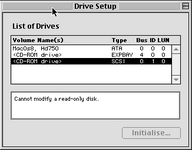 The expansion bay CD-ROM worked. I guess the SCSI cable & termination is basically OK, because otherwise it wouldn't have identified the drive. Do those drives need a special driver? Of course, the drive itself might not be working properly, I didn't hear the CD spin-up. I'm not holding out much hope that the PB1400 is fast enough to write to a CD-R, though that would be an amazing bonus if I got it to work and it did! Any ideas? | |
| Posted by: LaPorta on 2024-07-15 11:18:31 First question: are we sure th f drive actually can read discs? A hardware failure is very possible if the drive itself indeed shows up in drive setup. I’d also check Apple System Profiler and see what it says about the drive. | |
Posted by: Snial on 2024-07-15 12:52:22First question: are we sure th f drive actually can read discs?I don't know. I don't even know why I have a 4x SCSI CD-R drive. It doesn't come from my HP 715 PA-RISC workstation; and although I had a 90's or early 00's PC desktop given to me in the late 00's, I think it had IDE only. A hardware failure is very possible if the drive itself indeed shows up in drive setup.Agreed. I've never seen it working anyway, so it's a very real possibility. I’d also check Apple System Profiler and see what it says about the drive.I wonder if somehow, even if a disc doesn't mount, it'll play a music CD via the Apple CD player. It doesn't need to read much data then, just know it's an audio CD and play audio out the headphone socket. I haven't tried any of these things yet, so I'll try and do that next. | |
| Posted by: Arbee on 2024-07-15 13:17:01 A lot of versions of the CD-ROM extension would ignore CD-ROM drives that didn't return an APPLE COMPUTER INC ID string, similar to what unpatched HD SC Setup does with hard drives. I ran into that in MAME until I added the ID. Also, the Apple CD drives used proprietary audio playback commands because they pre-dated the SCSI MMC standard that made the now-standard commands exist. So audio playback is potentially the least likely thing to work. | |
| Posted by: Forrest on 2024-07-15 13:59:43 I’d bet the drive will work if you install CDRom Toolkit compatible with MacOS 8.1 | |
| Posted by: Arbee on 2024-07-15 14:01:56 Right, a third party extension should do the trick if the drive itself is OK. | |
Posted by: Snial on 2024-07-15 14:18:37A lot of versions of the CD-ROM extension would ignore CD-ROM drives that didn't return an APPLE COMPUTER INC ID string, similar to what unpatched HD SC Setup does with hard drives. I ran into that in MAME until I added the ID. Also, the Apple CD drives used proprietary audio playback commands because they pre-dated the SCSI MMC standard that made the now-standard commands exist. So audio playback is potentially the least likely thing to work.So, you're saying that I need to add the ID... as a string in a resource in the CD-ROM extension? I suppose the Apple System Profiler has provided the string? 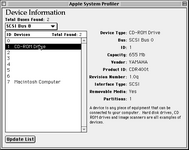 OK, so I can't just see a string, but I have Vendor, Product ID. And yep, the CD audio player didn't like it: 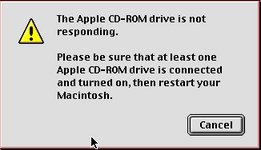 I’d bet the drive will work if you install CDRom Toolkit compatible with MacOS 8.1OK, I'll have search... Macintosh Garden? Right, a third party extension should do the trick if the drive itself is OK.OK, I'll try these things. | |
| Posted by: LaPorta on 2024-07-15 14:19:50 I mean you can try FBW CD Toolkit and all that. I honestly have had the best luck with late-release Apple CD/DVD driver extension. I have two non-Apple CD and DVD drives in my PT Pro and it drives them just fine. | |
| Posted by: pizzigri on 2024-07-15 15:05:26 If it’s the silver grey external Yamaha drive it’s a bitch to make it work… i gave up years and years ago. it had proprietary drivers and I believe was primarily made for pc. Also it was used in the music industry so who knows…. I remember ditching it for one of the Plextors | |
Posted by: Forrest on 2024-07-15 15:36:37Looks like FWB CD-ROM ToolKit 4.0 is what you need. | |
Posted by: Snial on 2024-07-16 12:58:23Thanks for the advice, however, FWB CD-ROM Toolkit 4.0 doesn't seem to work. The Mac boots up OK with the extension on, but the application crashes with a type 3 error. I increased the application memory size to 2MB from 500K, but it still crashed immediately with a Type 3. | |
| Posted by: LaPorta on 2024-07-16 13:49:44 My go-to in this case is to try and use the Apple CD/DVD Driver extension that comes with 9.1 or something. That might work. FWB always gives me crazy errors when I have tried it, too. | |
| Posted by: saybur on 2024-07-16 14:18:08 Lacie made external SCSI burners with Yamaha drives; those shipped with Adaptec Toast, might be worth trying out the Toast extension as well and see if that works. | |
Posted by: pizzigri on 2024-07-16 15:19:50Lacie made external SCSI burners with Yamaha drives; those shipped with Adaptec Toast, might be worth trying out the Toast extension as well and see if that works.That’s actually excellent advice - I second that. I remember having the extensions in the “must have” disc with the rest of the tools | |
| Posted by: LaPorta on 2024-07-16 15:31:34 Good call on toast…might work. | |
Posted by: Snial on 2024-07-16 15:37:01My go-to in this case is to try and use the Apple CD/DVD Driver extension that comes with 9.1 or something. That might work. FWB always gives me crazy errors when I have tried it, too.OK, and that'll work on Mac OS 8.1? Lacie made external SCSI burners with Yamaha drives; those shipped with Adaptec Toast, might be worth trying out the Toast extension as well and see if that works.OK, I'll try that if I can find it on Macintosh Garden. Thanks for the help, so far! | |
Posted by: LaPorta on 2024-07-16 16:47:00OK, and that'll work on Mac OS 8.1?Yes it should still work fine. | |
| Posted by: Snial on 2024-07-17 02:31:13 OK, next update. I tried the CD DVD extension from the Mac OS 9.1 updater. As normal, it was a bit of a trial getting there! I had the Mac OS 9.1 updater on CD, which I can read from the PB1400's internal CD drive. There's a system Tome, which I couldn't read. So, I found Tome Viewer on Macintosh Garden. I'm doing all my proper transfers using a compact flash card between this Mac mini 2012 and the PB1400's PCMCIA drive, so there's extra copying stages! It's in a later .sit format. I could unpack it using my UnstuffIt, but I couldn't open the .img file it unpacked to. So, then I booted up the PowerMac 9500 on Infinite Mac with Mac OS 8.6. Disk Copy 6.3 was on that, so I was able to mount that .img; then I compressed the application using Compact Pro (the best thing ever) and then BinHex'd it for good measure; copied it to the Compact flash card and uncompressed it onto the PB1400. Now I could read the Tome. I found the CD/DVD extension; unarchived that and then popped it into my System Folder. The extension worked - I could still read CDs on the internal CD drive. However, the external Yamaha CD-R drive still didn't work. Next attempt, trying Toast. If that doesn't work, I'm toast ;-) ! | |
| Posted by: LaPorta on 2024-07-17 02:43:53 Sorry for the hassle there. At least you ruled something out! | |
| 1 |