68kMLA Classic Interface
This is a version of the 68kMLA forums for viewing on your favorite old mac. Visitors on modern platforms may prefer the main site.
| Click here to select a new forum. | |
| Broken rheostat on Mac SE | |
| Posted by: Ttpilot on 2024-07-06 12:52:51 The display on my SE sits at the right edge of the screen. I was going to shift it left and discovered the little adjusting screw in the rheostat is missing. Is there a way to fix that short of replacing it? The display is completely usable as is, but it looks off center | |
| Posted by: codevonlux on 2024-07-06 19:27:01 Shifting image on the CRT for SE is done by adjusting/rotating the metal tab on the neck of the tube. Width adjusting is by core of an inductor coil. None of them is a rheostat. | |
| Posted by: Ttpilot on 2024-07-06 21:54:29 So it is. Thanks. In any case the little adjustment screw is gone on the [checks notes] width inductor coil | |
| Posted by: codevonlux on 2024-07-06 21:57:14 Any photo? Hard to imagine which part you are referring to (little adjustment screw) thanks. | |
Posted by: Ttpilot on 2024-07-06 22:23:24Any photo? Hard to imagine which part you are referring to (little adjustment screw) thanks.This one 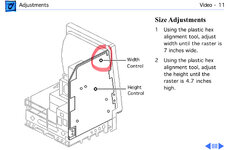 | |
Posted by: codevonlux on 2024-07-06 22:34:52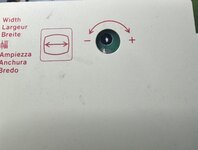 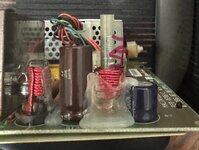 As you can see in the photo. There is no “screw” in the coil. You can just use a hex tool (you must not use metal tool when powered on otherwise the tool will get hot and burn your hand). I normally use a trimmed q-tip for this adjustment. You will notice the black part I marked in the photo to extent in and out the red wire coil. Hope this helps | |
| Posted by: codevonlux on 2024-07-06 22:38:20 If the black part is missing in your case, maybe someone in this forum can spare one whole part? | |
| Posted by: mmmlinux on 2024-07-09 08:33:41 You also dont want to use a metal tool because it will affect the inductor you are trying to tune. | |
Posted by: Ttpilot on 2024-07-09 08:56:20You also dont want to use a metal tool because it will affect the inductor you are trying to tune.I have a non metal tool. Unfortunately, there is no screw/thingie to adjust on that particular control | |
| Posted by: makerorama on 2026-07-09 13:10:55 Hi. Did this ever get resolved? I seem to be facing the same problem. I have just recapped my SE/30 and the picture is a bit too wide. I went for the width adjustment, but it seems its just an empty hole. I would expect to see a screw or something in there for me to turn with a plastic tool and adjust the width. 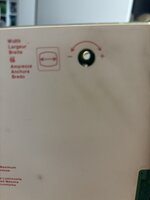 | |
Posted by: powellb on 2026-07-09 16:02:17Hi. Did this ever get resolved? I seem to be facing the same problem. I have just recapped my SE/30 and the picture is a bit too wide. I went for the width adjustment, but it seems its just an empty hole. I would expect to see a screw or something in there for me to turn with a plastic tool and adjust the width.It is hard to see with your eye (your picture is likely masked in that black area), but on the side facing the analog board is a hex shaped opening a little bigger than the hole you are seeing light through. You need to use your hex driver (if metallic, adjust while off, test, repeat). I have a problem that I am not sure what to do about: my horizontal width inductor is there, I can adjust it, but it makes no difference. The horizontal width on my SE/30 is blown out (it is missing the left and right regions of the screen). No matter the amount of adjustment changes it... EDIT: Reading more, DO NOT use the metal hex driver as I said above (even when off). The ferrite is extremely brittle and you can break it. This is a nice article that shows how to use a plastic straw and plastic hex to adjust it: Adjusting Width Coils | |
Posted by: makerorama on 2026-07-18 23:51:23It is hard to see with your eye (your picture is likely masked in that black area), but on the side facing the analog board is a hex shaped opening a little bigger than the hole you are seeing light through. You need to use your hex driver (if metallic, adjust while off, test, repeat).Thanks for the link. I now believe that in my case, the adjustment knob "core" actually fell apart while taking the computer apart. I found this small black threaded rod on the floor near where I disassembled the machine. I wasn't sure where it came from and thought it was for the chassi, but I now believe it goes into the width adjustment knob in between the coils. I haven't taken the time to disassemble the machine again. I am waiting for a BlueSCSI adapter to arrive. As soon as it does, I will open up the SE and take a look. | |
| 1 |