68kMLA Classic Interface
This is a version of the 68kMLA forums for viewing on your favorite old mac. Visitors on modern platforms may prefer the main site.
| Click here to select a new forum. | |
| Dark Castle 1.1 on a Mac Plus won't run , memory problem | |
| Posted by: reallyrandy on 2024-06-09 14:08:27 I'm running 6.0.8 with 4MB RAM. It says there is a problem with allocation because there is 10366 high bytes used. What does that even mean? I'm running a pretty sparse system folder. I swear I played this game on this very Mac when it was new 37 years ago. Yep, it's the same Mac Plus I bought in 1987. 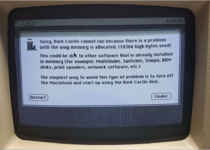 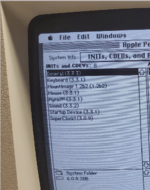 | |
| Posted by: LaPorta on 2024-06-09 14:27:06 Ok, so, a few things here: First, I see you aren't running MultiFinder - Check. Second, the real issue is that DC is not made to work normally on an HD with a System like 6.0.8 - it was made to be started from a floppy with the custom system file that Silicon Beach made for it. If you want to try that, I have said system file. Third, if you do want to try and get this working, try starting without any CDEVs at all and then give it a go. | |
Posted by: nathall on 2024-06-10 14:45:12I swear I played this game on this very Mac when it was new 37 years ago. Yep, it's the same Mac Plus I bought in 1987. cheers, I’ve still got mine from ‘88 | |
| Posted by: reallyrandy on 2024-06-10 18:18:26 Funny thing is, it works fine on my SE/30 running standard 6.0.8 with several CDEVs running. The Plus has the max 4MB but the SE/30 has 16MB. I'm sure that's the difference. | |
| Posted by: s_pupp on 2024-06-10 19:19:32 In the mid 1980’s, I played Dark Castle on my Mac Plus with 1MB memory. I’m pretty sure I was using System 3.2/Finder 5.3. OS 6.0.8 was a bit tough for a workable floppy-only workflow in the absence of an external floppy or hard drive. | |
| Posted by: mikes-macs on 2024-06-10 19:49:42 System 6.0.8 + AppleShare + Games = Issue | |
Posted by: reallyrandy on 2024-06-14 18:18:39System 6.0.8 + AppleShare + Games = IssueAh, OK I'll try that. I think I can add more than 4MB if I do it via RAM disk as well. Since I'm using a SillyTinySCSI it should be fast enough. | |
| Posted by: LaPorta on 2024-06-14 18:21:21 Dark Castle will run on a 512k even with the right system. You should be fine by disabling everything. | |
| Posted by: Tempest on 2025-05-22 13:06:25 I'm having the exact same issue on my SE. I don't have AppleShare or MultiFinder enabled or installed and I'm only running a few extensions like a CD Driver and StuffIt Expander with the Magic Menu. However I can't get Dark Castle to work even if I turn all of these off and hold down shift while booting. What else could be causing this error? | |
| Posted by: adespoton on 2025-05-22 13:32:55 Dark Castle comes on its own boot disk with a custom startup screen. As @s_pupp said, I'm pretty sure it used System 3.2. The solution is generally to boot from the original boot floppy; that's always worked perfectly for me. As soon as I start using System 6 or later, I run into problems. Beyond Dark Castle, however, has no issues running off the HDD. I've run that on everything from System 6.0.7 through Mac OS 9.2.2. SBS did some pretty nifty stuff to make the audio work on Dark Castle, and it's tied pretty tightly to the System 3.2 toolbox. So it's really easy to break the audio initialization routine during launch if you're using a later OS that changes memory addresses etc. Essentially, what you're wanting to do here is ensure that the memory addresses for audio stay where they're expected to be. Any INIT could influence this, especially if you're running System 6 or later. | |
| Posted by: LaPorta on 2025-05-22 13:43:32 If anyone needs the specific system for DC/BDC, I have it. Generally, the best way to play these games is by floppy with those systems. | |
| Posted by: Tempest on 2025-05-22 14:57:14 I have the exact same problem with Beyond Dark Castle. Same error and everything | |
| 1 |