68kMLA Classic Interface
This is a version of the 68kMLA forums for viewing on your favorite old mac. Visitors on modern platforms may prefer the main site.
| Click here to select a new forum. | |
| How to revert back to original view in the Extras folder? | |
| Posted by: SpeakCuba on 2024-06-04 13:25:46 I am new to the Newton, so I am a bit stuck here. I was messing around with the Extras folder, and I accidentally got stuck. Usually, when you click on it, it shows you the icons of installed packages. I accidentally did something, and now I cannot view those icons anymore; everything is just text, and in a list. How do I revert back to the icon view? Thanks in advance. This is what I have right now, a list, not icons, of all my installed packages: 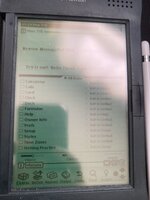 And this is what I would like to go back to: (Image taken from Google)  | |
| Posted by: beachycove on 2024-06-04 18:11:35 Looks like you hit the overview button, the big dot at bottom right. | |
Posted by: SpeakCuba on 2024-06-05 12:12:17Looks like you hit the overview button, the big dot at bottom right.Thank you, that worked. Cheers! | |
| 1 |