68kMLA Classic Interface
This is a version of the 68kMLA forums for viewing on your favorite old mac. Visitors on modern platforms may prefer the main site.
| Click here to select a new forum. | |
| Help with getting Mac-a-Mug Pro working on Mini vMac? | |
| Posted by: smallpanther51 on 2024-06-03 17:46:58 Does anyone have experience running Mac-a-Mug Pro on the Mini vMac emulator? I really want to try out this old piece of software but this is my first time doing anything with vintage Mac. I have managed to get an instance of System 6 running on Mini vMac and have also installed and ran BBEdit Lite, StuffIt Expander, and Font/DA Mover without issue. The only place I could find a copy of Mac-a-Mug Pro was on Macintosh Repository. It's a Stuffit archive from 2014 that I imported to the emulator using ImportFl and expanded using the StuffIt Expander. There's a readme in the expanded directory that says I need to copy some fonts over to the System file and I think I've done that correctly with Font/DA Mover. When I try to launch Mac-a-Mug Pro it opens a window for a moment and then seems to immediately close again. Here is a link to a short video I made where you can see the behavior I'm dealing with. I show off the fonts first and then try to launch the program. I know it's at least halfway possible to get this working because I found this page on Macintosh Repository where they have it running but with a lot of graphical issues (I suspect the fonts weren't copied correctly?). I would appreciate if someone more experienced with this kind of thing could chime in to let me know if I'm doing anything obviously wrong. Thanks. | |
| Posted by: Mu0n on 2024-06-04 06:14:42 What system and finder versions are you using? I recommend not going over System 6. 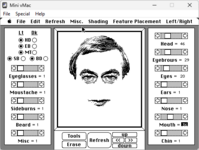 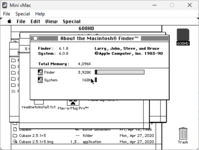 | |
Posted by: smallpanther51 on 2024-06-04 06:26:40What system and finder versions are you using? I seem to be on the same version: 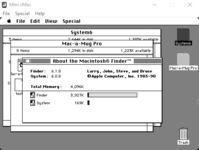 Edit: I'll also add that the Mini vMac version I'm running is the x86-64 for Windows version 36.04 from the standard variations page. | |
Posted by: Mu0n on 2024-06-04 06:41:54I seem to be on the same version: I took mine from Macintosh Garden here: Mac-a-Mug Pro - Macintosh GardenSoftware that generates facial composites out of individual features (184 hairlines, 117 eyebrows, 13 ears, 65 noses, 80 mouths, and 45 chins). You must install the included fonts before using it; they actually contain the program's source art.
I was able to successfuly take that file, unstuff it under System 7 (using Basilisk II) since I found dealing with unstuffing under System 6 is just asking for pain usually, then gone back to mini-vMac and run Mac-A-Mug from there. While it's a bunch of steps, those will be super useful in the long run as you deal with this. Another option is to use InfiniteMac.org https://infinitemac.org/ which is just running both those emulators in the background anyway, and you can deal with external files (just like an always running equivalent of the mini-vMac ImportFI). You can go in System 7, prep your mac-a-mug file, take it out as a .dsk or else, then go back in System 6 to run it. | |
Posted by: smallpanther51 on 2024-06-04 06:54:22I took mine from Macintosh Garden here: That got it working! Seems like the download from Macintosh Repository is just corrupted or broken somehow. I was fortunately able to skip a lot of those steps. I just loaded a blank disk into Mini vMac and imported the archive from Macintosh Garden to the blank. I used StuffIt Expander inside of Mini vMac to expand the archive and was able to just run the program. I didn't even have to import fonts a second time, it's just working now! 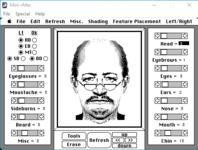 Thanks for your help! | |
| Posted by: Arbee on 2024-06-06 11:00:38 I have a lot of problems with downloads not completing properly on Macintosh Repository. I can resume them repeatedly until it's actually done and it will generally be OK, but Garden works every time. | |
| 1 |