68kMLA Classic Interface
This is a version of the 68kMLA forums for viewing on your favorite old mac. Visitors on modern platforms may prefer the main site.
| Click here to select a new forum. | |
| PowerBook 540c screen issue | |
| Posted by: crazyben on 2024-04-16 20:18:30 I recently acquired a PowerBook 540c. It boots up but the screen is having weird issue. It flickers between dark and bright and it has line all over making text unreadable. I did install 7.6 on it rule out the font issue for text. But nothing changed. Any idea what might be causing this? Do I need to recap it? | |
| Posted by: Shaddam IV on 2024-04-17 00:22:57 you might want o reset the screen cable (from the interconnect board to the screen). If this doesn't help, it might be the interconnect board... or even the motherboard. | |
Posted by: crazyben on 2024-04-17 09:09:10you might want o reset the screen cable (from the interconnect board to the screen). If this doesn't help, it might be the interconnect board... or even the motherboard.Reseting the cable didn't help. Now time to hunt the replacement parts. | |
| Posted by: Shaddam IV on 2024-04-17 09:13:44 I had a very similar issue on a Powerbook 165 (passive matrix screen). I tried resetting the cable and several interconnect boards. In the end the only thing that helped was a new motherboard. Good luck hunting! | |
| Posted by: alectrona6400 on 2024-04-17 09:16:39 those screens suffer from faulty capacitors iirc... might wanna take a look at those | |
| Posted by: Shaddam IV on 2024-04-17 09:18:18 I had understood that the active matrix color screens actually don't have a capacitor issue (only the passive matrix screens do). | |
| Posted by: alectrona6400 on 2024-04-17 09:20:58 ahhhh. didn't know they made active matrix models before the 5300. the cable could be the issue given the line pattern, and the CCFL bulb is probably on its last legs with the flickering (or the inverter is faulty). | |
| Posted by: Shaddam IV on 2024-04-17 09:24:08 the 520s were passive matrix (520: greyscale, 520c: color); the 540s active matrix (540: greyscale, 540c: color). I'm looking to replace the CCFL of an 180 (active matrix), but I'd need to find out the voltage (I think this is a couple hundred V) and power consumption. Haven't done that yet. There are online shops that (still) sell CCFLs for such displays - mostly for medical devices. | |
Posted by: crazyben on 2024-04-17 09:38:21ahhhh. didn't know they made active matrix models before the 5300. the cable could be the issue given the line pattern, and the CCFL bulb is probably on its last legs with the flickering (or the inverter is faulty).what is the best way to replace these? find another non working 540c? | |
| Posted by: alectrona6400 on 2024-04-17 09:40:52 perhaps, yeah. screens for laptops this old can be super hard to find.... so you'd likely have to spring for a donor unit. or you can find the model of your panel and find the replacement panel for it, i suppose. | |
| Posted by: AEChadwick on 2024-04-17 20:07:31 The 540c display can suffer from failed capacitors; i have replaced capacitors on a couple screens, including a new-old-stock that i purchased. It's an inexpensive treatment, certainly worth a try. @3lectr1cPPC maintains the most excellent reference site. if you want to purchase a replacement, search eBay and AliExpress for LQ94D041, that's the 540c’s active matrix LCD part. I've replaced a couple screens, and even devised a LED-backlight replacement method. | |
| Posted by: alectrona6400 on 2024-04-17 20:14:36 speaking of that... would it be possible to swap the screen on a 520 with a color active matrix screen? | |
Posted by: AEChadwick on 2024-04-17 22:25:59speaking of that... would it be possible to swap the screen on a 520 with a color active matrix screen?yes, as long as you have the correct Interconnect-to-Display cable, you can have an Active Matrix PowerBook 520c for the LQ94D041 Display you need the cable that says SHARP COLOR TFT (active matrix), part 821-0026-A / 632-0017-REV.A everything else--inverter board, interconnect board, interconnect-to-inverter cable--is all the same & interchangeable. | |
| Posted by: MacUp72 on 2024-04-17 23:58:15 you might check sockets for bent pins..easy to overlook 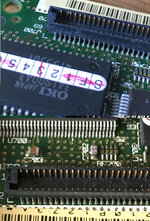 | |
| Posted by: 3lectr1cPPC on 2024-04-18 04:42:49 My first guess would actually be a video issue on the logic board. It could absolutely be the screen though, so try a recap if it’s a Sharp display. If it’s a Toshiba, or if the recap doesn’t help, it’s gonna either be the screen itself or the logic board. You also have two issues there - the flickering, and the missing columns of pixels. The latter looks far more like a cable problem. It’s just hard to know until you start swapping parts. | |
Posted by: 3lectr1cPPC on 2024-04-18 04:43:25ahhhh. didn't know they made active matrix models before the 5300. the cable could be the issue given the line pattern, and the CCFL bulb is probably on its last legs with the flickering (or the inverter is faulty).That sort of color flickering doesn’t look like it has to do with the backlight, I think that’s a video signal issue of some sort. | |
| Posted by: crazyben on 2024-04-18 07:04:05 I will take apart today to see what kind of display I have. Is this the right part for video cable? 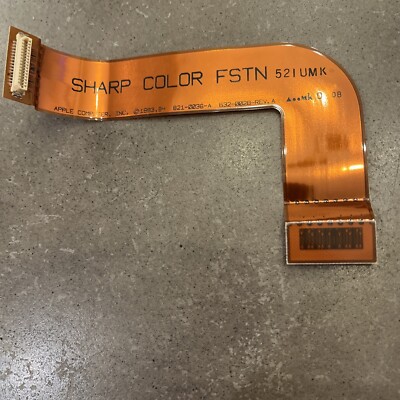
Apple PowerBook 520c/540c Invert Display Cable - 922-1114 - Sharp 821-0036-A New | eBay<p>This is a high-quality invert display cable for Apple PowerBook 520c/540c. The cable has a part number of 922-1114 and is manufactured by Sharp with part number 821-0036-A. It is brand new and suitable for vintage computing enthusiasts looking to restore their Apple PowerBook to its original...
www.ebay.com
| |
| Posted by: alectrona6400 on 2024-04-18 07:11:38 if you have a passive matrix display, yes. if yours is active matrix, no. the easiest way to tell is if your screen has more severe ghosting iirc, passive matrix refreshes slower and has a ghosting effect if you move something on screen (could be anything), active matrix is like what most LCD screens are, they refresh faster and don't have the weird fading thing. | |
| Posted by: crazyben on 2024-04-18 07:18:41 i cant really tell if there is ghosting or not. You saw the condition of my screen lol. | |
| Posted by: 3lectr1cPPC on 2024-04-18 07:25:20 That definitely appeared to be an active matrix screen. If it's a 540c, it almost certainly is. Someone COULD have swapped a 520c panel in, but that's extremely unlikely. The screen in that unit should either be a Sharp LQ94D041, a Toshiba LTM09C017, or a Hosiden LCD without a model number (though those are rare). All three use different cables that aren't compatible with each other. Only the Sharp LCD has electrolytic caps on it. | |
| 1 > |