68kMLA Classic Interface
This is a version of the 68kMLA forums for viewing on your favorite old mac. Visitors on modern platforms may prefer the main site.
| Click here to select a new forum. | |
| Archive A/UX hard drive from a IIfx | |
| Posted by: ClassicGuyPhilly on 2024-04-15 13:07:24 Hi all - my recently resurrected IIfx came with a 210MB SCSI Hard Drive running A/UX. As suggested by @ilitch64 I'd like to archive the drive in case there's something interesting on there. Can anyone give me advice on How I can do the archiving and what software would i need? I could hook the drive up to a PM 7500 running 8.1 and copy to its hard drive or I could boot the IIfx off a BlueSCSI running 7.1 (assuming this would work, haven't tried yet) and copy to SD Where should I upload the archive? Anything else I should know? Thx! 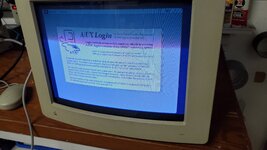 | |
Posted by: Phipli on 2024-04-15 13:10:32Where should I upload the archive?Nowhere at first. Backup as soon as possible, but take your time to upload so you can check for private files. No what enthusiastic people say 🙂 | |
Posted by: Phipli on 2024-04-15 13:11:57How I can do the archiving and what software would i need? I could hook the drive up to a PM 7500 running 8.1 and copy to its hard drive or I could boot the IIfx off a BlueSCSI running 7.1 (assuming this would work, haven't tried yet) and copy to SDDo you have any MacOS X machines that have 50pin SCSI? It's important to image everything, not just the stuff visible from normal Classic Mac OS. | |
| Posted by: ClassicGuyPhilly on 2024-04-15 13:12:19 Fair point @Phipli . There's nothing on the Mac volume but I have no idea how to check the A/UX volume without a valid password. The Guest access still requires a password. | |
Posted by: ClassicGuyPhilly on 2024-04-15 13:13:35Do you have any MacOS X machines that have 50pin SCSI? It's important to image everything, not just the stuff visible from normal Classic Mac OS.Unfortunately no. | |
Posted by: Phipli on 2024-04-15 13:13:39The Guest access still requires a password.Not from the correct host OS. OSX will probably show the contents of the AUX partitions. | |
Posted by: Phipli on 2024-04-15 13:14:10Unfortunately no.Not a Beige G3 down the back of the sofa? | |
Posted by: ClassicGuyPhilly on 2024-04-15 13:45:53Not a Beige G3 down the back of the sofa?Just checked. Yes to tabby cat behind sofa, no to Biege G3. | |
| Posted by: cheesestraws on 2024-04-15 13:49:34 Yeah, ideally you need a UNIXy box (be that A/UX or a modern UNIX) with 50 pin SCSI. | |
| Posted by: ClassicGuyPhilly on 2024-04-15 13:56:34 So if I jump down a rabbit hole and get an A/UX boot volume on the IIfx using the BlueSCSI then there's a viable path forward? | |
| Posted by: cheesestraws on 2024-04-15 13:57:52 Yes, if you get a fresh A/UX installation you will be able to do it. | |
| Posted by: ClassicGuyPhilly on 2024-04-15 13:59:20 Copy that, I will endeavor to do so. And honestly having A/UX running on a IIfx is kinda cool anyway 😉 | |
| Posted by: Andy on 2024-04-15 14:21:24 BlueSCSI supports a mode where you can plug a hard drive directly into it and it'll automatically image the drive. https://bluescsi.com/docs/Initiator-Mode That will give you a full image with partition table intact and will allow you to bypass reading the a/ux filesystem on a Mac. I haven't tried it myself but it looks pretty straight forward. Probably the best place to ask for assistance with that is their discord, there's a link on the troubleshooting page. | |
| Posted by: ClassicGuyPhilly on 2024-04-15 14:24:24 Ooo interesting will research that thanks @Andy! | |
| Posted by: SteveHere on 2024-04-15 16:57:39 You'll want to use the latest BlueSCSI V2 full sized "Desktop" version (the external and laptop versions don't have the required header pin jumpers) and the latest firmware. Older firmware had some issues as documented in this video from Adrian's Digital Basement ][... | |
| Posted by: ClassicGuyPhilly on 2024-04-16 05:16:16 @SteveHere appreciate that, however I only have a BlueSCSI 1.0-b. Guess back to the A/UX boot on IIfx path. | |
| Posted by: MacKilRoy on 2024-04-16 05:17:27 I can’t remember what version supports it, but newer versions of the FWB Hard Disk Toolkit (perhaps 3.0+, maybe 4.5) can save an image of an entire drive as a file, which can be restored back to another drive. I think it essentially does a ‘dd’. | |
| Posted by: zefrenchtoon on 2024-04-24 04:28:05 I had the same usecase with a HDD extracted from a faulty SE. I did a perfect image (like with 'dd') using DiskCopy 6.5b which is able to image a complete device (used for Apple Restoration Tool). Later, I booted from a Tiger install CD to make a 'dd' image and the result was the same as DiskCopy. | |
Posted by: MacKilRoy on 2024-04-24 04:58:18I had the same usecase with a HDD extracted from a faulty SE. Oh, interesting! I wasn’t aware DiskCopy could do a device image. I’ve only ever used 6.3.3 as the highest version. | |
Posted by: zefrenchtoon on 2024-04-24 05:08:24Oh, interesting! I wasn’t aware DiskCopy could do a device image. I’ve only ever used 6.3.3 as the highest version.As said on the garden page: DL #9's and #10: Disk Copy 6.5b11 and b13; These are two non-released beta versions of Disk Copy 6.5.".cdr" is related to the device image feature IIRC Be careful of the compatibility with MacOS 9.1 min 🙁 | |
| 1 > |