68kMLA Classic Interface
This is a version of the 68kMLA forums for viewing on your favorite old mac. Visitors on modern platforms may prefer the main site.
| Click here to select a new forum. | |
| BeOS: a Powercenter 132 sound issue with graphics card | |
| Posted by: MindWalker on 2024-04-01 07:06:50 Inspired by @Phipli's thread about PPC BeOS software, I got my PowerComputing Powercenter 132 back on the desk and finally tried some more BeOS on it 🤓 Using a pre-made BeOS image I was very quickly up and running, and mostly everything seemed to work fine out of the box. The only custom part my machine has is a Matrox Millenium II PCI card, which I had flashed to Mac ROM earlier (it works with MacOS and BeOS). Other than that it's a plain Powercenter with 133Mhz PowerPC 604, 96MB of RAM, and I believe 2MB of VRAM. However soon I found a problem. While I did get the startup sound on boot (everytime), I wasn't able to play any sound within BeOS. All players would just do nothing (CL-Amp, Sound settings panel), or tell me that no audio hardware was found (MediaPlayer) and at shutdown I would see that audio_server and/or media_addon_server would hang and need killing manually. I thought that perhaps this was an issue with the pre-made BeOS disk image, so I went and did a fresh install. With the proper BIN+CUE files installation was a breeze (with ZuluSCSI) but unfortunately the issue held. However; once I remove the Matrox GPU, the sound starts working again. In my usage having the extra GPU is not necessary, I can get Okish resolution and color with just the built-in graphics, but I was just wondering why this happens and are there any tweaks that I could try to get the sound working with the graphics card? Also: BeOS doesn't seem to mute the internal speaker when I connect external speakers to the line in at the rear (MacOS does this and even the startup chime plays only to the external speakers when connected). There doesn't seem to be Devices control panel (unlike BeOS's x86 version) so I guess there are no audio controls (even a volume slider at the BeOS menu) available at all? | |
Posted by: Phipli on 2024-04-01 07:12:47Inspired by @Phipli's thread about PPC BeOS software, I got my PowerComputing Powercenter 132 back on the desk and finally tried some more BeOS on it 🤓That is curious. I think I tried my Millennium, but not my Millennium II (because it needs some minor repair - artifacts suggesting a pin has come free somewhere). My less than helpful advice would be that the 8MB 12" ixMicro TwinTurbos can sometimes be found on eBay cheap. The 8MB lets you do 1280*1024 at millions of colours and the card has good BeOS performance. My more practical advice is just use the onboard video, it is actually pretty good all things considered. Is it possible to expand the VRAM? | |
| Posted by: MindWalker on 2024-04-01 07:31:35 Yeah I guess using just the onboard video would be the easy fix, and I must admit using much higher than 800x600 or 1024x768 doesn't really do that much good in old OS'. The MacOS drivers for the Matrox were also somewhat clunky. Under BeOS with the onboard video I can set it to 800x600 with 8 or 32-bit color or 1024x768 with only 8 Bits/Pixel, but I guess I can manage with that. (Again, not that there really is much software to run...) How did I change the CL-Amp's skin back to the classic WinAmp-look? The BeOS-default is... weird 😅 Also how can I take screenshots, in x86-BeOS it worked simply from PrintScreen-key? I guess there also isn't a network time utility, or any way to set the date past 2010? | |
Posted by: Phipli on 2024-04-01 07:37:11Also how can I take screenshots, in x86-BeOS it worked simply from PrintScreen-key?I don't know! I pressed cmd-shift-3 and the UI paused like it was taking an image, but I couldn't find a file and it wasn't on the clipboard! I gave up and took a photo of the screen with my phone. 😆 I guess there also isn't a network time utility, or any way to set the date past 2010?Perhaps try setting it in Mac OS. It will likely carry over via the RTC. You'll need 8.6 or later for NTP to work, some later versions of Classic Mac OS let you set the date directly to 2024 I think. Otherwise, there are a couple of solutions like setdate by bbraun. How did I change the CL-Amp's skin back to the classic WinAmp-look? The BeOS-default is... weirdNot sure either, AI haven't tried. But there is a weird sort of hidden menu in the middle of the player. Is it in there? | |
| Posted by: MindWalker on 2024-04-01 07:50:55 CL-Amp; the options menu and file info etc. are hidden in the vertical bar next to the display (in both skins), this took some trying to find 😅 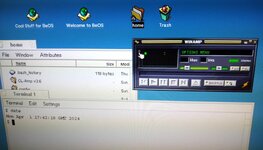 I find it neat that I can just give it an URL http://www.radio-paralax.de:8000/ (the trailing slash is important) and it just works 🎵 (Also a photo of the screen for now 😄) Also as seen in the photo; I used an NTP utility on MacOS 8.1 and it indeed gets over to the BeOS from the RTC. | |
| Posted by: MindWalker on 2024-04-01 07:56:51 Aha: it's ctrl + shift + 3 to take a full-screen screenshot, it saves to the home directory! 📸 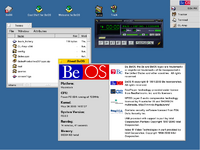 The thread is moving towards a general BeOS-PPC tips, but I am fine with that! 😄 | |
Posted by: Phipli on 2024-04-01 08:04:44Aha: it's ctrl + shift + 3 to take a full-screen screenshot, it saves to the home directory! 📸Interesting - command usually works for most things on BeOS. On mine it certainly does something, but no image appears in the home folder. I'm wondering if a bug is stopping it work when running at 1280x1024 or something, or perhaps with my video card if it is trying to extract it from VRAM? | |
| Posted by: MindWalker on 2024-04-01 08:09:45 Have you tried with different keymaps? I changed mine from whatever the default was to Finnish (to match my keyboard) and I almost feel like the ctrl + command keys were swapped (I had troubles finding how to copy&paste), perhaps it's different depeding on the keymap? On-board VRAM versus the video cards VRAM does sound plausible too, I guess. Another aha; there is a Media preferences tool and there under Mac Out I can set the volume or mute the line out (left slider-pair, stereo) or the internal speaker (right slider, mono), I guess being a multimedia OS it makes sense that one can use both at the same time unlike in MacOS! 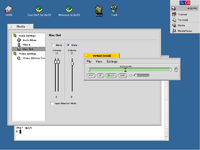 In Media / Audio Settings is also the checkbox I couldn't find ealier: "Show Volume Control on Deskbar". Gosh everything is hard when you start using a new OS 😅 | |
Posted by: Phipli on 2024-04-01 08:14:10On-board VRAM versus the video cards VRAM does sound plausible too, I guess.Sadly, since I'm using a 9600 I don't have any onboard video, one of the few beige macs that doesn't (one of... 5? II, IIx, IIcx, 9500 and 9600? Not that the 9500 and early 9600s are that different). Were there any BeOS magazines back in the day? I'd like to read about what people were doing in the actual PPC era. So much of the internet stuff is x86 BeOS and Haiku. Perhaps I should make a page on my website to gather PPC Be related stuff - the PBLA - PowerPC BeOS Liberation Army? 😆 | |
Posted by: Phipli on 2024-04-02 06:14:14How did I change the CL-Amp's skin back to the classic WinAmp-look? The BeOS-default is... weirdThis doesn't look like an improvement : https://archive.org/details/winampskin_beos This is better. A little more "Be" : https://archive.org/details/winampskin_BeOS_Amp another : https://archive.org/details/winampskin_BeOS_dano | |
| Posted by: lolo799 on 2024-04-02 06:45:19 Maybe your sound issue is related to https://oldvcr.blogspot.com/2022/12/the-strange-case-of-beos-srs-and-silent.html | |
Posted by: Phipli on 2024-04-02 07:01:58Maybe your sound issue is related to https://oldvcr.blogspot.com/2022/12/the-strange-case-of-beos-srs-and-silent.htmlThanks for sharing that - I couldn't remember where the TAM sound fix was. I want to put that on the page. (The TAM, 5500 and 6500 have the same logic board). | |
Posted by: Phipli on 2024-04-02 13:30:18Have you tried with different keymaps? I changed mine from whatever the default was to Finnish (to match my keyboard) and I almost feel like the ctrl + command keys were swapped (I had troubles finding how to copy&paste), perhaps it's different depeding on the keymap?I found this... If you go to Preferences>Menu, there is an option Cmd as shortcut key Vs ctrl as shortcut key. 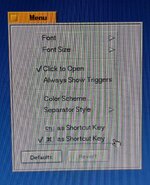 | |
| 1 |