68kMLA Classic Interface
This is a version of the 68kMLA forums for viewing on your favorite old mac. Visitors on modern platforms may prefer the main site.
| Click here to select a new forum. | |
| Centris 650 Not recognizing PDS PPC upgrade card 820-0562-A | |
| Posted by: trodemaster on 2024-03-31 10:54:09 I'm working on a Centris 650 build and was excited to add this Apple-branded PPC 601 820-0562-A Upgrade card to the system. I have installed these a few times in the past and it was trivial. However, when I insert this card, it does not seem to be recognized by the system. I have used TattleTech to view the NuBus details and it does not show up. This system is not overclocked (Yet). Other things I have tried so far
Thanks, Blake  | |
Posted by: Phipli on 2024-03-31 11:02:59I'm working on a Centris 650 build and was excited to add this Apple-branded PPC 601 820-0562-A Upgrade card to the system. I have installed these a few times in the past and it was trivial. However, when I insert this card, it does not seem to be recognized by the system. I have used TattleTech to view the NuBus details and it does not show up. This system is not overclocked (Yet).Check to make sure the contacts in the connector aren't bent. Use contact cleaner like deoxit to clean the card and logic board connector if that wasn't how you cleaned it before. Make sure it is properly seated, sometimes they don't go fully down easily. I realise you already have, but make absolutely sure! 😆 What is the name of the control panel you installed for it? Have you tried repasting the heatsink? Could you share a high resolution, clear, well lit, photo of both sides of the PCB with the heatsink off (while you're re-pasting it)? Some of this sounds like what you have already done, but you're on the right path, worth doing again seriously. | |
| Posted by: Phipli on 2024-03-31 11:06:41 Make sure the little hook on the heatsink is through the hole in the board properly, or it won't be properly seated on the CPU. | |
| Posted by: trodemaster on 2024-04-02 18:43:52 When cleaning the contacts, I have only used rubbing alcohol and a dust-free cleaning cloth, so using something stronger is up next. Re-seated it a couple of times and confirmed the connector is fully butted up against the socket. Heatsink repasted with careful attention to the hook on the far end. For software, I was re-installing 7.6.1, which I thought would install the Apple control panel if the card was on the bus. Do we trust TattleTech for knowing if the card is seen by the mac POST? 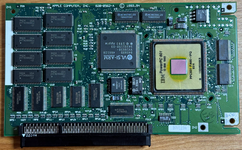 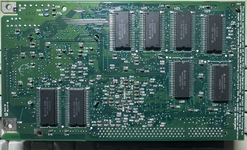 | |
Posted by: eharmon on 2024-04-02 23:50:20When cleaning the contacts, I have only used rubbing alcohol and a dust-free cleaning cloth, so using something stronger is up next.I believe when the card is disabled there's no way to see it on the bus. As soon as you hear the standard Quadra/Centris beep, you know it's allowed the 68k to take control and loaded it's standard ROM. To do so on the pane you're looking at, it would need to have its DeclROM exposed and I don't believe it is unless the card takes over the processor bus and maps its own ROM into memory, running the standard initialization routines and assembling the resource data. Interestingly your card must be a pretty early revision, as it uses 8 ROM chips instead of 4 as seen on later units. Watching this thread with interest, as I have a card which has the reverse(?) behavior: with it inserted the machine never beeps at all. | |
Posted by: Phipli on 2024-04-03 01:18:35Do we trust TattleTech for knowing if the card is seen by the mac POST?Yeah, as above, I don't think it shows in TattleTech. Go to the "Power Macintosh Card" control panel. Does it open without an error? | |
| Posted by: trodemaster on 2024-04-03 09:32:16 I extracted what seems to be the correct control panel for 7.6.1 and it throws an error. I'll do more testing once the contact cleaner shows up and I have more time. Boot chime is just the quadra one with the card installed or not. 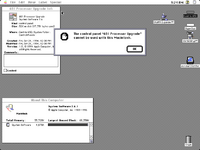 | |
Posted by: Phipli on 2024-04-03 09:51:55I extracted what seems to be the correct control panel for 7.6.1 and it throws an error. I'll do more testing once the contact cleaner shows up and I have more time. Boot chime is just the quadra one with the card installed or not.No, sorry, but you have got the wrong control panel! That one doesn't work in a 650. Go to the "Power Macintosh Card" control panelI promise I was exceptionally careful when I named it 🙂 | |
| Posted by: trodemaster on 2024-04-03 21:23:21 Ah that was it! Thank you! 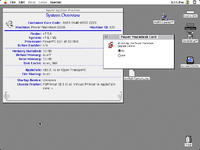 So this software does not work on 7.6.1 Apple Power Macintosh Upgrade Card Drivers (M2843LL/A) - Macintosh RepositorySoftware for the Apple Power Macintosh Upgrade Card (PPC 601). Supported Macintosh Models: Macintosh Quadra 610 Macintosh Quadra 650 Macintosh...
www.macintoshrepository.org
The "601 Processor Upgrade" control panel in 7.6.1 is not correct. This is the one that works Power Macintosh Card - Macintosh RepositoryPower Macintosh Card (Mac abandonware from 1994)
www.macintoshrepository.org
I installed the "Power Macintosh Card" control panel and toggled it on. Rebooted to a couple of chimes with the power PC one eventually showing up. | |
Posted by: Phipli on 2024-04-03 23:13:29I installed the "Power Macintosh Card" control panel and toggled it on. Rebooted to a couple of chimes with the power PC one eventually showing up.A quirk of the card, to switch processor you must Shutdown and start up again, not restart. The only way to switch reliably. So this software does not work on 7.6.1I tend to use https://macintoshgarden.org 🙂 | |
| Posted by: mousehouse on 2024-08-05 10:30:26 Found this thread when trying to fix my issue and this solved it... Thanks! | |
| 1 |