68kMLA Classic Interface
This is a version of the 68kMLA forums for viewing on your favorite old mac. Visitors on modern platforms may prefer the main site.
| Click here to select a new forum. | |
| Mac SE FTP/HTTP Downloading | |
| Posted by: SophieSorrow on 2024-03-26 21:09:21 I have a Mac SE with a BlueSCSIv2 currently running System 6.0.8 with MacTCP to leverage a WiFi connection. Things seem to mostly work, and I've even managed to print on my modern laserjet by pushing PostScript files to its onboard ftp server. I have two questions that I think y'all may be able to help out with:
| |
| Posted by: sfiera on 2024-03-26 21:16:41 For 1, GetDown Classic is exactly that. | |
Posted by: SophieSorrow on 2024-03-28 22:08:12For 1, GetDown Classic is exactly that.Ooh thank you. This is promising, but it looks like it only runs on System 7. I'll give it a shot, but hopefully it works with MacTCP rather than OpenTransport. | |
| Posted by: sfiera on 2024-03-28 22:55:40 Ah, sorry, I missed that requirement. Looks documented to work with MacTCP but not System 6. | |
| Posted by: Mk.558 on 2024-03-29 06:07:05 Can you try a different way of connecting the SE, besides the WiFi connection? | |
Posted by: SophieSorrow on 2024-03-30 14:09:54Can you try a different way of connecting the SE, besides the WiFi connection?No, I don't have another type of network interface other than the BlueSCSIv2 for this machine. The issue seems to be related to how Fetch initializes. | |
| Posted by: cheesestraws on 2024-03-30 14:47:08 then contact bluescsi support, it's their software, it's their responsibility to make it work properly. | |
Posted by: SophieSorrow on 2024-03-30 14:59:22then contact bluescsi support, it's their software, it's their responsibility to make it work properly. I wouldn’t expect to have much success reaching out to the creator of an open source project that’s not backed by any sort of company for support, which is why I reached out to the community. Fetch isn’t made by the person that made the BlueSCSIv2, it’s an FTP client from the 90s. The BlueSCSIv2 itself isn’t even using its own driver, it’s an experimental feature that uses the DaynaPort SCSI driver by presenting a device on the bus that connects to the WiFi module on the PicoW. That piece is working correctly with MacTCP, the issue is getting Fetch to work reliably with MacTCP. It regularly wants to initialize AppleTalk, which I’m not using, so then it fails out. The confusing part is that it intermittently decides to start working after I’ve toggled settings on and off between various components in this setup. The only thing I’m trying to determine here is if there is a repeatable set of steps I can take to ensure Fetch connects via MacTCP and not AppleTalk. It’s clear from this thread that few others are using a similar setup to mine, so it may be true that this setup is just intermittent & unreliable. Not surprising for a machine released in 1987. | |
Posted by: davewongillies on 2024-03-30 15:52:20I wouldn’t expect to have much success reaching out to the creator of an open source project that’s not backed by any sort of company for support, which is why I reached out to the community.Surprisingly some non-company backed open source projects do provide support, bluescsi being one of them. They have a troubleshooting guide which has this at the bottom if the guide doesn't help.
| |
Posted by: SophieSorrow on 2024-03-30 16:44:06Surprisingly some non-company backed open source projects do provide support, bluescsi being one of them. This isn’t really ‘bluescsi support’ that I can contact lol. Just an indication that I’m on the wrong forum and need to ask a different community. I’m still a little lost at the other reply saying it’s BlueSCSI’s responsibility to get Fetch working because it’s clearly not anybody’s responsibility, but I’ll avoid thinking too hard on that. Thanks all for trying, I’ll ask elsewhere ✌🏻 | |
| Posted by: Mk.558 on 2024-03-30 18:01:44 I getcha. MacTCP does not, according to my understanding, work with AppleTalk at all. I'd have to double-check about MacIP, but otherwise, not according to the information I'm aware of. 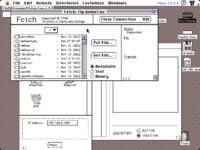 This is 7.1 working an outside WAN FTP connection with AppleTalk off, via the Ethernet port. A SCSI adapter likewise shouldn't rely on AppleTalk for anything TCP. The drive "MacPartition" is a BlueSCSI v2 A/UX 3.0.1 volume. Since others have also indicated trouble with the WiFi connectivity of the BlueSCSI, which is still an experimental feature according to my understanding, I don't think that's an issue with Fetch. I would reckon if you're looking to connect outside to look at MacIP or pseudo PPP dialup. | |
| Posted by: halkyardo on 2024-03-30 20:25:45 Actually, that brings up one thing that could be causing an AppleTalk error - the "EtherTalk" option under MacTCP is for an IP-over-AppleTalk protocol that you almost certainly don't want to use unless you've got a working AppleTalk network. Make sure you're selecting "Ethernet" in the MacTCP control panel. A lot of wifi access points don't pass AppleTalk traffic correctly, so trying to use a wifi adapter such as BlueSCSI V2 with AppleTalk can often be a frustrating exercise, but if you're just sticking with MacTCP, it should work OK. | |
Posted by: Mk.558 on 2024-03-30 20:56:58At Indiana University, unless told otherwise, when configuring MacTCP for your networked Macintosh, always click Ethernet instead of EtherTalk. Think it may be because of this? According to my notes, if you selected EtherTalk, then it only works over a LAN, but Ethernet lets you connect out. I'd have to verify that, checking... E: Nothing worked when it was selected to EtherTalk. Couldn't connect to my ftp server on the LAN. Just said it opened halfway then failed. | |
Posted by: halkyardo on 2024-03-30 21:13:17Think it may be because of this?Yeah, that option selects MacIP and will either say “EtherTalk” or “LocalTalk” depending on what your AppleTalk connection is set to. “Ethernet” does normal IP. Definitely a confusing UI choice on Apple’s part. MacIP is neat (I run it to give IP connectivity to my LocalTalk-only Macs) but since any Ethernet network these days is running IP anyway, it’s not really a useful option over Ethernet. | |
Posted by: Nixontheknight on 2024-03-31 12:00:44Yeah, that option selects MacIP and will either say “EtherTalk” or “LocalTalk” depending on what your AppleTalk connection is set to. “Ethernet” does normal IP. Definitely a confusing UI choice on Apple’s part.wait there's a free program that does the same thing as IPnetRouter? TIL! | |
| 1 |