68kMLA Classic Interface
This is a version of the 68kMLA forums for viewing on your favorite old mac. Visitors on modern platforms may prefer the main site.
| Click here to select a new forum. | |
| Apple IIe Resistor | |
| Posted by: MacintoshMan1999 on 2024-03-20 19:23:13 One of my apple II's is not working and I believe this is the cause: 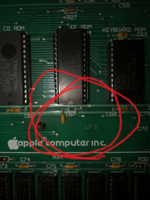 I tested the resistance of the other resistors under the other IC's and they're 5 Ohms. I'm not entirely sure how to find a direct replacement on Mouser so I'm asking for help. Thanks. | |
| Posted by: Callan on 2024-03-20 20:11:06 That's just a dcap (not a resistor) . That wouldn't prevent it from booting. Most issues I've found with 2e's have been ram related (4164's) | |
| Posted by: zigzagjoe on 2024-03-20 20:12:01 That looks like a 0.1uf axial lead ceramic capacitor used as a bypass capacitor. Won't stop it from booting. | |
| Posted by: Skate323k137 on 2024-03-20 22:14:21 In a perfect world, that decoupling cap shouldn't stop it from booting as indicated above, but being on the EF ROM I'd still replace it and then get to RAM checking / logic probe etc. next. Any "104" (.1 uf) ceramic cap should be fine, most folks don't keep axial capacitors around but a normal ceramic cap is fine. Most of the time a .1uf 50v would be something I'd grab from my spares in this case. | |
Posted by: MacintoshMan1999 on 2024-03-21 00:01:27In a perfect world, that decoupling cap shouldn't stop it from booting as indicated above, but being on the EF ROM I'd still replace it and then get to RAM checking / logic probe etc. next.Alright, It displays nothing and has no "Beep". it occasionally displays this: 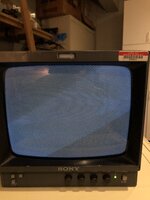 As for the RAM, I'm a complete noob. | |
| Posted by: bibilit on 2024-03-21 00:14:30 Not your issue here, but yes you can replace that cap, won't hurt. Several logic boards were available for the IIe, some with sockets for most chips, some without. You can try swapping the first (on the left) chips with some from the right if those are socketed. The rams chips are on the bottom of the board, near the keyboard. But not sure this is your issue again. | |
| Posted by: MacintoshMan1999 on 2024-03-25 10:11:57 What does this LED indicate? 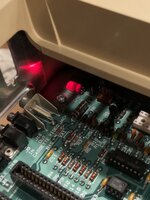 | |
| Posted by: bibilit on 2024-03-25 12:29:44 Never seen a Led at this position. The only one which is present by default is the power Led, on the upper left side of the board. | |
| Posted by: waynestewart on 2024-03-25 12:53:41 From Understanding the Apple IIe A self-test LED is connected across the speaker jack in the Apple Ile to give a firmware diagnostic pass indication when the motherboard is powered up with no keyboard or speaker connected. | |
Posted by: MacintoshMan1999 on 2024-03-25 13:52:48From Understanding the Apple IIeSo being lit means it passed or failed? | |
| Posted by: MacintoshMan1999 on 2024-03-25 16:03:57 Here's a video that might help: View attachment IMG_0089.MOV | |
Posted by: Callan on 2024-03-25 18:41:43Here's a video that might help:That looks like your computer is working, but you have a horizontal sync issue. Not sure if it's your monitor. Look for the hsync adjustment on the monitor. That or you could get one of those apple to vga cards and just run it on a vga monitor | |
Posted by: MacintoshMan1999 on 2024-03-25 18:51:22That looks like your computer is working, but you have a horizontal sync issue. Not sure if it's your monitor. Look for the hsync adjustment on the monitor. That or you could get one of those apple to vga cards and just run it on a vga monitorI've always used this monitor, so it should be fine. The beeper speaker doesn't work as well. | |
Posted by: MacintoshMan1999 on 2024-03-25 18:56:32I've always used this monitor, so it should be fine.and I have 2 //e's | |
| Posted by: Arbee on 2024-03-26 08:40:21 That video looks like it's working but the monitor can't sync to it. | |
Posted by: Callan on 2024-03-26 08:47:30and I have 2 //e'sAnd the other works fine on this monitor? | |
Posted by: MacintoshMan1999 on 2024-03-26 11:59:40That video looks like it's working but the monitor can't sync to it.You and Callan were right, The PVM's horizontal sync was off. I'm going to adjust. And the other works fine on this monitor?The other II is the first one with the broken capacitor. | |
| Posted by: MacintoshMan1999 on 2024-03-26 14:33:01 Nevermind, There's a button labeled "Int/Ext Sync" and it was on external. That was stupid. The beeper speaker still isn't working though. When I do the self test "Kernel OK" is the result. It used to be "System OK". If the Kernel is ok, does that mean other components are not? | |
| Posted by: Callan on 2024-03-26 19:06:09 That's fine. It.say kernal okay on an unenhanced iie (doesn't have the upgraded processor). Your sound problem could be as simple as a bad speaker or it's just not plugged in. Make sure the 2 pin connector is seated correctly on the speaker out pins (look under the keyboard) | |
| Posted by: bibilit on 2024-03-27 04:57:36 Yes » Kernel OK « for any Unenhanced IIe and « System OK « for Enhanced ones. | |
| 1 |