68kMLA Classic Interface
This is a version of the 68kMLA forums for viewing on your favorite old mac. Visitors on modern platforms may prefer the main site.
| Click here to select a new forum. | |
| How to confirm my CPU type and count in my G4? | |
| Posted by: 1200XL M.U.L.E. on 2024-02-03 20:39:17 About a year ago, during days of better health and all that, I purchased a Power Mac G4 from the shopgoodwill site. The machine was advertised as having a 733 MHz processor and 128 MB of RAM. This is what is printed on the specifications sticker on the back. Now, after a long long long break, I pull out the machine and turn it on. It chimes and boots. To my surprise, it has a seemingly clean install of Leopard 10.5.8 and the System Profiler is telling me I have a Dual 1 GHz processor setup inside. I open up the machine to take a look inside and I see a large heat sink. that isn't shy to warm up. 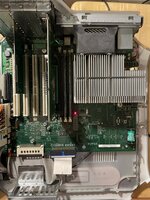 Did someone do a major hotrod upgrade here? What is the best, most definitive method of identifying and confirming my CPU type without removing the CPU and/or the heat sink? Thanks! 🙂 | |
| Posted by: joevt on 2024-02-04 15:37:29 Boot into Open Firmware and get the cpu-version property? 0 > dev / ls FF828F80: /PowerPC,601@0 FF829878: /chosen@0 ... 0 > dev @0 ok 0 > .properties name PowerPC,601 device_type cpu reg 00000000 00000000 cpu-version 80010303 clock-frequency 2376FAC0 timebase-frequency 00BEBC20 80010303 = PowerPC 7445 or 7455 v3.3 (Apollo 6) https://gist.github.com/gnzlbg/f4ccfb304b97708c142fd7004df8c761 https://www.nxp.com/docs/en/supporting-information/PPCPVR.pdf Since you have a dual CPU, you should maybe see two CPUs in Open Firmware. | |
| Posted by: LaPorta on 2024-02-04 17:19:03 Looks like my original 1.0 GHz DP QS heat sink. The profiler isn't going to BS you unless there is some weird, 3rd party thing in there. | |
| 1 |