68kMLA Classic Interface
This is a version of the 68kMLA forums for viewing on your favorite old mac. Visitors on modern platforms may prefer the main site.
| Click here to select a new forum. | |
| QS G4 USB Overdraw Warning | |
| Posted by: LaPorta on 2024-01-19 15:16:20 I am getting this message on my G4 every time I start it up. I have no way to reliably figure out what is causing it, short of pulling everything out. As far as USB, I have the keyboard/mouse, as well as an iSub connected to the internal 1.1 ports. I have a PCI USB 2.0 card installed, and all that is in there is a joystick, and a 4-port USB hub that currently has one Gravis GamePad Pro connected to it. I can't find anymore info in the System Profiler or anything. Would the Console be able to give me more info somewhere? 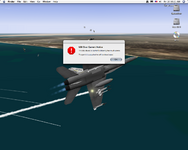 | |
Posted by: Nixontheknight on 2024-01-19 15:18:38I am getting this message on my G4 every time I start it up. I have no way to reliably figure out what is causing it, short of pulling everything out. As far as USB, I have the keyboard/mouse, as well as an iSub connected to the internal 1.1 ports. I have a PCI USB 2.0 card installed, and all that is in there is a joystick, and a 4-port USB hub that currently has one Gravis GamePad Pro connected to it.use a USB-Y cable until you can figure out what is causing it | |
Posted by: Phipli on 2024-01-19 15:19:42I am getting this message on my G4 every time I start it up. I have no way to reliably figure out what is causing it, short of pulling everything out. As far as USB, I have the keyboard/mouse, as well as an iSub connected to the internal 1.1 ports. I have a PCI USB 2.0 card installed, and all that is in there is a joystick, and a 4-port USB hub that currently has one Gravis GamePad Pro connected to it.It will be a built in port, not one on the card, and I think, once it has happened, the port won't work until it gets a chance to reset? Or am I misremembering. I'd start by unplugging everything and plugging them back in one at a time after a reboot watching for the message. Any other way isn't easier and it might clear the fault. You probably have a short somewhere. Don't forget that sometimes there are ports inside the case. Make sure nothing metal is leaning against the or the logic board. | |
Posted by: LaPorta on 2024-01-19 17:47:02use a USB-Y cable until you can figure out what is causing itY-Cable? | |
Posted by: LaPorta on 2024-01-19 17:47:57It will be a built in port, not one on the card, and I think, once it has happened, the port won't work until it gets a chance to reset? Or am I misremembering.I'll give that look and see...if I can rule out the card, that helps right there. | |
Posted by: Nixontheknight on 2024-01-19 19:15:01Y-Cable?it's a USB cable with two male ends, one for power, maybe to plug into a power bank, and one for data, that should be plugged into a computer | |
| Posted by: LaPorta on 2024-01-19 19:37:28 Plot thickens: I wound up unplugging literally everything from USB...still got the warning. So, on an educated guess, I remembered that the two USB ports on the ADC display never really worked properly. So, I restarted, and unplugged and plugged the monitor back in....and the message was duplicated. I guess I will try a separate monitor to see if it is the video card itself or the monitor. What a strange error. | |
| Posted by: LaPorta on 2024-01-19 19:59:54 Yeah, it's the monitor. I hooked a DVI-VGA adapter to the Radeon 9000, got my Dell 17" on there. When I started with just the Dell, there was no message or warning. Once I hooked up the Cinema Display via ADC, warning immediately came back. The USB ports on the display also do not function. So...do I have a malfunctioning USB system in the monitor? Or, do I have some sort of failing G4 PSU that cannot meet the demands of the monitor? | |
Posted by: halkyardo on 2024-01-19 21:21:56So...do I have a malfunctioning USB system in the monitor? Or, do I have some sort of failing G4 PSU that cannot meet the demands of the monitor?For what it’s worth, I have an ADC Cinema Display that’s always had a similar problem. Sometimes the ports work, sometimes they just never get recognized, sometimes they cause an overcurrent warning. Even happens when plugged into a non-Mac via the big DVI adapter brick. I’ve taken to just leaving the USB part of the adapter cable disconnected, but I suppose that’s not quite so do-able when connected directly through ADC! | |
| 1 |