68kMLA Classic Interface
This is a version of the 68kMLA forums for viewing on your favorite old mac. Visitors on modern platforms may prefer the main site.
| Click here to select a new forum. | |
| Mac ii not working | |
| Posted by: Papichulo on 2024-01-19 07:05:56 Im sure this is common but I have 3 Mac II motherboards 1 thats been recapped and has a soldered in battery holder. I cant get any of these to work. Are the power supplies known to fail on these? | |
| Posted by: finkmac on 2024-01-19 07:07:14 all 68k mac power supplies are suspect at this point. give it a recap. | |
| Posted by: robin-fo on 2024-01-19 07:56:34 What are the symptoms? I guess you have two working batteries installed on each board? | |
| Posted by: joshc on 2024-01-19 13:26:10 It is common. It’s the startup circuit that is problematic on these; not usually the power supply actually. The logic boards will all need recapping before going further. Lookup Macintosh II startup schematic - on both Google and this forum and you’ll find lots of information from people who have repaired these machines before. | |
| Posted by: jmacz on 2024-01-19 18:56:06 +1 on what @joshc said. Mac IIs require working PRAM batteries or they won't start. The power supply connector pins on the motherboard, check pin 15. When you push the power button, you should get around 4.5-6V coming from the two PRAM batteries to that pin (and onto the PSU). If that's not there, your startup circuit is not working (either the batteries are dead or you have busted traces in that part of the board). If you're getting that proper voltage on pin 15, then you can check pin 1 through 6 to see if the PSU is working. 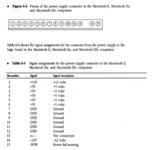 | |
Posted by: Papichulo on 2024-01-25 07:24:13What are the symptoms? I guess you have two working batteries installed on each board?Yes i have 2 new pram batteries but nothing happens. Ill try testing the circuit now | |
| Posted by: pezter22 on 2024-01-25 19:02:09 It is possible to "jump start" the Mac II's to bypass the startup circuit on the motherboard when trying to figure out a startup issue. I made my own using a AA battery holder (similar to the link) with the two wires attached. I soldered on some alligator clips. You just need 3v, touch the negative to any ground (I use the power supply case) and the positive to pin 15. It should boot. This will at least let you know that you have an issue with the Nand Gates in the startup/shutdown circuit. | |
| Posted by: pezter22 on 2024-01-25 19:02:46 Here's a YouTube tutorial on how to jump start the Mac II | |
| Posted by: 68kPlus on 2024-01-25 19:29:26 Why does it have two batteries? Does it need 6V for some reason? | |
Posted by: David Cook on 2024-01-26 09:00:43Why does it have two batteries? Does it need 6V for some reason? On the Mac II, the batteries supply the real-time clock (RTC) and the soft-power on/off circuit. The real-time clock is designed to operate with a single battery, so they just connect a wire to one of the batteries for that purpose. The soft power circuit uses HC logic series technology which runs from 2V to 6V. This should also be fine for running from a single battery. That suggests something else needs a higher voltage. There are three other connections to the soft-power circuit: 1. The VIA chip that allows software to shut down the machine runs at 5V. Having a 5V signal going into an HC chip running at 3V is not good. But, they could always have used a diode or transistor to safely permit the low signal to power down. 2. The ADB power-on key signals power-up by grounding this pin. So, no problem there. 3. That leaves the power supply turn-on signal. It must need a higher voltage than a partially-used single lithium battery can supply after a transistor voltage drop. So, yes, I would conclude the power supply itself must require the pair of batteries to turn on. Apple improved the power-supply design in the IIcx (and future) by having the power supply produce a separate always-on +5V. This provides three benefits: 1. No batteries are needed to power on the computer. The always-on +5V powers the soft-power circuit. 2. Only a single battery is needed for powering the real-time clock when the computer is unplugged. 2. Current from the single battery for the real-time clock is not needed when the computer is plugged in, because the always-on +5V supplies power to the real-time clock. This allows the battery to last longer. - David | |
Posted by: joshc on 2024-01-26 09:50:01On the Mac IIAnd IIx, IIfx. I’m sure most people know but just in case. They carried on basically the same power on/off circuit for the three Big box Mac models. | |
Posted by: 68kPlus on 2024-01-26 15:38:22On the Mac II, the batteries supply the real-time clock (RTC) and the soft-power on/off circuit. The real-time clock is designed to operate with a single battery, so they just connect a wire to one of the batteries for that purpose. The soft power circuit uses HC logic series technology which runs from 2V to 6V. This should also be fine for running from a single battery. That suggests something else needs a higher voltage.Right! That's really interesting, and mildly annoying, as it makes for another failure point. Still really cool though | |
Posted by: joshc on 2024-01-27 00:49:11Right! That's really interesting, and mildly annoying, as it makes for another failure point.Yeah, when these battery bomb it’s like someone set a nuke off in there. Two Maxell batteries makes for some real destruction. | |
Posted by: 68kPlus on 2024-01-27 14:50:36Yeah, when these battery bomb it’s like someone set a nuke off in there. Two Maxell batteries makes for some real destruction.I've seen that on a few posts - literal logic board Armageddon | |
| Posted by: Papichulo on 2024-01-31 21:10:55 Finally got it working. Just put 2 new pram batteries where i cut off the old batteries View attachment 72845693614__F1BFD658-D30F-43C7-B74A-10A4907F6315.MOV | |
| 1 |