68kMLA Classic Interface
This is a version of the 68kMLA forums for viewing on your favorite old mac. Visitors on modern platforms may prefer the main site.
| Click here to select a new forum. | |
| Modifying Startup Screens | |
| Posted by: Phipli on 2024-01-11 00:08:23 So, there are a couple of ways of modifying Startup Screens that I know of. On older OSes (pre System 7.5 era) you can edit the icon and text string (it's a pascal string, so keep it the same length or modify the length manually).  On "Mac OS" type systems there are a series of pict resources you can edit. 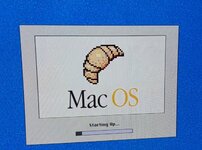 On all Classic OSes I've used, you can put a file in the system called... StartupScreen with a pict resource and it draws it over the top during boot. 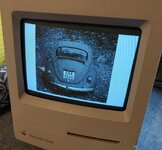 What I'm wondering though, when I modify the stock Pict from System 7.5 or later it loads really slowly. I'm guessing Apple's stock image is a MacDraw style pict with multiple elements including vector objects? Me editing it is putting it back as a single bitmap. Does anyone have any suggestions how best to edit it and keep the original vector content so they draw as quickly as the stock image? | |
Posted by: robin-fo on 2024-01-11 00:41:10What I'm wondering though, when I modify the stock Pict from System 7.5 or later it loads really slowly.My first guess would have been that the original PICT used a smaller bit depth than your replacement. Maybe you could analyse it using „GraphicConverter“ or so.. | |
| Posted by: joshc on 2024-01-11 01:01:28 There are also various extensions for custom startup screen behaviour I think. | |
Posted by: Phipli on 2024-01-11 03:12:37My first guess would have been that the original PICT used a smaller bit depth than your replacement. Maybe you could analyse it using „GraphicConverter“ or so..Probably right, I pasted the stock Pict resource into ClarisWorks 2's draw tools, and it came in as a bipmap. It could only be 4bit that would work, so it would have to be drawn in that mode. I might try making a vector pict version anyway because I could do that in 8bit. There are also various extensions for custom startup screen behaviour I think.I've only ever done it by hand, do you know any examples? | |
| Posted by: Phipli on 2024-01-11 03:13:32 Extra note, for people following along at home. In Mac OS 7.5.3 the pict images are stored in the System Update file, not the System File itself. | |
Posted by: slomacuser on 2024-01-11 03:38:57Welcome - Macintosh GardenThis is a very tiny program (8 KB). Here is an excerpt of the original ReadMe file (also included): Welcome is a simple application which allows you to edit the “Welcome to Macintosh.” message that is displayed when the Mac boots. Welcome comes with no warranty, use it at your own risk.
🙂 | |
| Posted by: werdna on 2024-01-11 05:31:20 I have a question. On a MacXL, or on any machine pre-system 7, is there any way to load a StartupScreen file that's larger than 512x342? I've tried this to no avail. Instead, it stretches out 512x342 images to fill the entire screen. And getting the backdrop extension to work for wallpaper? Forget about it... | |
| 1 |