68kMLA Classic Interface
This is a version of the 68kMLA forums for viewing on your favorite old mac. Visitors on modern platforms may prefer the main site.
| Click here to select a new forum. | |
| Patch 8*24 GC Control Panel for Compatibility with Drag & Drop? | |
| Posted by: olePigeon on 2024-01-07 11:19:30 I have another 8*24 GC question. Apparently one of the reasons for the 8*24 GC's problems with newer systems is that the 8*24 GC control panel is incompatible with the Drag & Drop extension. It will cause all sorts of visual artifacts. Is this something could be patched and fixed? I'm not sure of the timeline of things in regards to the 8*24 GC and Drag & Drop, because Apple never bother to fix it (or it was unfixable.) | |
| Posted by: Phipli on 2024-01-07 12:06:30 Your difficulty there is like a swiss cheese incident - you're looking for two rare occurrences that are coincident. You want someone who both is able to debug the problem, and who has one of the rarest Nubus video cards. | |
| Posted by: olePigeon on 2024-01-07 14:08:37 I'd be happy to lend a card for this purpose. | |
| Posted by: jmacz on 2025-03-10 16:33:42 I may have found a card, not sure if it's a rev A or a rev B, has same ROM part number as the card hyperneogeo sold on the board a couple years ago. Anyhow, once I get it (and have some time), will take a look to see if it's clear what's happening. Based on some tech articles I read on the GC acceleration, I'm guessing the artifacts are from the drag and drop extension taking some shortcuts when drawing during drag operations, and this is causing issues as the GC acceleration operates asynchronously. Need to confirm whether the artifacts show up during a drag operation, if so what drawing operations are done during a drag, and whether that scenario can be patched in a straight forward manner. Perhaps changing the drawing operation (resulting in drags being a little bit slower) could work and/or disabling acceleration during drag operations. | |
| Posted by: jmacz on 2025-03-18 16:01:13 I've got the driver installed (v7.0.1) and acceleration enabled. I also have the Macintosh Drag and Drop extension (v1.1) loaded. This is running in my IIfx which is using System 7.1.1. I have it set to millions of colors on a 13" monitor. TattleTech says this card is revision 1 so I assume that's revision A. I did notice that the animated icon during startup isn't clipped properly and draws outside of the icon when animating the rocket launching. I see artifacts during some drag operations but also during some XOR drawing operations. Hopefully get some time to take a look further to see which exact operations are causing it. | |
| Posted by: jeremywork on 2025-03-19 01:55:27 A few oddities I'm accustomed to when acceleration is enabled alongside drag and drop: - Netscape Navigator draws 'Back' in every button across the toolbar. - Drawing dropdown menus more than once consecutively becomes garbled (e.g. open the control panels menu from the Apple menu, then slide across to the Special menu and slide back in one continuous motion) - Desktop pattern which has been hidden by a window for a while does not redraw properly when the window is moved (especially when switching contexts several times or opening and closing additional programs while the window stays in background) | |
| Posted by: adespoton on 2025-03-20 15:01:29 Hmm; anyone with the issue happen to have Macsbug installed? This really sounds like two different things are writing to the same memory address. | |
| Posted by: jmacz on 2025-03-20 16:08:34 From what I read in an article, the 8*24GC acceleration handles drawing asynchronously and thus expects applications to be using QuickDraw calls which have all been trapped. If any application writes directly to the frame buffer, you get issues. | |
Posted by: jmacz on 2025-03-27 22:07:42I did notice that the animated icon during startup isn't clipped properly and draws outside of the icon when animating the rocket launching. Looks like this occurs if the boot icon starts from the second row. If it's on the first row, it renders perfectly. | |
| Posted by: jmacz on 2025-04-15 23:03:12 Procured a second card, rev B this time. So I have both revs. But debugging is still on the back burner. I have a few other projects I need to finish first. | |
| Posted by: olePigeon on 2025-04-16 15:08:30 The fact that you're even investigating is good enough for me. | |
| Posted by: jmacz on 2026-05-14 17:54:31 Wow, been a year.. but finally found some time to disassemble the Macintosh Drag and Drop system extension as well as the 8 * 24 GC control panel. I was able to reproduce the following two artifacts when running the 8 * 24 GC with acceleration enabled while at the same time having the Macintosh Drag and Drop system extension installed on System 7.1:
On the 8 * 24 GC, the driver patches QuickDraw traps to replace it with "accelerated code" and that acceleration executes on the AMD chip on the 8 * 24 GC card. The acceleration happens asynchronously unlike what normally happens without acceleration which is everything is serialized in software in the Mac. It looks like the Macintosh Drag and Drop extension's XOR drawing of the drag outline is not getting sequenced correctly with the Finder's drawing of the window/folder hilites. The Finder's hilite gets queued up asynchronously on the 8 * 24 GC card and the DnD extension reads the current frame buffer and while its calculating the XOR, the Finder's hilite executes on the 8 * 24 GC card, updates the frame buffer, and then the DnD system extension draws and the result is that the XOR doesn't land right. I tried looking for ways to flush the queue on the 8 * 24 GC card but could not find a good way to do that. In the end, I settled on a dumber method... I patched the Macintosh Drag and Drop extension such that when a drag operation starts, I disable acceleration on the 8 * 24 GC card and after the drag operation ends, I re-enable it (if it was previously enabled before the drag started). I was able to disassemble the 8 * 24 GC control panel and find how the enabling/disabling of acceleration works. The result is that I have a patched Macintosh Drag and Drop extension that no longer causes the artifacts for the above two repro cases, and given it's enabling/disabling acceleration during drags, I think it should theoretically resolve the issue for other cases. 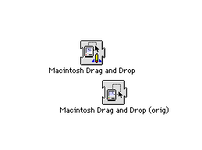 The patched version has a little GC rocket on the icon. 🙂 I am still working out a few things... there's a few more XOR drawing functions inside the DnD system extension and I'm looking at what those are for. It looks to be an animation but need to figure out what it is and when it's called. I haven't been able to cause that code to execute yet. I will upload the patched version when I'm finished toying with it. But this helps the issue for System 7.1. System 7.5+ is another story as Drag Manager is built into the System file. I'd need to either generalize the patch as a separate extension that overrides Drag Manager and works on both System 7.1 and System 7.5+ or I'd have to patch various System 7.5+ files which I don't want to do. Will circle back after figuring out what the other drawing calls are as I didn't patch those. I only patched the main drag handler. | |
| Posted by: David Cook on 2026-05-14 18:19:22 Awesome! | |
| Posted by: Iesca on 2026-05-14 18:26:19 Wonderful news! Now to just get my hands on an 8•24 GC card for my Mac II... | |
| Posted by: jmacz on 2026-05-14 19:09:20 Well duh... there's a better way. I'm going to create a new system extension which wraps the DragDispatch trap to add the enabling/disabling of the acceleration. That should be cleaner as it avoids patching the stock system extension, and hopefully work on System 7.5+ as well. | |
| Posted by: Callan on 2026-05-15 00:19:08 Looks like I got my 8*24 just in time! Awesome work! Amazing after sale service! too! 😁 | |
| Posted by: tvj on 2026-05-15 08:37:21 Sweet! This is so cool, thank you so much for your effort!! | |
| Posted by: olePigeon on 2026-05-15 08:42:25 Yay! | |
| Posted by: jmacz on 2026-05-15 20:10:57 Got it working. It's now a system extension of its own. It does not replace the normal drag and drop extension. Both must exist. I have tested it on System 7.1 on a IIfx running the 8 * 24 GC (rev 2). I also tested it on System 7.6.1 and it works there too -- obviously for System 7.6.1, the normal drag and drop extension is not necessary as the Drag Manager is built into the system. I have only tried reproducing the artifacts on the Finder and that problem seems fixed. I have not tested it on anything else. Try it out and let me know if you find any bugs. I have attached the extension to this post. | |
Posted by: Concorde1993 on 2026-05-15 21:59:18I have only tried reproducing the artifacts on the Finder and that problem seems fixedSo does this new extension remove the artifacts I see to the left of the Welcome to Mac box on the 8.24GC? 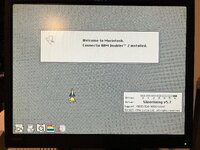 | |
| 1 > |