68kMLA Classic Interface
This is a version of the 68kMLA forums for viewing on your favorite old mac. Visitors on modern platforms may prefer the main site.
| Click here to select a new forum. | |
| PowerBook 180 Replace CCFL with LED | |
| Posted by: AEChadwick on 2023-12-21 08:24:00 I have been restoring my PowerBook 180 to its full potential, using parts from several other machines (including a dead 180 i bought from a russian kid in a parking lot in south Beverly Hills for $50... i might have agreed to become a fence for other things he finds, not sure, this is a wild hobby). After baking several LCDs to remove the tunnel, i set about replacing the dim, dying CCFL with an off-the-shelf LED strip. I keep using the same strips so i always have a baseline. i got inspiration and help from @PB170; he shared his pinout of the PowerBook 1XX inverter board, which was an invaluable start. Getting the strip to work in the 180 required a little mod (to reverse the signal). It also required a boost converter to get the PowerBooks’s 7.5v VCC up to 9v. I used a little strip of ABS plastic (old model supplies) to hold the strip in place. The 180’s backlight is an easy take apart, you barely have to get into the screen; the baking-and-realigning process was much harder). After that, everything works great. The light is bright; the adjustment works in the right direction, albeit not very sensitively... the ramp from none-grey-BRIGHT is very quick. this might work in other 100-series, please share your results. 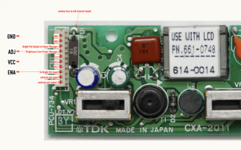 | |
| Posted by: desertrout on 2023-12-21 10:30:41 Nice! Thanks for sharing - I'm definitely interested in making this mod to my 170 and 180. Do you have any pictures of how you mounted the boost converter and panel? | |
| Posted by: croissantking on 2023-12-21 10:36:11 Yeah I need to do this mod on one of my PB180 LCDs. The stock CCFL is so very dim. | |
Posted by: AEChadwick on 2023-12-21 12:23:30Nice! Thanks for sharing - I'm definitely interested in making this mod to my 170 and 180. Do you have any pictures of how you mounted the boost converter and panel?i did not take pictures, but there is no trick to it—there’s acres of space at the bottom of the LCD, and the bezel sits so far forward nothing is cramped. I just trimmed the wires to look clean and mounted the boards in with double-sided-foam tape, | |
| Posted by: Brooklyn on 2023-12-21 12:32:09 Looks great! Maybe a bit too modern 😂 Do you have a link to the LED you used? | |
Posted by: AEChadwick on 2023-12-21 12:51:52Looks great! Maybe a bit too modern 😂 put something in an apple store, it instantly looks cool & modern! usually i link to the board, you caught me the one time i was all “why bother” | |
| Posted by: GRudolf94 on 2023-12-21 12:54:13 Oooh I did this to my cardboard 150 and never did document it (except instead of a commercial inverter and strip I used parts of a broken laptop screen). Good job, yours is a lot tidier! | |
Posted by: croissantking on 2023-12-21 13:06:35Oooh I did this to my cardboard 150 and never did document it (except instead of a commercial inverter and strip I used parts of a broken laptop screen). Good job, yours is a lot tidier!Cardboard 150 🤣 LMAO usually i link to the board, you caught me the one time i was all “why bother”Did you have to cut it down? I’m reading the description and it says how you can shorten it, every three LEDs or something like that. | |
Posted by: desertrout on 2023-12-21 13:59:31i did not take pictures, but there is no trick to it—there’s acres of space at the bottom of the LCD, and the bezel sits so far forward nothing is cramped. I just trimmed the wires to look clean and mounted the boards in with double-sided-foam tape,Nice thanks! Oooh I did this to my cardboard 150 and never did document it (except instead of a commercial inverter and strip I used parts of a broken laptop screen). Good job, yours is a lot tidier!Good God! 🤣 | |
Posted by: GRudolf94 on 2023-12-21 14:01:16Good God! 🤣Hey, I just got the inside bits attached to shards of shattered case 😆 Next version is gonna be LEGO. Maybe will redo the LCD with the inverter from this thread as that's a fair bit better. Might be convinced to design a turnkey replacement, too. | |
Posted by: AEChadwick on 2023-12-21 19:46:06Might be convinced to design a turnkey replacement, too. (i read “design a turkey replacement” and wondered where this was going...) | |
Posted by: AEChadwick on 2023-12-21 19:49:30Did you have to cut it down? I’m reading the description and it says how you can shorten it, every three LEDs or something like that. pardon me, i thought you meant the LED controller board. the LED strip itself (included with the controller board) is cut-to-fit, every three LEDs closest to the size of the CCFL tube. The strip is simply laid in place, perpendicular to the screen, and wedged in with a strip of ABS plastic. | |
| Posted by: Shaddam IV on 2024-04-24 03:16:36 Does anyone know what voltage and frequency (and power consumption) the original CCFL of a 180 display requires? I'm trying to find a replacement CCFL, but for that I'd need to know the volts (and possibly a/c frequency) als well as the amperes that would be required. Thanks! | |
| Posted by: 3lectr1cPPC on 2024-04-24 11:54:03 For voltage you should be able to measure off the connector/cable on the inverter board | |
| Posted by: Shaddam IV on 2024-04-24 12:26:47 I‘m told that the inverter board outputs a high frequency alternating current, which I can‘t measure with a regular volt meter. I‘d need an oscilloscope that I don‘t have. Is that really so? | |
| Posted by: 3lectr1cPPC on 2024-04-24 12:31:35 no clue, someone else will have to weigh in. | |
| Posted by: iQQator on 2025-10-13 03:14:35 Hi, remove fuse to kill or switch off ?) Did you use a diffusing lens or is it just the LEDs that are emitting light so evenly? | |
Posted by: AEChadwick on 2025-10-13 06:44:46Hi, remove fuse to kill or switch off ?) i just snipped the fuse off entirely. does yours have a switch?? i did not add any diffusion to the LEDs. i have rarely encountered brights spots... i wonder if lightly sanding the top of the LED would add just enough diffusion? i will try that on a build. (i'm playing with a powerbook 1400 next...) | |
| 1 |