68kMLA Classic Interface
This is a version of the 68kMLA forums for viewing on your favorite old mac. Visitors on modern platforms may prefer the main site.
| Click here to select a new forum. | |
| 64x64 desktop patterns on an SE/30 | |
| Posted by: croissantking on 2023-12-12 14:17:49 Under System 7.5.5, Desktop Patterns will only offer 8x8 sized patterns on a black and white compact mac. Is there a way to trick it into allowing me to set the 64x64 patterns? I have tried using Wish I Were… to change the machine ID to a Macintosh CX, but it doesn’t work. This photo shows the Desktop Patterns cdev contains both 64x64 ppats, and 8x8 PAT#s. It reveals either one set or the other but it is doing a different check than Machine ID, I guess. 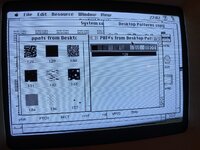 Edited: I meant 64x64 not 32x32. | |
| Posted by: David Cook on 2023-12-12 20:18:31 It checks the highest bit of low memory $20B, which is the SPMisc2 byte of parameter RAM. It then sets the program global variable -$0166(A5) boolean based on that bit. Everywhere else in this code, it checks that boolean to decide to use ppat or PAT#. 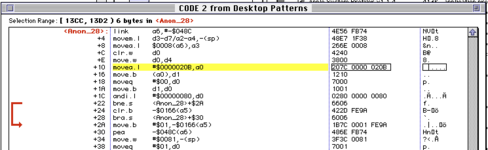 Now we just need to find out what sets or clears that bit. | |
| Posted by: David Cook on 2023-12-12 20:40:16 That low memory global is called pCDeskPat in this usage. Inside Macintosh says the following about it: 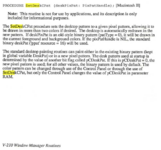  The notation [Macintosh II] may be a color quickdraw issue or a ROM support issue. It might be interesting override the Desktop Pattern code and see if it crashes -- or if support had been added in the system even on B&W machines. | |
| Posted by: David Cook on 2023-12-12 20:43:07 Make a copy of the Desktop Pattern application. Open it in ResEdit. Open CODE resource 2. Change the '66' in the code below to '60'. Save. Close. Run it.  | |
| Posted by: Juror22 on 2023-12-12 21:35:52 I am SO gonna try this! | |
Posted by: Snial on 2023-12-13 02:15:27Make a copy of the Desktop Pattern application. Open it in ResEdit. Open CODE resource 2. Change the '66' in the code below to '60'. Save. Close. Run it.There's also an app called Desktop Textures 2.0 which supports 64x64 pixel desktop patterns and works under System 7.1. | |
Posted by: croissantking on 2023-12-13 06:08:21Make a copy of the Desktop Pattern application. Open it in ResEdit. Open CODE resource 2. Change the '66' in the code below to '60'. Save. Close. Run it.Brilliant detective work, @David Cook. I can confirm it works (see photo). Unfortunately, the set ppat does not persist through a restart. Perhaps Desktop Patterns is not correctly storing the ppat in the System file, only in RAM? 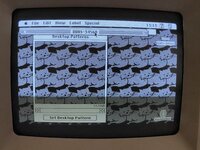 | |
Posted by: David Cook on 2023-12-13 09:45:50Brilliant detective work, @David Cook. I can confirm it works (see photo). Cool! Checking the leaked system code, there are a bunch of patches related to pCDeskPat. They patched the Mac II ROM, DisplayMgr, and WindowMgr. So, it looks like the retention issue is a system/ROM bug. | |
Posted by: croissantking on 2023-12-13 09:52:42Cool!I haven't run into this on any colour/grayscale Mac I own, though. Why would it specially affect my SE/30 with your patch applied to Desktop Patterns? You mentioned the ROM - I am using a custom ROM (BMOW Rominator II Atom), which is based on the IIsi ROM. I will try with the stock ROM. | |
Posted by: croissantking on 2023-12-13 11:01:23There's also an app called Desktop Textures 2.0 which supports 64x64 pixel desktop patterns and works under System 7.1.Where can I get this? I don’t see it on the ‘Garden. Edit: Found it https://www.macintoshrepository.org/25881-desktop-textures-installer-2-1-7-pattern-databases- | |
Posted by: Snial on 2023-12-13 12:00:31Where can I get this? I don’t see it on the ‘Garden.Oh wow! On MacintoshRepository! Yes, have version 2.0 on some of my Zip disks and my PowerBook 1400c. Backstory: My Performa 400 pre-installed OS (7.1P I think) supported larger desktop textures! I think 64x64, but maybe just 32x32. They could be selected via a control panel, but at one point I mucked it up (don't ask me how, this was in the mid-90s.. maybe I found a copy of System 6.0.8 on a floppy, and was surprised I could boot into it, but then it reverted to 8x8 patterns. However, when I booted back into 7.1P they didn't turn back into 32x32 ones and I couldn't select the previous set). I was gutted. Later, however, Desktop Textures appeared on a MacFormat magazine disk or CD so I was able to achieve pretty much the same thing. | |
| Posted by: olePigeon on 2023-12-13 12:03:55 There's also "Wallpaper" by Thought I Could. They have a "Zebra" edition just for B&W Macs. | |
Posted by: croissantking on 2023-12-13 18:59:39Oh wow! On MacintoshRepository!Desktop Textures is sadly not compatible with System 7.5 on an SE/30. It sets the large texture alright, and the texture is retained during a restart... until the Finder loads/menubar appears and it switches back to boring old grey. I wonder what's going on there. I'll have to try 'Wallpaper' next. | |
Posted by: Phipli on 2023-12-14 00:25:19Desktop Textures is sadly not compatible with System 7.5 on an SE/30. It sets the large texture alright, and the texture is retained during a restart... until the Finder loads/menubar appears and it switches back to boring old grey. https://macintoshgarden.org/apps/deskpicture-11 Not sure which you've tried. | |
| Posted by: Andy on 2023-12-14 04:01:53 There's also Before Dark https://macintoshgarden.org/apps/before-dark-103 | |
Posted by: croissantking on 2023-12-14 17:53:37There's also "Wallpaper" by Thought I Could. They have a "Zebra" edition just for B&W Macs.Wallpaper has done the job. It works great. That was surprisingly hard. | |
| Posted by: olePigeon on 2023-12-15 09:10:40 Nice to know it worked. One of my favorite programs, and was a great little company. | |
| 1 |