68kMLA Classic Interface
This is a version of the 68kMLA forums for viewing on your favorite old mac. Visitors on modern platforms may prefer the main site.
| Click here to select a new forum. | |
| BMOW Floppy Emu update: StuffIt file support, SCSI and CD-ROM image support | |
| Posted by: bigmessowires on 2023-12-11 11:38:37 If you have a Mac and a BMOW Floppy Emu disk emulator, here's a new firmware https://www.bigmessowires.com/emu/femu-231209M.zip that adds some features I've been discussing in 68kMLA threads. Please give it a try and let me know how it works for you. Even a basic report of "it works fine, I have nothing more to say" is helpful. StuffIt File Support via Boxing Archive files like StuffIt .sit, BinHex .hqx, MacBinary .bin, Compact Pro .cpt, and text .txt can now be directly used as if they were floppy disk images, with a new feature I'm calling "boxing". Select a .sit file (or other archive) on your SD card, and Floppy Emu will automatically create a temporary disk image "box" that contains the file. From the user's point of view, this basically makes StuffIt files and other archive files behave as if they were disk images, and it's a major time-saver and quality of life improvement when you're downloading software from The Garden and using your Floppy Emu to transfer it to your Mac. 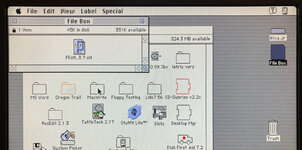 Floppy Emu generates a read-only box disk that's the smallest possible size to contain the StuffIt archive file: 400K, 800K, or 1440K. Your Mac will need to have support for the larger floppy disk sizes in order to transfer larger StuffIt files. 400K box disks are HFS, not MFS, so you'll need to be running System 2 or later. Macintosh Hard Disk support for Zulu SCSI, Blue SCSI, and CD-ROM images For Mac models with support for HD20-type hard disks, Floppy Emu can now use disk images in SCSI device or CD-ROM formats, with an embedded Apple Partition Map, such as the disk images used with Zulu SCSI or Blue SCSI. Supported formats are HDA, IMG, ISO, CDR, DSK, and TOAST. When browsing for disk images in the Floppy Emu directory menus, these images will appear with an APM suffix, while traditional disk images will appear with an HFS suffix. For APM images, Floppy Emu will search the partition map and mount the first HFS partition in the image, ignoring driver partitions and other boring stuff. 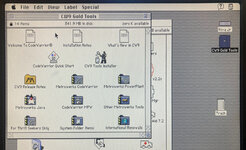 Yes, this means Floppy Emu is now a CD-ROM emulator (sort of) - see here with a CodeWarrior CD mounted. CD-ROM images are mounted as read-only hard disks, not as removable media. If you're running System 6, you may see an error message complaining that the desktop file couldn't be created because the disk is locked, just like you would with a real CD-ROM. The INIT Desktop Manager 2.01 will fix this. With System 7 or later, it's not needed. Other Stuff The Floppy Emu Model C also received some UI improvements and polishing. A "Settings Menu..." item has been added to the top level of the menus, providing an alternate way to return to the settings menu without needing to reset the device. The ".." directory menu item for returning to the parent directory was something that only a UNIX nerd could love, and has been replaced with "Go Back" and a curly arrow icon. Most error messages or dead-ends in the UI flow now have a way to exit or return, so it shouldn't ever be necessary to use the RESET button to perform a hard reset of the device. 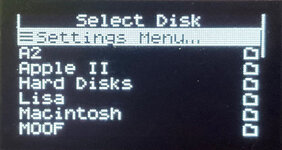 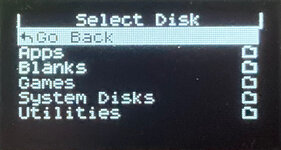 | |
| Posted by: aeberbach on 2023-12-11 12:22:59 What a great update! Thanks! | |
| Posted by: bigmessowires on 2023-12-11 12:38:02 Sorry, the correct link for the firmware is https://www.bigmessowires.com/emu/femu-231209M.zip It's too late for me to edit the post now. Mods please help? | |
Posted by: Phipli on 2023-12-11 12:41:53Sorry, the correct link for the firmware is https://www.bigmessowires.com/emu/femu-231209M.zip It's too late for me to edit the post now. Mods please help?@Cory5412 @wthww | |
| Posted by: chrisrueckert on 2023-12-11 12:42:42 The link femu-231209M leads to an page not found error. Update: Now saw the new link, thanks! | |
| Posted by: JT737 on 2023-12-11 13:33:11 Looks good here: 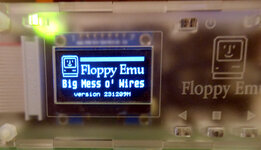 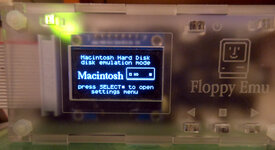 | |
| Posted by: adb9001 on 2023-12-12 05:18:37 This is fantastic!! | |
Posted by: joshc on 2023-12-12 05:31:27CD-ROM images are mounted as read-only hard disks, not as removable media. These are really cool updates. Floppy Emu was already great and now it's even better. I do have a question about the CD-ROM support. As it's not mounting as removable media, will it only work with CD images that have a driver (i.e. bootable discs?) | |
| Posted by: bigmessowires on 2023-12-12 09:25:27 It should work with any CD-ROM image, but you may not be able to boot from the image. Very little has actually changed involving the HD20-type disk emulation - it's only that your "hard disk" may now be a specific range of bytes within an image file, instead of the whole image file. Floppy Emu will examine the image file to see if there's an Apple Parition Map, and it will ignore the areas for driver partition and other partitions, and emulate a hard disk using the range of bytes for the first regular HFS partition. Fun fact: In my testing of various CD-ROM images, there was practically no correlation at all between the filename extension (ISO, CDR, TOAST) and the format of the image data. Sometimes the CD-ROM file was just a plain HFS filesystem with an ISO or TOAST filename, and sometimes it was a device image with a partition map and multiple partitions including an HFS partition. No wonder this is a frequent source of confusion. Because of this, the Floppy Emu won't make any assumptions from the filename extension except that this is some type of image it should try to open. Its behavior is based off an examination of the image contents and not the filename. | |
Posted by: Phipli on 2023-12-12 09:31:14These are really cool updates. Floppy Emu was already great and now it's even better.I think it is mounting them as HD20 RO disks? Fun fact: In my testing of various CD-ROM images, there was practically no correlation at all between the filename extension (ISO, CDR, TOAST) and the format of the image data. Sometimes the CD-ROM file was just a plain HFS filesystem with an ISO or TOAST filename, and sometimes it was a device image with a partition map and multiple partitions including an HFS partition.Yeah, they all iso really, but I thought .toast had a custom header. How are you managing block size, (possibly also an offset)? It isn't the same on all images. | |
| Posted by: mst3k on 2024-04-15 14:56:05 After spending the weekend working the reset button on my Floppy Emu to the bone, I thought, 'there must be an update to this...". Installed it today, and though late to the kudos here, it is a terrific update. Thank you! | |
| Posted by: akator70 on 2024-04-16 09:20:32 Has anyone used one of these with a 68K PowerBook? | |
| Posted by: dr.zeissler on 2025-05-05 13:00:01 Can this thing be bought in the EU? | |
| 1 |