68kMLA Classic Interface
This is a version of the 68kMLA forums for viewing on your favorite old mac. Visitors on modern platforms may prefer the main site.
| Click here to select a new forum. | |
| B&W Studio display 21” Deflection problem | |
Posted by: bromaster on 2023-12-08 14:14:51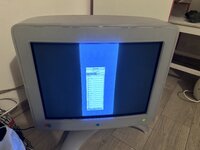 Hi. I have a problem with my Studio Display 21". I already received it in this condition. At first glance, you can see that there is a problem with horizontal deflection. I have experience with analog circuits, but this monitor is a highly advanced digital one. I've already looked through the deflection board. I found one suspicious connection there, but repairing it did not help. I also checked most of the capacitors and semiconductors and they all look good. Is it possible that the reason lies, for example, in the Video board or somewhere else? The flyback transformer does not shoot, although of course I suspect it too... At higher resolutions the image becomes more unstable with a crest. Geometry regulation from setup is working good but is lack of adjustment range.. Hi. I have a problem with my Studio Display 21". I already received it in this condition. At first glance, you can see that there is a problem with horizontal deflection. I have experience with analog circuits, but this monitor is a highly advanced digital one. I've already looked through the deflection board. I found one suspicious connection there, but repairing it did not help. I also checked most of the capacitors and semiconductors and they all look good. Is it possible that the reason lies, for example, in the Video board or somewhere else? The flyback transformer does not shoot, although of course I suspect it too... At higher resolutions the image becomes more unstable with a crest. Geometry regulation from setup is working good but is lack of adjustment range.. | |
| Posted by: ObeyDaleks on 2023-12-08 15:58:49 When you say you “checked the capacitors”, I assume you just visually inspected them? Also, when you say “flyback does not shoot”, do you mean it’s not arcing? This doesn’t look like a flyback issue to me. I would try playing with the high voltage adjustment pot (if you can find it - should be on the neck board). To me, this looks like an issue with the power delivery to the flyback or yoke, possibly due to bad power supply. Unless you’re skilled enough to start checking voltages, the other alternative is to start recapping, starting with the power supply. Might be expensive as I suspect this monitor has a massive number of caps. | |
Posted by: bromaster on 2023-12-08 16:55:31When you say you “checked the capacitors”, I assume you just visually inspected them? Also, when you say “flyback does not shoot”, do you mean it’s not arcing? This doesn’t look like a flyback issue to me. I would try playing with the high voltage adjustment pot (if you can find it - should be on the neck board). To me, this looks like an issue with the power delivery to the flyback or yoke, possibly due to bad power supply. Unless you’re skilled enough to start checking voltages, the other alternative is to start recapping, starting with the power supply. Might be expensive as I suspect this monitor has a massive number of caps.When I said that I checked the capacitors, I meant that I checked their capacitances with an RLC meter. I have a good knowledge of electronics and have experience in working with HI POT devices. I have repaired several CRT monitors in my life, but of the old type. Setting the geometry, turning the magnets and adjusting it is not a big problem. It's just the complexity of this particular monitor and the lack of a wiring diagram that makes i need help. Regarding the flyback transformer, what I meant, was that i don’t hear any noises and high voltage shots, that often indicate the beginning of the end of a transformer | |
| Posted by: bromaster on 2023-12-10 12:40:19 I have a little update. A friend of mine, who has several such monitors, gave me one today, which he bought once, but it was damaged during transport (the plastics broke). Anyway, he never turned it on and gave it to me for parts to put the one I have back on its feet. I decided to run this part donor first to check if everything is OK and look what happened 😅It looks as if it was some common fault in these monitors. Has anyone really encountered anything like this? Of course, it's not the computer's fault. I checked on three different ones 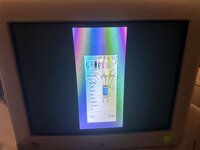 | |
| Posted by: bromaster on 2023-12-13 13:56:49 Next update. I found bad transistor in deflection circuit. Besides Base and emitter i have 35ohm in both monitors. After remove of course. 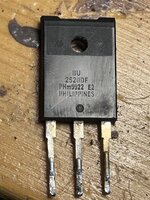 | |
| Posted by: bromaster on 2023-12-15 12:40:09 I discovered that the transistor was good and the problem was elsewhere. I didn't take into account that high-power bipolar transistors have a built-in resistor between the emitter and the base... this misled me. However, I found the cause of the failure. (The same in both monitors. Damaged capacitor in the deflection circuit. I have absolutely no idea how I could have missed it earlier... anyway. The monitor works 🙂 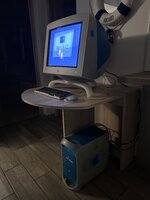 | |
| Posted by: treellama on 2023-12-15 13:24:10 Simply gorgeous, nice work | |
| 1 |