68kMLA Classic Interface
This is a version of the 68kMLA forums for viewing on your favorite old mac. Visitors on modern platforms may prefer the main site.
| Click here to select a new forum. | |
| bench test of Performa 6214CD internal IDE hard disk | |
| Posted by: bigmessowires on 2023-11-11 12:21:39 Just for grins I ran FWB Hard Disk Toolkit on my Performa 6214 (75 MHz PPC 603), and used it to bench test the internal hard disk. It's a 1.2 GB Conner IDE. 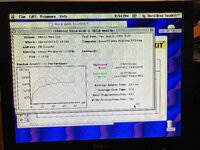 Aren't those numbers much lower than you'd expect? 1789 KB/sec sustained read? That's the slowest sustained read speed of any hard disk in HDT's database, and the only thing slower is a ZIP disk. I thought the IDE drives in these computers were supposed to be slightly faster than a comparable SCSI drive from the same era. To pick a random comparison, HDT's database has a 6GB WD 36400 IDE hard disk benched at 7435 KB/sec sustained read and 5615 KB/sec sustained write. Should I consider replacing the HD? Maybe I need to use a different IDE driver? Side commentary: HDT mis-identifies the computer's CPU type and speed, or else I'm wrong about what computer I have. | |
| Posted by: LaPorta on 2023-11-11 12:29:58 I guess it depends on the IDE implementation. Is it of the earlier variety that is slow? | |
| Posted by: NJRoadfan on 2023-11-11 12:38:19 Conner drives weren't exactly fast. They spun at 4500RPM vs. everyone else doing 5400RPM. Don't be surprised if it is a Seagate branded drive too, as Conner was bought out by 1996. Another factor is if the x200 Power Macs used the IDE controller design unchanged from the 630 series. If so, it was PIO Mode 0 and very slow. Redhill has more info on the drive here: https://www.redhill.net.au/d/45.php | |
| Posted by: Phipli on 2023-11-11 12:47:12 But, in defence of the 6200, stock SCSI disks were only around 2MB/s. They weren't much different. I don't have many stock disks to test though. | |
| Posted by: bigmessowires on 2023-11-11 13:54:51 I don't have any other IDE disks on hand, but I tried a couple of external SCSI drives. Ancient 40MB Quantum LPS: sustained read 1077 KB/s. Quantum Fireball 1.2GB: sustained read 3682 KB/s. I need an internal drive though, so that means IDE. Is it worth replacing the internal drive with a larger/faster IDE drive, or is the bottleneck probably the IDE controller and not the disk? | |
Posted by: Phipli on 2023-11-11 13:59:41I need an internal drive though, so that means IDE. Is it worth replacing the internal drive with a larger/faster IDE drive, or is the bottleneck probably the IDE controller and not the disk?The interface isn't hugely fast, but I'd look for a bigger disk. An 18GB disk means you can stick a load of installers and disk images on a partition and install several operating systems on different partitions 🙂 | |
Posted by: bigmessowires on 2023-11-11 14:02:06They spun at 4500RPM vs. everyone else doing 5400RPM.That source actually says 3600 RPM. Ouch! | |
Posted by: Phipli on 2023-11-11 14:04:04Just for grins I ran FWB Hard Disk Toolkit on my Performa 6214 (75 MHz PPC 603), and used it to bench test the internal hard disk. It's a 1.2 GB Conner IDE.Oh, how come it says 603e? Isn't the 6214 a 6200 variant? | |
Posted by: Phipli on 2023-11-11 14:05:30Oh, how come it says 603e? Isn't the 6214 a 6200 variant?It also says 100MHz. I think you might have a 6300 in a 6200 case? | |
| Posted by: bigmessowires on 2023-11-11 14:26:41 I think that's just a bug. It also says 37.5 MHz (bus speed?) which wouldn't make sense for a 100 MHz system. Motherboard doesn't have any obvious model name, but the Apple part number 820-0685-B matches the 5200/6200 motherboard. | |
Posted by: Phipli on 2023-11-11 14:34:02I think that's just a bug. It also says 37.5 MHz (bus speed?) which wouldn't make sense for a 100 MHz system.The thing to check is System Profiler, in the Apple Menu. But 2x 37.5 sounds more sensible than 2.5x, although it could be an overclock. | |
| Posted by: JustG on 2023-11-11 14:41:07 What version of FWB Hard Disk Toolkit are you running? My 6214 has a SSD via IDE to SATA adapter. Curious to see the performance difference. | |
| Posted by: LaPorta on 2023-11-11 15:04:51 I got around the IDE thing in my Quadra 630 by using the CD SCSI bus to run a SCSI2SD. | |
Posted by: bigmessowires on 2023-11-11 15:18:36What version of FWB Hard Disk Toolkit are you running? My 6214 has a SSD via IDE to SATA adapter. Curious to see the performance difference.FWB Hard Disk Toolkit 4.5.2. Yes I'd love to see your numbers as well. You'd still be limited by the IDE controller but would have max performance from the disk itself. | |
Posted by: bigmessowires on 2023-11-11 15:19:43I got around the IDE thing in my Quadra 630 by using the CD SCSI bus to run a SCSI2SD.Nice trick! I have a ZuluSCSI hanging off the external SCSI bus, from which I'm currently installing OS8.6. | |
Posted by: Phipli on 2023-11-11 15:24:44Nice trick! I have a ZuluSCSI hanging off the external SCSI bus, from which I'm currently installing OS8.6.How much RAM do you have? I think the specified minimum for 8.6 is something like 24, but I'd say practical minimum is 32MB. | |
| Posted by: bigmessowires on 2023-11-11 16:00:42 When I started this whole mess, the computer was running OS8.5.1 with a boatload of extensions, and I somehow thought it was OS9.2.2. The start-up time was 1:45 from power button to desktop... ugh. So I performed a clean install of OS8.6 plus Speed Doubler 8, and now the start-up time is 1:50. 🤔 The thing to check is System Profiler, in the Apple Menu.Huh... interesting. It says Machine ID 42, model name Power Macintosh/Performa 6200/6300 series, processor info PowerPC 603e, machine speed 94 MHz. It also reports 48 MB RAM and 256K external L2 cache. ??? What the heck is this? | |
| Posted by: bigmessowires on 2023-11-11 16:02:18 The motherboard: 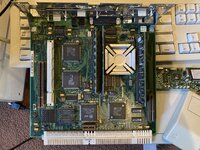 | |
Posted by: Phipli on 2023-11-11 16:07:56When I started this whole mess, the computer was running OS8.5.1 with a boatload of extensions, and I somehow thought it was OS9.2.2. The start-up time was 1:45 from power button to desktop... ugh. So I performed a clean install of OS8.6 plus Speed Doubler 8, and now the start-up time is 1:50. 🤔Time to benchmark it. If it is similar to a 7100, faster than a 6100... You have what might be an overclocked 6200 (or 6300 board). | |
Posted by: Phipli on 2023-11-11 16:20:55The motherboard: 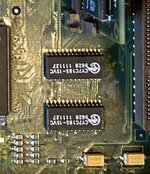 These chips look to be 28th week of 1996, which is after EveryMac says they stopped producing the 6200. There could be reasons for this, like warranty replacement or whatever, but I suspect that is a 6300 board and they were common PCBs between the machines. Hence System Info giving them one Gestalt. | |
| 1 > |