68kMLA Classic Interface
This is a version of the 68kMLA forums for viewing on your favorite old mac. Visitors on modern platforms may prefer the main site.
| Click here to select a new forum. | |
| Apple IIGS start up failure | |
| Posted by: logan48maer on 2023-10-19 21:31:44 I just got this new to me IIGS delivered today. When I try to start up I get this screen. It won’t try to lost from a 3.5 or 5.25 drive or from my Floppy EMU. Am I doing something wrong here? Any help would be greatly appreciated! 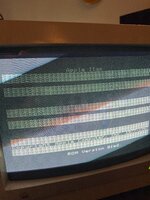 | |
| Posted by: logan48maer on 2023-10-19 21:35:31 I just got this new to me IIGS delivered today. When I try to start up I get this screen. It doesn’t even try to boot from a 3.5 or 5.25 drive or from my Floppy EMU. Am I doing something wrong here? Any help would be greatly appreciated!View attachment 63868 | |
| Posted by: bibilit on 2023-10-20 02:46:11 Probably an issue with hardware. ram issue maybe ? | |
| Posted by: Arbee on 2023-10-20 05:04:32 Yeah, that machine's broken. Check if the battery's leaking (and remove it immediately if it is). | |
| Posted by: logan48maer on 2023-10-20 11:31:33 I examined the board and the battery was already removed. It looks clean too. Could it not be starting properly because there isn’t a battery? 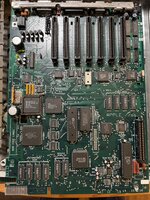 | |
| Posted by: Skate323k137 on 2023-10-20 11:36:27 Complete lack of a battery shouldn't cause that as far as I know. You can try reseating the ROM at UI10 next to the CPU just in case, as well as any other socketed chips if you're comfortable with it. Bonus points if you clean the IC legs carefully. It could also be a RAM issue but your RAM is soldered in, making that a bit more difficult to check. | |
| Posted by: bibilit on 2023-10-20 11:40:51 Can you have a look at those two spots ? Hard to see but look Strange to me. | |
Posted by: Skate323k137 on 2023-10-20 11:44:56Can you have a look at those two spots ? Hard to see but look Strange to me.Good eye! Definitely there could be a few traces suspect there. At least they all look fixable on first glance [if they are broken]. | |
| Posted by: logan48maer on 2023-10-20 12:35:14 Seemed to be some dust that wiped off. Do you see any other suspect points that I should address? | |
| Posted by: logan48maer on 2023-10-20 15:57:14 Update: I took out the board and cleaned it with IPA, I reseated the ROM and cleaned it too. Still encountering the same problem. On a separate note. I have a GGLABS GZ/80 7Mhz card that I'd like to eventually use in this machine if I can get it up and running. Does it matter what slot the accelerator card is placed in, and do I need to do anything other than just install the card? Are there any board modifications that I will need to make? | |
| Posted by: Byte Knight on 2023-10-20 18:43:26 I'd reseat all the roms and cards to start with. | |
| Posted by: waynestewart on 2023-10-21 08:04:39 Try the self test The self-test is activated by pressing Open-Apple and Option on power up | |
| Posted by: Arbee on 2023-10-21 08:54:43 That GGLabs card is a Z80 CP/M card, not an accelerator. | |
| Posted by: bigmessowires on 2023-10-21 09:12:00 I'd guess this is more likely a RAM issue than ROM. The computer is doing the right thing at start-up (ROM) but there's a repeating pattern of wrong lines in the screen buffer. Could be bad RAM, or a bad address line? Also I just noticed there are two separate threads about this same IIgs problem going simultaneously here. From the other thread: Try the self test | |
Posted by: logan48maer on 2023-10-21 13:36:10Try the self testI tried the self-test and got "System Bad: 01353300" Any idea what this points to specifically? | |
Posted by: logan48maer on 2023-10-21 14:17:09I'd guess this is more likely a RAM issue than ROM. The computer is doing the right thing at start-up (ROM) but there's a repeating pattern of wrong lines in the screen buffer. Could be bad RAM, or a bad address line?There are two separate threads accidentally. I made a typo in the first one and tried to correct it by editing the post, but somehow it created a second duplicate post. (This one were in now) I have tried to delete the other one but couldn’t figure out how to. I did try running the self test and got the following result. 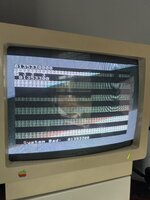 | |
Posted by: logan48maer on 2023-10-21 14:18:30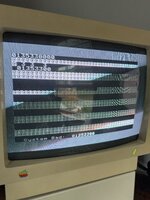 | |
| Posted by: zigzagjoe on 2023-10-21 14:58:35 Looks like that's an issue with ROM. Reseat it, for starters, as Byte Knight said. | |
| Posted by: Arbee on 2023-10-21 15:25:31 That screenshot *really* looks like bad Mega II-side RAM. It's possible the code isn't being reported correctly because of that. | |
Posted by: logan48maer on 2023-10-21 16:30:14That screenshot *really* looks like bad Mega II-side RAM. It's possible the code isn't being reported correctly because of that.Is that possible to repair? If so where can I find instructions? | |
| 1 > |