68kMLA Classic Interface
This is a version of the 68kMLA forums for viewing on your favorite old mac. Visitors on modern platforms may prefer the main site.
| Click here to select a new forum. | |
| Mac IIci with dead NuBus slots | |
| Posted by: bigmessowires on 2023-10-16 08:00:58 The problem: none of the NuBus slots in my recapped IIci seem to work. I've been happily using the computer for years, but never had a reason to try the NuBus slots until now. I've inserted a Toby video card and a Farallon Etherwave card, but neither one seems to be recognized. Tattletech doesn't show any NuBus cards present. Same for the Slots diagnostic program from Apple Developer Technical Support. No video output from the Toby either. This seems to be a somewhat common issue with the IIci, because some of the NuBus circuits are right next to capacitors that leak evil corrosive goo. There's some discussion of similar problems here: 
Problem with IIci and NuBus cards (Solved!)Hello, testing an Ethernet Card that works on my IIsi and not in my IIci, it seems that I could have a problem with the NuBus slots. I found this: The Cap next to this IC did leak and it was replaced, but I didn't see until now evident damages in this chip. Did you have similar experiences?
 tinkerdifferent.com
The problem area seems to be near chip UH1, next to NuBus slot C. According to the schemtic, this chip is used by all three NuBus slots, not just slot C. I took a closer look at mine, and there are problems: 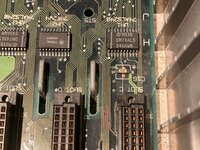 It's hard to see in the photo, but the legs of UH1 on the side towards the NuBus slot look gray and cruddy, compared to the shiny legs on UH2. And some of those traces running to the left of Slot C look broken. I'm not sure yet which traces those are, and whether they're solely for Slot C or are also used by the other slots. From my testing, all three slots are currently non-functional. I will start by replacing UH1 and testing those other traces. This is a detour for me, a project within a project, as I'm trying to use the NuBus slots in this IIci to test some video cards for my Mac to VGA adapter sync splitter project. Any other suggestions for places to check that might cause all three NuBus slots to die? | |
| Posted by: joshc on 2023-10-16 08:09:22 The damage in that area is very typical for IIci boards that have been left in their original non-recapped state for a long time, I've seen it first-hand numerous times. What is less typical is all the extra trace damage next to the bottom of slot C - all those traces are going to need buzzing out to see which ones need repairing. I wouldn't even assume UH1 is bad until you check all the traces first. | |
Posted by: Phipli on 2023-10-16 08:59:37It's hard to see in the photo, but the legs of UH1 on the side towards the NuBus slot look gray and cruddy, compared to the shiny legs on UH2They're probably ok even though they look a little tired. And some of those traces running to the left of Slot C look broken. I'm not sure yet which traces those are, and whether they're solely for Slot C or are also used by the other slots.Start here. Clean, scrape off some some solder mask with a knife, scrub with a broken corner of a PCB (or fancy fiberglass pen, depending on if you're as cheap as me) until the copper gleams, tin with lots of flux, remove excess solder with wick, bridge with enamel wire. I will start by replacing UH1Leave this until you repair the traces. It likely is fine. /Me goes to read what @joshc said and see if we agreed 🤣 | |
Posted by: Phipli on 2023-10-16 09:00:22I wouldn't even assume UH1 is bad until you check all the traces first.Yay! A consistent message! *Highfive* | |
Posted by: Melkhior on 2023-10-16 09:23:12I'm not sure yet which traces those are, and whether they're solely for Slot C or are also used by the other slots.NuBus is a 'true' bus, so pretty much all the pins/signals are common through all the slots. The exceptions are the ID pins (which are either floating or tied to ground on the motherboard) and the NMRQ pins (non-master request, a.k.a. interrupt, one per slot). So odds are, if one slot fails, they all fails. Also it's multiplexed, so if you loose an A/D signal, it goes down very quickly as you have both wrong addresses and wrong data... | |
| Posted by: bigmessowires on 2023-10-16 09:44:36 I'll try to beep them out and see where they go. Even though it's logically a common bus, those particular traces might be specific for connecting the shared signals to Slot C, no? It depends exactly how the traces are routed on the board, which the schematic can't tell us. | |
Posted by: Phipli on 2023-10-16 09:52:20I'll try to beep them out and see where they go. Even though it's logically a common bus, those particular traces might be specific for connecting the shared signals to Slot C, no? It depends exactly how the traces are routed on the board, which the schematic can't tell us.There are more dodgy looking traces around. I'm guessing the exposed copper is from you scrubbing them, but there are some others as well. There are likely even more elsewhere. 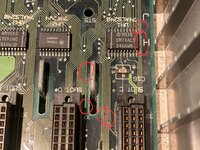 | |
| Posted by: joshc on 2023-10-16 09:56:57 Hey, I can draw circles too... 😉 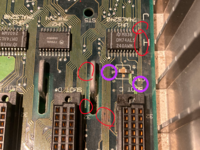 | |
| Posted by: volvo242gt on 2023-10-16 10:18:01 It's not uncommon for the upper right leg to not be grounded when cap goo gets to it. You might be good to go after a general cleanup of that area, then a bodge wire is added between that leg and a grounding point. My own IIci had the same issue. In my case, after replacing the chip, it still didn't work. Wound up buying another board off the 'bay and after verifying that the slots were working, had it recapped. I'm not sure what the status is on my old board, which I let @James1095 have after he recapped my current board. | |
Posted by: Phipli on 2023-10-16 10:19:36Hey, I can draw circles too... 😉You can draw circles better than me. I'd question whether mine are technically circles at all 😉 | |
Posted by: volvo242gt on 2023-10-16 10:27:10You can draw circles better than me. I'd question whether mine are technically circles at all 😉Yours look hand-drawn, so yeah, they are... lol | |
| Posted by: bigmessowires on 2023-10-16 11:24:40 NuBus slots fixed! Cards detected! Toby video card works! It's a good day. Yeah there were a LOT of suspicious-looking traces, but they all tested OK except for a single one here: 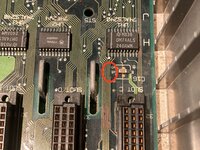 I repaired that with a wire from chip UH1 to the underside of NuBus slot C, and everything is working again. Thanks for your troubleshooting suggestions! | |
| Posted by: joshc on 2023-10-16 12:11:14 Nice. A lot of those traces are exposed so I would recommend some fingernail polish or UV curable solder mask on them to protect them (or just tin them with solder, but sometimes it doesn't like to take to thin traces like that). | |
Posted by: Phipli on 2023-10-16 12:26:04sometimes it doesn't like to take to thin traces like thatYou have to scrub them with fibreglass in the same direction as the trace, then tin them by fluxing the area and running used solderwick over the top. Small amounts of remaining soldermask stops them tinning, get them clean and even the smallest trace tins. | |
| 1 |