68kMLA Classic Interface
This is a version of the 68kMLA forums for viewing on your favorite old mac. Visitors on modern platforms may prefer the main site.
| Click here to select a new forum. | |
| Mac SE 800k 20SC bad startup screen no boot | |
| Posted by: stansteph54 on 2023-10-08 14:44:50 Dear all, I’m the happy owner of a Macintosh SE M5011 first version with the 800k floppy and internal 20SC which luckily badged as well at its back. Unfortunately I’m not able to have it booting despite of trying different ram simms combinations that were tested well on my other SE Fdhd. Here is video of that startup screen which is anyway changing when I push the reset button on the side of the motherboard. R35 was cut, R36 is empty. I did resolder R35 in order to try the pictured 4*256ko configuration but anyway.. same startup screen. Any idea what could be the issue ? Many thanks beforehand for your time spent in reading and helping me. 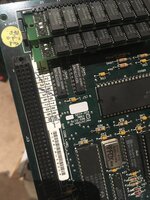 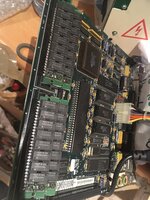 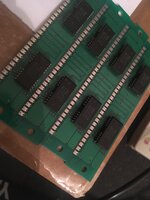 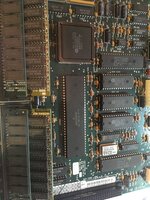 | |
| Posted by: stansteph54 on 2023-10-08 14:48:59 ps : Also different Analog board were tried including the working one the FDHD. thanks | |
| Posted by: bigmessowires on 2023-10-08 20:58:12 Do you hear the startup chime when you turn on the power? Can you get a closer photo of the screen? | |
| Posted by: stansteph54 on 2023-10-09 01:40:47 Thanks a lot for your help. No chime at startup unfortunately. Here are some closer pictures. The screen isn’t frozen compared to chessboard issues, there are kind of speedy activities. Here is also a new video with reset button effect. it also makes a slight tic sound in the speaker when pushed (see also last 2nd picture which is with button pushed ). Could / Should I test the Rom chips on the working FDHD motherboard ? thanks again 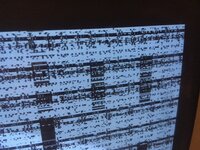 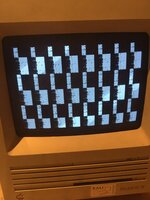 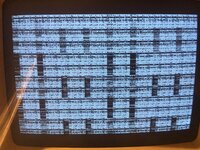 | |
| Posted by: LaPorta on 2023-10-09 03:53:07 Has that original axial battery leaked at all? They usually don't, just checking. Some good shots of the entire board would be very helpful, as well. | |
| Posted by: stansteph54 on 2023-10-09 04:57:11 No leakage at all, the motherboard looks very good but I will take some pictures of. Thanks a lot | |
| Posted by: stansteph54 on 2023-10-11 03:33:36 Yesterday, I re socketed the Rom chips and deOxited all socketed chips without any positive effect, unfortunately 😥 | |
| Posted by: stansteph54 on 2023-10-11 13:18:42 Hi, here are the requested additionnal pics I took in best quality with my wife's phone lol. Also, I found this link which is interesting relatively to HALT and RESET mistakes/short on the cPU caused by a wrong sound chip ? Mac SE Checkerboard pattern after cleaning battery leakHi, Just bought Macintosh Plus and Macintosh SE 1/40 on local market. Plus works (but I need a keyboard ;) ), SE was known to be broken / showing only horizontal dotted line (not solid). After disassembly I saw this mess: After touching battery it got even worse it was still half-full of it's...
 forum.vcfed.org
What I found is that both RESET and HALT lines are driven LOW (active) and for some reason they are both short. On working computer I applied 5V to them... and got sad mac face! So I desoldered audio chip again, and tried resetting CPU by hand (this time on correct connector). And I got usual background! Thanks again for your possible help, Regards 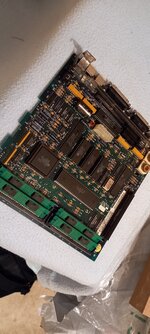 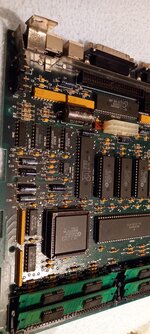 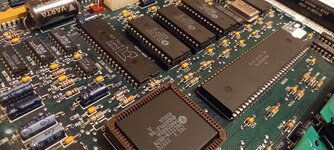 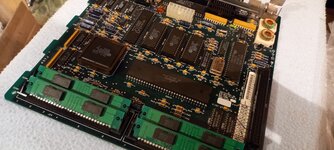 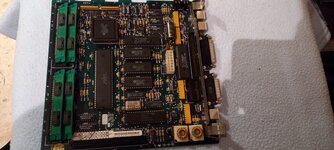 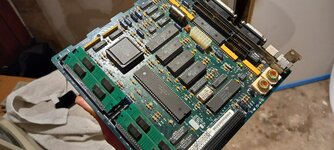 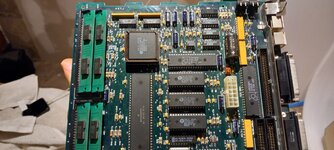 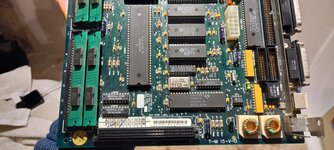 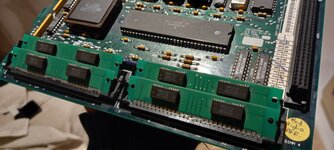 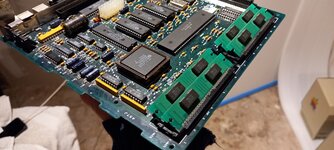 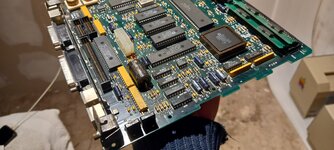 | |
| Posted by: LaPorta on 2023-10-11 13:57:46 Sometimes those two-chip RAM chips don’t play nice. Do you have any regular sticks around? | |
| Posted by: stansteph54 on 2023-10-11 14:48:32 thank you so much for reading my post and answering ♥️ I do have some 8 pins that I guess being 1Mb Simms, see first pictures on top of this topic. A ll of them were tested successfully on the FDHD board | |
Posted by: stansteph54 on 2023-10-12 00:00:288 pins*8 chips | |
| Posted by: bigmessowires on 2023-10-12 08:14:45 OP has no chime, and a changing pattern of garbage on the screen. I'm not 100% sure about the SE, but on the Mac Plus I think you'll get a boot chime even if there's no RAM at all. The video circuitry displays a fixed region of RAM as an image. It's interesting that the video image is continuously changing. Either the CPU is continuously writing data here (unlikely) or the video circuitry is reading from the wrong address, because of problems with the address lines or another reason. When you hold the reset button, the video image stops changing. This suggests to me that the changing garbage may actually be written by the CPU. Maybe it read the wrong instruction from ROM, putting it into an infinite loop that continuously writes data across the whole address space? That seems a bit far-fetched though. Problems with the address lines could prevent reading ROM during startup (no chime) and could also result in reading video data from a non-RAM address (changing garbage image). There might also be a problem with the address decoding, but that seems less likely. I would use a schematic and check for continuity on all of the address lines to all of the chips where they should be connected, and also check that there is not continuity between any address line and an adjacent address line or other signal or supply voltage. | |
Posted by: LaPorta on 2023-10-12 08:23:51OP has no chime, and a changing pattern of garbage on the screen. I'm not 100% sure about the SE, but on the Mac Plus I think you'll get a boot chime even if there's no RAM at all. Is that so? I guess if I thought it through that would make sense, playing before any sort of conceivable RAM check could happen. Thanks for that, and I missed the no chime. | |
Posted by: stansteph54 on 2023-10-12 11:33:01OP has no chime, and a changing pattern of garbage on the screen. I'm not 100% sure about the SE, but on the Mac Plus I think you'll get a boot chime even if there's no RAM at all.Thanks a lot @bigmessowires , that's for sure a very helping post <3 Do you think I could try to switch the 2 Rom chips with the ones of the working FDHD motherboard ? Or at least try the Rom chips of the non-working 800k motherboards on the working FDHD motherboard ? same for IWM ? I checked all markings on the chips but they are quite different... thanks a lot again for your input | |
| Posted by: bigmessowires on 2023-10-12 12:25:49 It couldn't hurt to try swapping chips between two logic boards. But I'm guessing the problem is something more than a bad chip. If you don't have a multimeter, get one that has a continuity check mode where it beeps when there's a low-ohm connection. Then use it to beep out all the address and data lines on the board and make sure they're correct. | |
| Posted by: stansteph54 on 2023-10-13 00:51:07 Thanks again. I will do my homework I promise you. I love having teaching 🙏🙏♥️ https://museo.freaknet.org/gallery/apple/stuff/mac/andreas.kann/SE_P1.GIF | |
| Posted by: bibilit on 2026-02-09 08:08:27 I have a similar issue, no battery issue, but getting the chessboard pattern also. Logic Board is really clean, getting activity at the CPU, but A18 and A19 don't seem great. I have swapped RAM and Roms, and the BBU for a test, but still getting more or less the same issue (i have swapped all socketed chips) If i remove both ROMS, i still have the same screen, so thinking something wrong in this area, but so far lost. Any idea ? | |
| Posted by: bibilit on 2026-02-14 22:58:18 Still trying to get it working. | |
| 1 |