68kMLA Classic Interface
This is a version of the 68kMLA forums for viewing on your favorite old mac. Visitors on modern platforms may prefer the main site.
| Click here to select a new forum. | |
| Mobius 030 Accelerator Problem | |
| Posted by: MacintoshMan1999 on 2023-09-05 20:07:46 I've got a Mobius 030 Accelerator card that is preventing the computer from booting When it's installed and i power on the computer the disk drive head moves and i get a screen full of garbage. Photo: 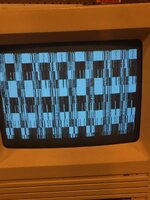 | |
Posted by: Nixontheknight on 2023-09-07 09:08:27I've got a Mobius 030 Accelerator card that is preventing the computer from booting When it's installed and i power on the computer the disk drive head moves and i get a screen full of garbage.check the RAM and see if the power supply is supplying the proper 5V and 12V, you can get access to both to probe through the floppy port | |
Posted by: MacintoshMan1999 on 2023-09-08 00:48:34check the RAM and see if the power supply is supplying the proper 5V and 12V, you can get access to both to probe through the floppy portThe RAM is fine, the Mac boots fine without the accelerator but when I attach it the Mac still shows garbage. | |
Posted by: Nixontheknight on 2023-09-08 10:20:50The RAM is fine, the Mac boots fine without the accelerator but when I attach it the Mac still shows garbage.then try recapping your analog board, it might not be able to handle the current of the accelerator if it hasn't been recapped | |
| Posted by: Phipli on 2023-09-08 10:38:40 It's the PSU that produces the voltages on these, not the analogue board. Test the voltages on the floppy port before recapping anything. | |
Posted by: MacintoshMan1999 on 2023-09-09 02:56:55It's the PSU that produces the voltages on these, not the analogue board.Noted, Will do. | |
| Posted by: MacintoshMan1999 on 2025-03-15 00:34:04 After a LONG time of procrastination, I've finally gotten around to ordering capacitors for my SE's power supply. While flipping around in a scan of the manual it says that ram at 100ns or faster is required for the 25MHz and I've only got 70ns. Should I get 100ns RAM? | |
| Posted by: Byrd on 2025-03-15 01:06:29 I don't think that's the cause of your problem, faster RAM will run at the slower specified speed (70 - 100ns). | |
Posted by: cheesestraws on 2025-03-15 01:16:19While flipping around in a scan of the manual it says that ram at 100ns or faster is required for the 25MHz and I've only got 70ns. 'ns' is 'nanoseconds' here, so lower numbers are faster - so you're already faster than 100ns. Should be fine. | |
Posted by: MacintoshMan1999 on 2025-03-27 12:05:12'ns' is 'nanoseconds' here, so lower numbers are faster - so you're already faster than 100ns. Should be fine.Whoops, bit of a dufus moment there. I finally replaced all the caps but the bars still persist, at least the fan spins a bit faster. Tried swapping around different ram sticks, tried it without ram, and double checked the jumper settings. I tried the troubleshooting tip in the manual (pages below) and determined its still the Mob30. | |
| Posted by: MacintoshMan1999 on 2025-03-29 14:27:37 Could it be the processor or an IC? Tantalum Caps rarely fail so I'm discounting that. | |
| Posted by: Byrd on 2025-03-29 22:50:00 Show some pics - does the accelerator need it's own power source? | |
| Posted by: MacintoshMan1999 on 2025-04-01 00:22:07 No, it does not need an individual power supply. Pics: | |
| Posted by: Byrd on 2025-04-01 01:26:43 Keeping it simple, I'd reseat and clean the sockets, and switch around RAM - a lot - to see if any of the garble is different. Can the Mac boot without RAM in the SE motherboard? | |
Posted by: MacintoshMan1999 on 2025-04-01 10:14:08Keeping it simple, I'd reseat and clean the sockets, and switch around RAM - a lot - to see if any of the garble is different. Can the Mac boot without RAM in the SE motherboard?Reseat as in remove and replace the chips themselves? If so I’ve done that too all the chips except the Xilinx, don’t have a tool for that one. Unless you mean the solder I’ve tried swapping different RAM sticks and even tried it without ram in the accelerator, the garbage on the screen has disappeared and now only the bars remain. The manual describes how to boot normally with the card installed by using the programmer’s switch, I’ve tried that and it works as normal. I didn’t know that the SE could boot without RAM, I’ll try that and report back. | |
Posted by: MacintoshMan1999 on 2025-04-03 15:58:47Can the Mac boot without RAM in the SE motherboard? With the Accelerator attached? | |
| Posted by: MacintoshMan1999 on 2025-04-15 22:54:05 No luck still, In the interim I've been attempting to install Sys 7.5 on my SE with little luck. Any tips? | |
| Posted by: MacintoshMan1999 on 2026-04-18 17:19:41 Well, this is not good. I was taking another look at the accelerator card and I noticed that the "XILINX" FPGA was in the wrong way. I put it in the RIGHT way and it popped. I think I'm fucked. | |
| Posted by: Byrd on 2026-04-18 18:59:02 It doesn't look in the wrong position in the pic ... I'm sure you can find another part. | |
| Posted by: MacintoshMan1999 on 2026-04-18 19:06:11 Well, the data's definitely gone... I can find the chip but I'm gonna need to... Well, you know, I don't have the code that was on that. The programmed code. It doesn't look in the wrong position in the pic ... I'm sure you can find another part. 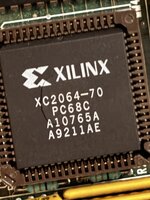 | |
| 1 > |