68kMLA Classic Interface
This is a version of the 68kMLA forums for viewing on your favorite old mac. Visitors on modern platforms may prefer the main site.
| Click here to select a new forum. | |
| Strange issue with Hard disk | |
| Posted by: bibilit on 2016-07-04 05:13:07 I have a strange issue with a disk. I have been able to connect the drive to my Powerbook 1400, format the drive and copy a System. The drive is not detected by my SE, would not boot and is invisible whatever i do. I have made exactly the same process with another drive, and the drive is working great. | |
| Posted by: Elfen on 2016-07-04 07:06:39 What system are you using on both machines? There is an issue with partition/formats when crossing that bridge between System >7 to System >7.5 and CPUs from PowerPC to 68K. | |
| Posted by: bibilit on 2016-07-04 08:44:16 The Same on both disks, SSW 7 | |
| Posted by: rsolberg on 2016-07-04 11:13:16 Is this an external SCSI hard drive? If so, I suspect a termination issue. The 1400 does not supply termination power to the SCSI bus, but the SE does. If your enclosure has auto termination and the drive inside has conflicting termination settings, the lack of bus term power on the 1400 might allow it to work, but not on the SE. Also, the lack of an internal SCSI HD in the 1400 means that an external drive set to SCSI ID 0 might work with it, but it wouldn't on the SE. | |
| Posted by: bibilit on 2016-07-04 14:06:04 You are probably right, something is related with termination. The HD is an internal one, but i use an enclosure to connect to the Powerbook. The crazy thing about it is that disk came from an SE, and Worked before a clean installation. The SE has no hard drive at the moment, so was perfect for a test, and i was able to boot it with the other drive, even with a Jaz disk. | |
| Posted by: Macdrone on 2016-07-04 23:35:46 Clean installation with new driver in system 7 rather than update may have done it. I know some drivers do not play nice backwards. Especially with powerpc. I have disks that seperate 68000,68020 and 68030 from 040 and powerpc installations because of hard disk drivers, so that maybe the issue. 7.5 and 7.6 floppies utility disks, that come with the CD installer are that way. | |
| Posted by: bibilit on 2016-07-10 05:51:04 Ok, removed the HD from the enclosure and connected it to the SE, and got a boot. Problem solved. | |
| Posted by: rsolberg on 2016-07-10 09:45:58 Glad to hear you got the drive to cooperate. Here's the enclosure I had a similar issue with on my SE. It works great with its original HP CD-RW installed, but proved fickle with a Seagate Hawk hard disk until I found the right jumper combination on the drive. It's a 68 pin external interface, 50 pin internal. 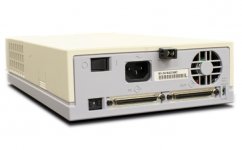 | |
| Posted by: bibilit on 2016-07-10 10:37:30 Thanks, I managed to "repair" another drive, well sort of. the drive didn't let any program formating it, most of the times just get a message stating that the process failed. In the end used a trick that worked a couple of times for me, made two partitions and the formating went smoothly. Have now two volumes instead of one, not a big deal, rather have a working hard drive with two volumes than a non working drive. | |
| 1 |