68kMLA Classic Interface
This is a version of the 68kMLA forums for viewing on your favorite old mac. Visitors on modern platforms may prefer the main site.
| Click here to select a new forum. | |
| Twentieth Anniversary Mac PSU replacement | |
| Posted by: chrisrueckert on 2023-07-02 01:44:22 I am looking for a replacement of my defective PSU for the TAM. Ebay lists PSUs with similar part numbers but I am not sure if these are also suitable for the TAM. The OEM part number is dps-150gb-1 A, that Apple part number is 614-0057. What options are there to be used as a replacement from your experience? PS: Yes, I fried it because I did not change the voltage switch to 240V. What a firework... 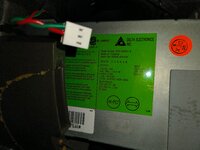 | |
| Posted by: Byrd on 2023-07-02 03:03:07 Argh! Our of interest, how easy/hard was it to get into the internals of the sub - any pointers? My best suggestion would be to research PSUs as found in 6500 desktop Macs, maybe a 6400. I believe the TAM subwoofer PSU is basically an extension of this. | |
| Posted by: chrisrueckert on 2023-07-02 13:46:15 It was quite ease. This YouTube video explains how: How To Repair TAM's Bose Buzz - #MARCHintosh Launch Video Featuring The 20th Anniversary Mac! - YouTube I'll have look a the 65/6400 PSU and will share my findings here. | |
| Posted by: Byrd on 2023-07-02 15:56:06 That's good to hear - did you damage the rubber top in disassembly at all? I'd crack open the existing PSU to see damage and go off the 6500 PSU as reference, they will be very similar. | |
| Posted by: chrisrueckert on 2023-07-03 02:52:49 It did get off quite easily. No apparent damage. | |
| Posted by: GRudolf94 on 2023-07-06 03:39:44 Same as desktop macs of the era, yes. That said, it should probably be repairable. Let us know if you want help with that. | |
| Posted by: chrisrueckert on 2023-07-21 13:46:17 I finally found time to open up the TAM PSU and assess the damage. 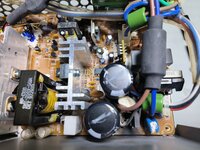 There is grime to the right of the large capacitor on the bottom. Could this have been an exploded film capacitor (like the one just above it with the white stuff on it filled into a transparent plastic surrounding? Here's a picture of the entire PSU for reference: 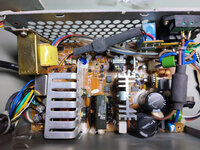 | |
| Posted by: GRudolf94 on 2023-07-21 14:03:21 Filtering here seems to all be on the board soldered to the back of the input jack (and filter caps fail safe, without taking down the PSU). That looks a bit like a grenaded MOV. | |
| Posted by: chrisrueckert on 2023-07-25 05:12:51 What's a MOV? | |
| Posted by: GRudolf94 on 2023-07-25 05:59:23 Metal Oxide Varistor. A surge protector - once its rated voltage is exceeded, it becomes a short and blows the fuse. | |
| Posted by: techknight on 2023-07-26 07:18:54 MOVs do have a lifespan so thats not surprising. Also a surge could have done this as well. the TOP226Y and 1ohm fusible resistor are a known weak spot in these PSUs, knocking out standby voltage. When the TOP controller fails, it opens the 1ohm resistor. | |
| Posted by: chrisrueckert on 2023-07-26 09:07:30 Thanks for the additional insights. These two seem to have blown up. 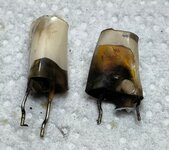 They were at positions 21 and 22. 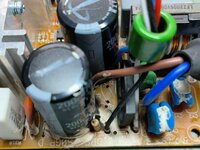 Here's a closer look at one of them: 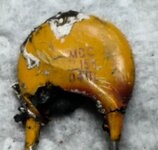 Can I assume the second one has the same specs? It's covered with the white glue which is difficult to remove. | |
| Posted by: GRudolf94 on 2023-07-26 09:14:16 Aha, spot-on. They're varistors, as predicted, and will both be the same. That's Z1 and Z2, Z being a common symbol for a varistor. | |
| Posted by: chrisrueckert on 2023-07-26 10:37:53 Thanks! Are the MOV polarised like capacitors? MOVs do have a lifespan so thats not surprising. Also a surge could have done this as well.Does that mean that th TOP failed too? | |
| Posted by: GRudolf94 on 2023-07-26 10:41:24 You can test the PSU by cleaning up the carbon created by the MOVs disintegrating and replacing the fuse. See if it has trickle voltage after that. | |
| Posted by: chrisrueckert on 2023-07-27 13:33:41 I replaced the two MOVs with spares from another P6500 PSU. Connected to mains did not blow more parts, luckily. So far so good. However, the TAM doesn't power up. What's the best way to test if the PSU delivers power to the TAM? | |
| Posted by: GRudolf94 on 2023-07-27 14:14:32 Did you also replace the fuse? Check the single yellow wire against any ground for voltage when disconnected from the Mac. | |
| Posted by: chrisrueckert on 2023-07-28 14:23:54 Yes, the fuse was replaced and working. There are two yellow wires. Which one do you mean? 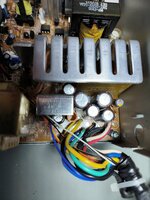 | |
| Posted by: GRudolf94 on 2023-07-28 14:32:01 Hmm, I wonder if the colors are different. Are they labeled on the PCB? | |
| Posted by: chrisrueckert on 2023-07-28 14:45:54 I couldn't see any labels, unfortunately. Looking at it again, I now see three yellow cables. Two with similar diameter and one with a thinner wire. 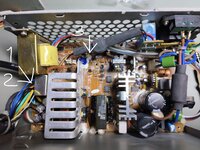 | |
| 1 > |