68kMLA Classic Interface
This is a version of the 68kMLA forums for viewing on your favorite old mac. Visitors on modern platforms may prefer the main site.
| Click here to select a new forum. | |
| Question on widgets for classic mac os | |
| Posted by: rlawson on 2023-06-23 05:30:13 So I'm doing the ThinkC study group over at tinkerdifferent (Mac C Programming primer is the book). it's a load of fun. But I have a question. The basic widgets that come out of the box seem very limited (menus, buttons, text boxes). What did mac devs back in the day use for things like - displaying sortable tables, progress bars, custom widgets. I'm imagining there is a piece I am missing. Right now all our examples are of the flavor - draw some text or graphics on the main window and maybe pop up a dialog with some widgets on it. | |
| Posted by: Crutch on 2023-06-23 05:40:45 In the Mac C Programming Primer era, you mostly are on my own my friend! For sortable tables, you can use the List Manager, but everything beyond basic display and scrolling of the table contents (including any sortability implementation) is on you. For custom controls, the standard approach would have been to write your own CDEF (control definition function resource). See the Control Manager chapter of Inside Macintosh Volume I. This is a nontrivial exercise though. For progress bars, one would probably just use QuickDraw to draw and update the thing on the screen, or implement a custom draw procedure for a dialog box userItem. See the section on ”user items” in the Dialog Manager chapter of Inside Macintosh Volume I (the upshot is, you use SetDItem and replace the handle argument to that trap with a pointer to a procedure you want to draw the item whenever appropriate). Some of these types of widgets may have been supported by either MacApp or the THINK Class Library, the two primary development frameworks that emerged by the early ‘90s, but I didn’t use either much myself and don’t think that’s the direction you want to go anyway. | |
| Posted by: rlawson on 2023-06-23 06:26:01 Ok thanks! And as far as placing controls on the main window - I would make toolbox calls (like to ListManager)? I have been using ResEdit to design Dialogs which is slightly visual basic like. But I don't suppose that similar thing exists for the main window? | |
Posted by: Phipli on 2023-06-23 06:46:16Ok thanks! And as far as placing controls on the main window - I would make toolbox calls (like to ListManager)?ResEdit does windows as well as dialog boxes. 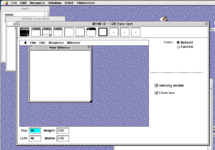 | |
| Posted by: rlawson on 2023-06-23 07:40:27 Right - but I didn't see a way to place controls graphically on it like the DITL editor on dialogs | |
Posted by: Phipli on 2023-06-23 07:43:43Right - but I didn't see a way to place controls graphically on it like the DITL editor on dialogsYou're testing my memory... was... it done the same way as with a dialog box, effectively loading a dialog style layout into the window? Sorry, I'd forgotten it wasn't obvious. Crutch will do a much better job at answering than me. | |
| Posted by: Crutch on 2023-06-23 10:46:35 You can just make it a dialog box. The DLOG resource editor lets you use any window definition proc you want, including one that looks like a standard document window. You can go ahead and use that and drop controls wherever you like. Basically, think of a DLOG resource as just a way to combine (any type of) window with a list of things you want to be prepopulated in the window on load (stored in the corresponding DITL resource). It doesn’t have to represent a “dialog box” really. Just keep in mind that your “window” is now really a dialog box — you would display it using GetNewDialog, etc. You could then (if you want) use IsDialogEvent and DialogSelect for event handling and just treat it as if it were a modeless dialog box (which is really what it is) — or, you could handle events yourself and use FindControl, TrackControl etc. on a mouseDown exactly as if you’d added the controls yourself with NewControl. Just remember to draw the dialog items with DrawDialog, and that if it’s a resizable window with scroll bars, you have to move and resize the scroll bars yourself anytime the window size changes. | |
| Posted by: rlawson on 2023-06-23 12:04:40 ahh ok I see. I couldn't get my mind past the dialog being something that shows up when you need confirmation from the user. But just make it the whole window. Got it - thanks! | |
Posted by: oldmacuser on 2023-06-23 12:08:35So I'm doing the ThinkC study group over at tinkerdifferent (Mac C Programming primer is the book). it's a load of fun.Interesting. Please do tell more about the study group if you don’t mind sharing! | |
| Posted by: rlawson on 2023-06-23 12:13:44 Yeah it's a hoot. Each week you do a chapter and there is a forum thread for each week. That allows people to drop in and start whenever and you just post screenshots/questions/code to the thread corresponding to the chapter you are on. Others that have already done it answer questions/encourage. It's fun. I develop in Java/Python professionally atho I did C for a few years 20ish years ago so it's fun for me to go back to basics. 
ThinkC - [Study Group 0] Getting your Development Environment Setup & Hello, World!Welcome to the FIRST Study Group Getting your Development Environment Setup & Hello, World! Remember if you're not ready to start this week, don't worry, just come back when you are, we'll still be here to help! Our goals for this week: Setup your environment Start reading Chapter 1 & 2 of...
 tinkerdifferent.com
| |
| Posted by: Crutch on 2023-06-23 14:23:29 (Right here on 68Kmla is also a great place to get your vintage macOS dev questions answered, of course!) | |
Posted by: oldmacuser on 2023-06-23 14:48:20Yeah it's a hoot. Each week you do a chapter and there is a forum thread for each week. That allows people to drop in and start whenever and you just post screenshots/questions/code to the thread corresponding to the chapter you are on. Others that have already done it answer questions/encourage. It's fun. I develop in Java/Python professionally atho I did C for a few years 20ish years ago so it's fun for me to go back to basics.Thank you! This is wonderful! | |
Posted by: oldmacuser on 2023-06-23 14:48:52(Right here on 68Kmla is also a great place to get your vintage macOS dev questions answered, of course!)Of course! Will do! | |
Posted by: rlawson on 2023-06-23 15:24:32(Right here on 68Kmla is also a great place to get your vintage macOS dev questions answered, of course!)Yes I can see you are more knowledgeable than most (all) of us in the study group. Thank you for the help! | |
Posted by: Mu0n on 2026-03-15 06:36:35For custom controls, the standard approach would have been to write your own CDEF (control definition function resource). See the Control Manager chapter of Inside Macintosh Volume I. This is a nontrivial exercise though.Nice thread exactly on point in what I find myself needing today. I'm working on an app called FireJam that lets you use these inputs: * Typing keyboard * MIDI in (possible thanks to a great quality help I got from here in 2024) * Mouse click and hold Leading to these outputs: * MIDI out * All 3 variants of the Sound Driver * Hopefully a real time mix of the freeform buffer with polyphony My current wish is to reverse highlight the note graphics as they are interacted with and i thought I'd make a Code Resource of a note shape in a rectangle. I read and tried to dig in these materials: * Original Inside Macintosh vol 1 * Later inside macintosh : control manager * Think C primer vol 1 and 2 * Ultimate Mac Programming None carry you all the way with all the steps needed in both ResEdit and Symantec C++ 6.0 which I'm using. I know I have to: * Set the project type to code resource * Set the signature type to either CODE or CDEF * Set the main function as pascal long main * Deal with a switch with a short variable to deal with all cases associated with controls * Add the built resource to my main project's resource fork either as a CDEF directly or a CODE * Use a ControlHandle with a procID of 16*CDEF_id + variantNb After all is said and done, I should have 7 rectangles representing my crude octave (white notes only for now) but all I get is a large rounded rectangle surrounding the area I wanted my first test in, as if it reverted to a single normal button. Questions: 1) must I build a CODE and then resedit-make a CDEV with 0000 0080 (to link it to is 128) or do I build a CDEV directly? 2) should I have used empty text labels with programmed click behavior and bypassed all this mess instead to get my rectangular shapes? And call a FrameRect on their updating? | |
| Posted by: Mu0n on 2026-03-15 12:45:19 If I bypass custom controls completely and do my own mouseDown and mouseUp event detection, and mathematically figure out what rectangle to invert based on the MIDI note value, I can sorta do what I want with InvertRect. I just tested it on real hardware and so far, the amount of logical tests isn't enough to make it noticeably slow. It's still very snappy indeed. It would be a pain to do the whole white note around the black ones, which was the whole point in the beginning to do these as custom CDEF and let the Control Manager deal with all that. I'm still very interested to learn how to do it. 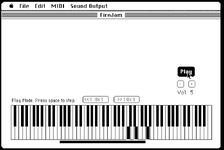 | |
| Posted by: joevt on 2026-03-15 13:30:45 1) CODE resources are completely different than other types of code resources such as DRVR, CDEF, WDEF, etc. CODE resources are segments of an application. You split an application into segments to improve memory utilization. i.e. A code segment is not loaded unless code in that segment is to be executed. A code segment can be unloaded by code in another segment when that code segment is no longer needed. Segments are either defined by compiler directives inserted into a source file, or by defining the segments in the project and dividing source files between the segments. https://developer.apple.com/library/archive/documentation/mac/pdf/Processes/Segment_Manager.pdf Does Symantec C++ have DRVR, CDEF, WDEF examples? Generally, a code resource DRVR, CDEF, WDEF, etc is a separate target of a project. The target is a resource. The resource is then made a dependency of the application target so that it will get inserted into the resource fork of the application. 2) Depends. How much work does the Control Manager do for you? Drawing controls is not as simple as a single draw. You need a device loop to handle drawing to multiple screens of different pixel depths (if you wanted to support Color QuickDraw). It would be a pain to do the whole white note around the black onesWhite keys of the keyboard are composed of one or two rectangles. Or you can make a region. The region is composed of one or two rectangles so they won't be too large in memory. It looks like the left edge of your invert rectangle is two pixels too far to the left. Or three pixels if you want the inverting rectangle to be surrounded by white pixels. The bottom edge is one pixel too far to the bottom. Or two pixels if you want the inverting rectangle to be surrounded by white pixels. I just tested it on real hardware and so far, the amount of logical tests isn't enough to make it noticeably slow. It's still very snappy indeed.I think the number of tests needed is one to four, since the keys are mostly equal width. Divide the mouse horizontal position by the width of the white keys to get the white key index. I suppose the black line dividing white keys should correspond to the white key to the right of the line. The mouse vertical position determines if you need to test the modulus of the division to determine if a black key is pressed. If the width of a key is 8 then a mod < 3 should test for a black key on the left and a mod > 5 should test for a black key on the right. A mod value in between represents the white key. For each white key, you should have a bit that states if the right side of the white key has a black key. For the left side of the white key, you would check the value for the white key to the left. It appears that the position of the black key on the right side of a white key is variable (by one pixel?). An extra bit is required for that info. This extra bit is added to the mod check described above. | |
Posted by: joevt on 2026-03-15 17:48:08so far, the amount of logical tests isn't enough to make it noticeably slowYou said this which implies there may be a lot of tests (like a couple rectangles per key), but I reread your post, and see that earlier you said that what rectangle to invert is figured out mathematically, which probably means you do the divide method already to minimize the number of tests so maybe my description doesn't add anything to what you currently have. | |
Posted by: Mu0n on 2026-03-16 05:53:461) Thanks for taking the time to respond, I really appreciate it! I'll be frank, to even start to get going, I tried to summon help from copilot and I was immediately skeptical, as I very often am, and end up eventually finding the real information from real references. The general strategy it told me was: * make a separate Symantec project of Code Resource type (chosen with the radio button in that dialog) and enter 'CODE' as the type. * use 'pascal long name_of_CODE_resource(short message, short item, short num, long param) as the entry point. BUT, I think that's bad advice and it only successfully compiles if I give it the name 'main'. * build it, copy it to the main project's resource file as a CODE resource ID=128 * add a CDEV resource with this hex content only: 0000 0080 (decimal 128 in the 2nd word) feels sketchy and weird, why wasn't it just a simple and straightforward building into a CDEV resource directly? Does Symantec C++ have DRVR, CDEF, WDEF examples?Symantec C++ is very light on examples. Making your own CDEV is typically not covered in programming books. I've opened quite a few more on top of the list I previously wrote. We're on the same page about understanding that it's best to make it a separate project just for the purpose of building the resource only. 2)I'm limiting myself to single monitor, 512x342 monochrome screen, ie the Mac Plus for now. Having a restrictive scope helps me get to a finish line. As I understand it, there are 3 routes for custom controls: 1) completely wing it with events detection (mouse, keyboard shortcut if you want one and here, even a midi in command), update redraw myself as part of your Window Handle management loop 2) (the one I want, since it'd allow me to reuse this well compiled resource) custom CDEV and bring it in as a Control, so that click management is done automatically, I can stash a MIDI byte value inside it so I know which note to sound off as part of my program, I can easily spawn many of them and their click detection routine is already done since it's just a variant of a common button 3) Complete overhaul of the Window as a Dialog instead, which lets me use static text fields with no text in them and I force their update to be tied with a FrameRect. However, I'd have to read how modeless dialog work. Iirc , dialogs work best if you expect one "result" instead of a continuous stream of results. I feel like there's a less robust event based looping with them compared with windows. It would also require the biggest code overhaul of the 3 across many of my files. White keys of the keyboard are composed of one or two rectangles. Or you can make a region. The region is composed of one or two rectangles so they won't be too large in memory. Good catch, this is only a dummy image I made with a PICT in superpaint, it's gonna be dynamically drawn soon and I can ditch the PICT. My plan has shifted to draw brain dead simple full white rectangle first as a bottom layer, and overlay the black notes on top of them and have their mouse click detection supersede and prevent a white note detection directly underneath them. I also read I could do Rgn with a Diff but that seems like more work for no gain. I think the number of tests needed is one to four, since the keys are mostly equal width. Those are good recommendations if I keep going with route 1, which is my fallback option if I can't figure out CDEV. You said this which implies there may be a lot of tests (like a couple rectangles per key), but I reread your post, and see that earlier you said that what rectangle to invert is figured out mathematically, which probably means you do the divide method already to minimize the number of tests so maybe my description doesn't add anything to what you currently have.The most complicated tests are mostly when figuring out a mouse click location and which key to trigger its updating of its graphics and which note to dispatch to audio. When I react to MIDI in or react to the typing keyboard, the note is a known quantity and no logical test needs to be performed. | |
| Posted by: Mu0n on 2026-03-16 11:22:08 Another thing I tried to do, but it failed. I tried stealing Control Panel's Sound slider by copying its CDEF and CNTL resources (1 each) into my own project resource file. ResEditing control panel/Sound shows: a CDEF file ID 3 a CNTL ID -4048 and procID 48 For the CNTL, the procID 48 is coherent with Inside Mac's formula which says: procID = (16 * CDEF_ID) + variantNb which would mean here: (16 * 3) + 0. The CNTL's RefCon of -4048 (and ID of -4048) - not sure how to explain that one. I tried manually changing it to 128. from my code, I tried both: assuming a: ControlHandle sVolume; 1) sVolume = GetControl(_the_CNTL's ID_, myWinHandle); and 2) sVolume = NewControl(__and all its initial values__); both give me the bog standard rounded rect button. One thing though, this control inside the Sound control panel item is used inside a DITL and dialog and messes with an Owner field in those. I thought it was still worth it to try and hack it into a standard window Control. | |
| 1 > |