68kMLA Classic Interface
This is a version of the 68kMLA forums for viewing on your favorite old mac. Visitors on modern platforms may prefer the main site.
| Click here to select a new forum. | |
| Macintosh SE/30 baterry Bombed - Vertical Lines after recap | |
| Posted by: hendrix900 on 2023-05-28 04:15:35 Hello everyone I recently purchased a Macintosh SE/30 with the battery exploded. 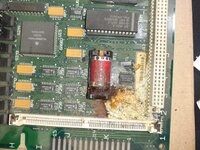 After cleaning the area, and recap, I find that the computer turns on fine (correct sound, mouse cursor and floppy disk appear on the screen). 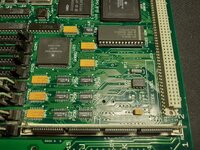 But it has a flaw in the image, some very fine vertical lines. 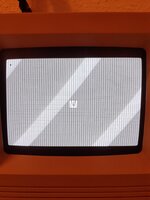 I have tried changing to reset the RAM and ROM, as well as trying different RAM configurations with the units that the computer had. Any clue where the problem might be? Thanks! 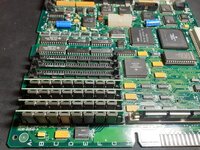 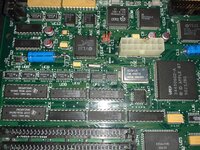 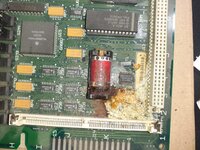 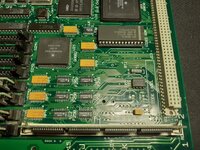 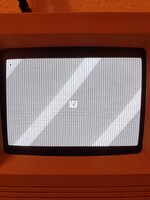 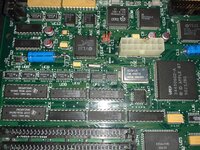 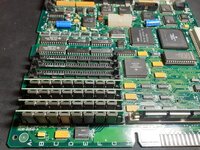 | |
| Posted by: croissantking on 2023-05-28 04:45:15 Wow, you’re lucky. Most battery bombed boards need a lot of bodge wires to get going again. I would suspect the chips at UD8 or UE8 to be the culprit. Probably one of the pins not making contact to the pad. There is a capacitor that leaks next to these chips and often causes the problem you’re seeing. | |
| Posted by: rollmastr on 2023-05-28 05:27:00 I would assume the missing diodes D1 and D2 would cause issues. Get two BAS40-06 back on these pads. | |
| Posted by: croissantking on 2023-05-28 05:29:27 Those diodes are inline with the PRAM battery so would have no effect on the video output | |
| Posted by: hendrix900 on 2023-05-28 12:01:55 You are right croissantking Finally i found the problem folowing your recomendations. I solder a cable between leg 14 from UE8 to Leg 23 to UC6 (41264) following the schematics, there has to be connection, but it didn´t. After solder a cable, the jailbars lines disappear. Thank you so much! | |
| Posted by: falen6 on 2023-05-28 16:57:22 I have had this same problem many times and each time it was a broken trace. pad coming for UD8 , UE8...... metered them out , found the break , jumped it and it worked | |
| Posted by: hendrix900 on 2023-06-09 10:38:11 Let's see if someone can help me find what could be causing the time not to advance in the system. I have replaced the battery with a cr2032 cell, replaced the crystal with a new one and the two missing diodes D1 and D2 with 1N914 diodes. I'm not sure if the way I've placed them is correct. Settings like mouse, date are saved between rebots/power offs, but time is not advanced. Thank you! 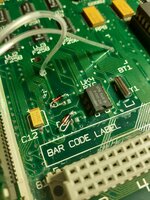 | |
| Posted by: 3lectr1cPPC on 2023-06-09 10:41:50 Have you tested continuity for all of those vias near the explosion? One in the bottom left corner in particular isn't looking too good. | |
| Posted by: hendrix900 on 2023-06-09 12:21:54 Clock is running again, the path that connects to the D2 anode was cut. The clock starts working again, but what I notice is that time passes slower than it should. I have checked and the crystal that I have put is 32.768Khz. Why could this be happening? | |
Posted by: hendrix900 on 2023-06-10 09:02:18Clock is running again, the path that connects to the D2 anode was cut. The clock starts working again, but what I notice is that time passes slower than it should. I have checked and the crystal that I have put is 32.768Khz.I've checked and the clock is not running when the computer is off, but the configuration and date/time is saved. I've also checked all the conection between rtc, crystal Y1, and UK12. And there is conection. Any idea why the seconds go slowly, and not increaaing when the system is off? Thanks! | |
| Posted by: dochilli on 2023-06-10 09:34:12 Deleted... | |
| Posted by: Phipli on 2023-06-10 09:43:14 Daft question, is the battery in the right way around? | |
| Posted by: hendrix900 on 2023-06-10 11:19:34 Yes the Battery CR2032 is in the right way. I installed a CR2032 Coin Cell Battery Holder with a switch on/off If I turn off the baterry when the computer is off, all settings that baterry save, are deleted when the computer start | |
| 1 |