68kMLA Classic Interface
This is a version of the 68kMLA forums for viewing on your favorite old mac. Visitors on modern platforms may prefer the main site.
| Click here to select a new forum. | |
| SCSI connections | |
| Posted by: MacUp72 on 2023-05-27 23:52:25 I want to connect my 540c to a 1400c for updating the system on the blackbird, so basically from HMI-30 to HMI-30. Next week I'll get a set of cables together with an HMI-30 to 25pin adapter, also with a video-out cable. 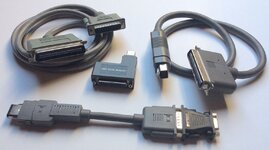 The L- shaped adapter has no switch on it, so it only will provide SCSI-mode..from my understanding, to connect the both powerbooks I'll further need a gender changing adapter between the two male SCSI ends? man, these vintage cables/adapters are gettig expensive these days..  | |
| Posted by: MacUp72 on 2023-06-02 03:29:28 ok, a PowerBook 160 came in with a bunch of cables..but both ends have a male end, is the adapter ok for that? 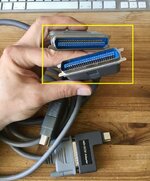  | |
| Posted by: MacUp72 on 2023-06-12 02:44:48 ok, didnt work because of termination issues, only for external devices since the L-shaped adapter has 29pins.. | |
| Posted by: finkmac on 2023-06-12 05:41:43 huh? you can't use two regular PowerBook SCSI cables to do target disk mode... You need an adapter that specifically provides it. See the HDI-30 SCSI pinout. Spoiler content hidden. Look at the HDI-30 connector there, it's missing pin 1. If you look at yours, you'll (almost definitely) see the missing pin. That's what tells the PowerBook to enable Disk mode. You need either a switchable adapter, or one of these cables Spoiler content hidden. Those gender changers will NOT work. | |
| Posted by: MacUp72 on 2023-06-12 10:35:32 yeah I noticed that, these adapters are quite hard to find here in germany and I got this adapter and cables together with a pb 160, so I'll use it just for external use. | |
| Posted by: SuperSVGA on 2023-06-12 15:03:01 You can actually do it without target disk mode. You just need to interrupt the target Powerbook before it starts up, and as long as there aren't any SCSI ID conflicts it works, even on older Powerbooks that don't support target disk mode. | |
| Posted by: MacUp72 on 2023-06-14 02:21:37 interrupt? what do you mean..pulling out the scsi cable during boot?💀 | |
| Posted by: ArmorAlley on 2023-06-14 04:08:50 An external SCSI-HD with two ports is required. Whether it can be done in one go [PB540c — ext. HD — PB 1400c] would surprise me, but sneakernet will work. If you don't have a SCSI CD-Burner get one. They are very useful for this sort of thing. | |
Posted by: SuperSVGA on 2023-06-14 06:46:42interrupt? what do you mean..pulling out the scsi cable during boot?💀The interrupt usually triggers the debugger if the system is booted, or during startup will typically give you a "Sad Mac" error which is normal. Typically there is a dedicated interrupt ⎉ button, but I think on the 540c does not have one, you have to press Command⌘ + Power to trigger the interrupt. The trick here is using the interrupt to keep the target system from fully starting up, so that the SCSI bus is free but the drive is still being powered. Then as long as you don't have any duplicate SCSI IDs, you would be able to see the drive on the other system. You may have to change the SCSI ID on one of the drives, because the default is typically 0 and you can't have two drives with the same ID. Here for example is my Macintosh Portable reading the drive from a Powerbook 145, which doesn't even support SCSI Target Mode:  The Powerbook doesn't even boot, but it turns on enough to run the hard drive. I've changed the SCSI ID for the hard drive in the Macintosh Portable to ID 2, so I can leave the Powerbook's hard drive at ID 0. | |
| Posted by: MacUp72 on 2023-06-14 09:56:46 well, it did work a bit but not really 😆 ..I connected both PBs( both have different scsi IDs, 0 and 2 )booted the 1400 and then jumpstarted the 540 with Command⌘ + Power to trigger the interrupt..the 540 chimed a sad MAC and its drive ran. On the 1400 though, Lido actually recognized the external scsi disk, I even can format it but it doesnt mount it..the 1400 freezes. Then I pulled all the cables and started the 540 from the Lido floppy disc alone, then it was actually able to reinitialize and mount it...but not connected..interesting stuff. (maybe mod the L-shaped adapter? is it possible to stick a pin into the missing 30 pin hole?) | |
| Posted by: Forrest on 2023-06-14 12:16:01 You really want a SCSI CDROM to install OS and install software. There was one offered for free on this forum back in April. Maybe someone here has one. | |
| Posted by: MacUp72 on 2023-06-16 02:08:04 I ordered a BlueScsi, not a fan of piling kilograms of vintage devices of doubtable functionality😎 | |
Posted by: croissantking on 2023-06-16 11:45:41well, it did work a bit but not really 😆 ..I connected both PBs( both have different scsi IDs, 0 and 2 )But the 1400 doesn’t have a SCSI drive internally, so you don’t need to worry about this bit. | |
Posted by: MacUp72 on 2023-06-16 23:40:13But the 1400 doesn’t have a SCSI drive internally, so you don’t need to worry about this bit.no, not for the 1400 obviously | |
| 1 |