68kMLA Classic Interface
This is a version of the 68kMLA forums for viewing on your favorite old mac. Visitors on modern platforms may prefer the main site.
| Click here to select a new forum. | |
| Macintosh Plus Logic Board Troubleshooting Help - Long Chime | |
| Posted by: embBambooLounge on 2023-05-15 05:30:56 Thank you to everyone that helped me get the analog board working after chasing down and replacing 5 parts (other than capacitors). On one of the tests I ran (https://68kmla.org/bb/index.php?thr...-help-r2-and-r3-burning-up.44175/#post-485518) the board made this long chime and I haven't been able to get it to do anything else since then. My guess is that at some point an over voltage may have been sent down the board but I am not sure. When I start the Mac I get this extended chime that does finally stop. I am getting nothing on the screen even if I turn the brightness way up (although I can hear the high voltage running and see the glow of the filament in the tube). Using my oscilloscope it seems as though the processor is running and the ROMs are being read. I am not seeing much on the video out from the logic board and only seem to have horizontal sync. Please note I recently bought the oscilloscope so my knowledge here is limited. I had read in a few posts that the 74LS166 ICs in U10F and U11F could be faulty and noticed they were tied to ground on PIN6 (CLOCK INHIBIT) so I pulled them out to see if that would change anything but still received the long extended chime. I didn't see any other other LS chips tied to ground on any other pins so my thought was perhaps one of them went bad. I don't have a working board to cross reference so it was a shot in the dark. I've attached a video with the chime in case anyone has heard it before. As always thank you for any tips to follow! | |
| Posted by: RetroTheryboy on 2023-05-15 06:08:58 You seem to have no RAM in bank A, bank A has to be filled first. Memory detection is not automatic so you will have to set the resistor jumpers too to match what RAM you have. Unexpected RAM configurations can lead to very unusual behaviour. 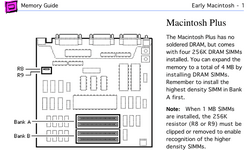 | |
Posted by: embBambooLounge on 2023-05-15 10:51:12You seem to have no RAM in bank A, bank A has to be filled first. Memory detection is not automatic so you will have to set the resistor jumpers too to match what RAM you have. Unexpected RAM configurations can lead to very unusual behaviour. HI! Thank you for pointing that out! I had removed some RAM to troubleshoot and I was trying all different combinations just to see if I could get different behavior. I will try again later with the original RAM to confirm if there is still an issue. The resistor is clipped and I assume it was running 4MB but I was never able to get it to boot so I am not sure. I have two sticks a 1MB SIMMs in the Mac Classic I just fixed up. I know those work so I can install those into BANK A to confirm it isn't a RAM issue. | |
Posted by: embBambooLounge on 2023-05-16 03:37:41HI! Thank you for pointing that out! I had removed some RAM to troubleshoot and I was trying all different combinations just to see if I could get different behavior. I will try again later with the original RAM to confirm if there is still an issue. The resistor is clipped and I assume it was running 4MB but I was never able to get it to boot so I am not sure. I have two sticks a 1MB SIMMs in the Mac Classic I just fixed up. I know those work so I can install those into BANK A to confirm it isn't a RAM issue.Unfortunately it doesn't seem to be RAM related as I put all four original sticks back in and get the same thing. I tried 1MB sticks from a classic and saw the same thing. Thank you for your suggestion though! | |
| Posted by: RetroTheryboy on 2023-05-16 05:17:51 How are the voltages. You can measure these either from the motherboard connector or from the floppy port. 5V from pin 6 and ground shell. If your 15.66Mhz is correct you can trace that down to the TSM ic. Thats where many of the main clocks are generated. You should be able to verify the 8,4,2,1 MHz clocks from here. 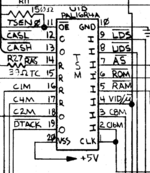 The sound data comes from VIA U11D to the sound IC and is clocked by VSYNC 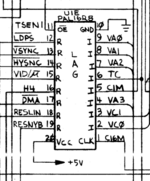 VSYNC is generated by LAG , based on the master clock and 1MHz from the TSM with the scope you might be able to check these and make sure they are within spec. 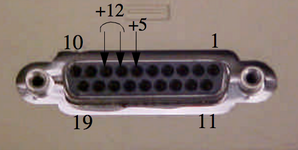 | |
Posted by: embBambooLounge on 2023-05-17 19:41:49How are the voltages. You can measure these either from the motherboard connector or from the floppy port. 5V from pin 6 and ground shell.Thank you for your thorough suggestion. The voltages are checking out all in spec so I don't think I have a analog board issue anymore. Checking the TSM I am seeing: PIN 1 - 15.6mhz PIN 2 - 15.6mhz PIN 3 - 7.94mhz PIN 4 - 22.2khz PIN16 - 1mhz PIN17 - 5.2mhz PIN18 - 2mhz PIN19 - 2mhz For the LAG: PIN 1 - 15.9mhz PIN13 - not stable PIN14 - 22.3kHz | |
| 1 |