68kMLA Classic Interface
This is a version of the 68kMLA forums for viewing on your favorite old mac. Visitors on modern platforms may prefer the main site.
| Click here to select a new forum. | |
| Pulling Chicago from ROM | |
| Posted by: Mark Newlon on 2023-05-13 09:14:30 Hey gang, I'm trying to use Chicago in OSX. Searching through all of my System 7 and under sys folders I turn up nothing. Evidently, Chicago is in ROM. Is there any way to get a copy out and store it? | |
| Posted by: robin-fo on 2023-05-13 09:36:23 Also checked the Fonts folder in your System Folder? 😉 Here is mine. 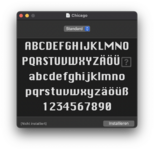 | |
| Posted by: Mark Newlon on 2023-05-13 10:02:03 Nice! I could not find it in ANY system fonts folder I could access on my SE. Tried Systems from 3.2-6.0.8 BUT I GOT IT!!!! In my Floppy EMU, System 7.0 , MORE TIDBITS disk image- BAM-There it is! I JUST installed it into my OSX 10.10 fonts folder and I have Chicago, in all it's Vintage Glory, working in Adobe Illustrator! Thank you for your reply! | |
| Posted by: robin-fo on 2023-05-13 11:46:19 On System 6, you need Font/DA-Mover to extract fonts from the system file. But in any case, you won‘t find TrueType fonts in System 6 and bitmap fonts are no longer supported in Mac OS X. | |
| Posted by: Mark Newlon on 2023-05-13 12:21:44 I was booted into my SE w/Sys 7.0 so I could use my Zip drive to shuttle stuff off. Sys 7 wouldn't let Font/DA mover run. The SE has 6.0.5 internally, which won't support the Zip. So I checked the 7.0 install images. I'll check out Font/DA mover next time I'm booted into 6.0.5 - Thanks! Here's a pic from OSX 10.10 w/Illustrator CS6 | |
| Posted by: Mark Newlon on 2023-05-13 12:24:35 Adobe stopped support for Type 1 fonts too. Those were my BREAD & BUTTER in the 90's! Sad to see them go, but of course, vector fonts are the ONLY way! | |
| 1 |