68kMLA Classic Interface
This is a version of the 68kMLA forums for viewing on your favorite old mac. Visitors on modern platforms may prefer the main site.
| Click here to select a new forum. | |
| 6100 AV Card Red Lines @ 256 Colors | |
| Posted by: superseth on 2023-05-08 13:29:48 Just got an AV card out of a trashed 6100 AV to stick in my trusty 6116CD. When I first booted it up I got an image, but there were red line showing up at regular intervals on the screen. Anyone run into this before? Strangely, it goes away in Thousands or Millions of colors, but I wonder if the card is really busted? 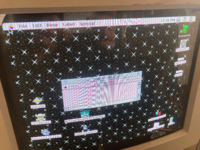 | |
Posted by: Phipli on 2023-05-08 13:49:00Just got an AV card out of a trashed 6100 AV to stick in my trusty 6116CD. When I first booted it up I got an image, but there were red line showing up at regular intervals on the screen. Anyone run into this before? Strangely, it goes away in Thousands or Millions of colors, but I wonder if the card is really busted?That's usually a VRAM issue. So either a pin with a bad contact on one of the chips, or a bad chip (more likely the former). Based on the condition of some of the AV cards I've seen, have you checked for cap leakage? | |
Posted by: Phipli on 2023-05-08 13:52:03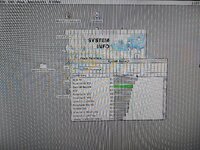 This is an ixMicro card with similar issues. Several pins had been knocked free on... the RAMDAC I think it was. | |
| Posted by: superseth on 2023-05-08 14:08:51 Hmmmm ok, all the ram on this card is soldered to the board, I'll take a closer look at the chips. I didn't see any obvious cap leakage, but I haven't tested them yet with a multimeter. | |
Posted by: Snial on 2023-05-08 14:29:08That's usually a VRAM issue. So either a pin with a bad contact on one of the chips, or a bad chip (more likely the former).Given that @superseth said that it goes away for thousands of colours, couldn't it be a palette issue rather than VRAM? We can see that the issue occurs on every 8 pixels, but only for certain colours (white?). Surely, if it was a VRAM issue affecting every 8th byte, e.g. a bad bit, then it would cause the wrong colour to be indexed for all 8th bytes; however, if it was a palette issue, then it's only when an indexed colour maps to a faulty palette address or register that the problem would happen. | |
| Posted by: cheesestraws on 2023-05-08 14:30:54 look at the corruption on the scroll bar buttons, though. that's odd. | |
| Posted by: superseth on 2023-05-08 15:34:36 yeah and the clock at the top doesn't have the stripes either! If it was everywhere on the screen I would assume it was a cable or vram problem. So I took it out to look at the caps and ram, everything seemed ok. I then took the card out of the PDS case/riser to inspect the back as well. It was a bit dusty but otherwise seemed ok. After reseating everything and turning the machine back on....the lines have gone away, including at 256 colors. I installed Macbench and ran through all the graphics tests to try pushing the card a little and it didn't trigger anything strange. I am going to try digging out some other monitors to see if resolution changes cause it to return. I am glad the problem is gone but I want to know why in case this is just temporary or someone else runs into this in the future. | |
Posted by: joshc on 2023-05-09 04:14:35After reseating everything and turning the machine back on....the lines have gone away, including at 256 colors.Sounds like the pins may be dirty, on the card or on the PDS riser, or in the PDS slot itself. Some contact cleaner may help. | |
| Posted by: slomacuser on 2023-05-09 06:18:21 I had an AV card with bad picture. Replacing the caps solved the problems. | |
| Posted by: superseth on 2023-05-10 22:01:27 Thanks for the tips everyone - I might need to start thinking about caps on this machine as a whole. So far things have been ok but I know it is just a matter of time. | |
| Posted by: joshc on 2023-05-11 04:15:48 Yeah 6100s need recapping, and PDS/NuBus cards as well, anything of that age with those can-style electrolytic caps. | |
| 1 |